Reference Section
E20
Editing Images (Still Images)
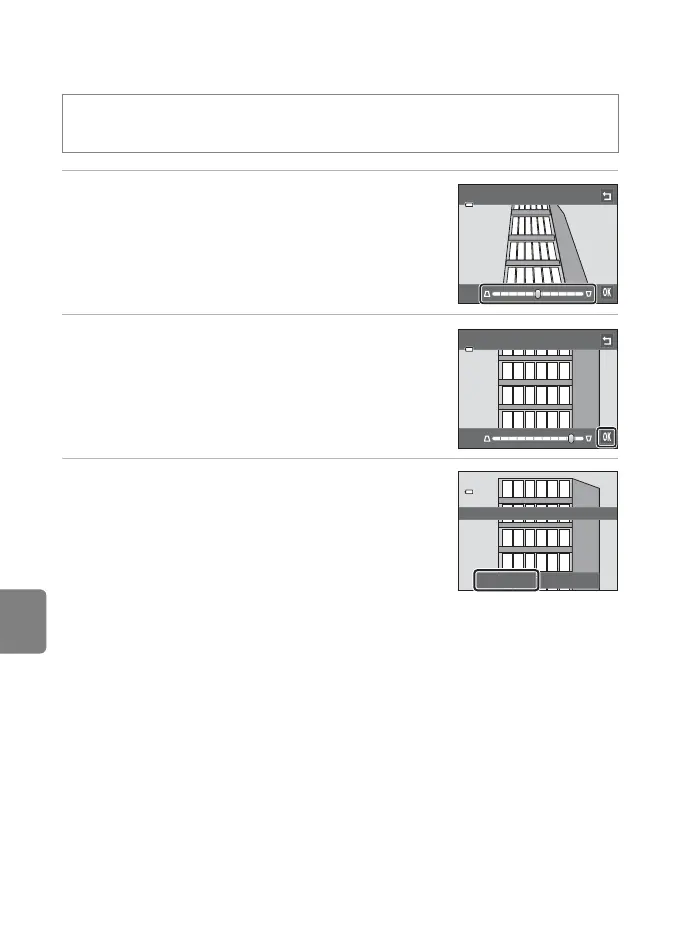
O Perspective Control: Adjusting a Sense of Perspective
1 Tap y or z, or tap or drag the slider at the
bottom of the screen to adjust perspective
control.
2 Tap I.
3 Tap Yes.
• A new, edited copy is created.
• Copies created using the perspective control function
can be recognized by the q icon displayed in playback
mode.
C More Information
See “File and Folder Names” (E86) for more information.
c button (playback mode) M Tap the d tab M Tap M Retouch M
O Perspective control
Perspective control
Perspective control
Save OK?
Yes No



 To Next Page