E27
Reference Section
Connecting the Camera to a TV (Playback on a TV)
Connect the camera to a television using the included audio/video cable to play
back images full-frame or in a slide show, or to play back movies, on a television.
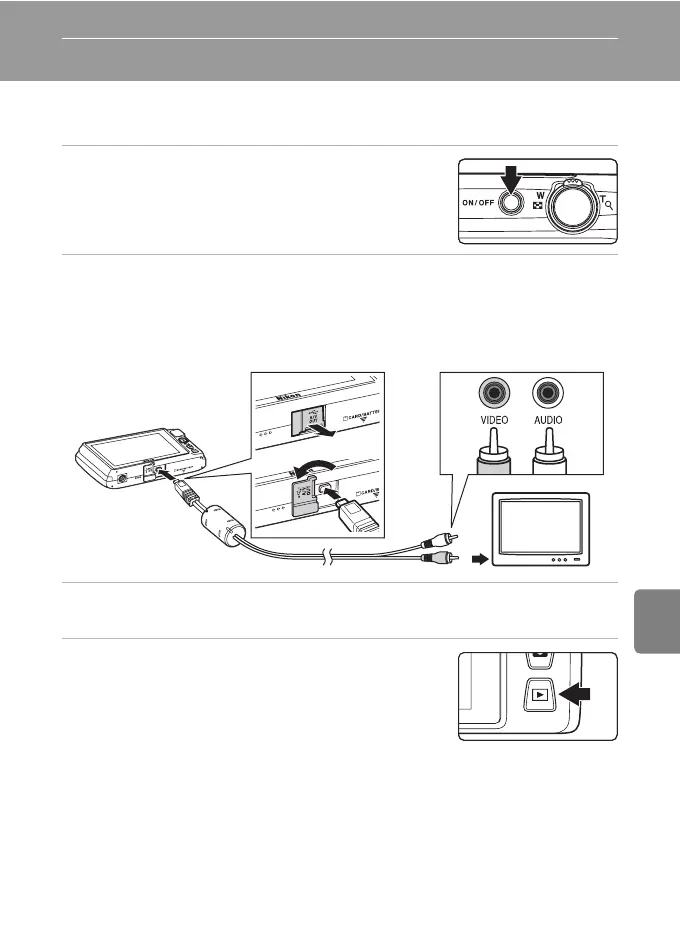
1 Turn off the camera.
2 Connect the camera to the TV using the included audio/video cable.
• Connect the yellow plug to the video-in jack and the white plug to the audio-in jack
on the TV.
• Be sure that plugs are properly oriented. Do not attempt to insert plugs at an angle,
and do not use force when connecting or disconnecting the plugs.
3 Tune the television to the video channel.
• See the documentation provided with your television for details.
4 Hold down the c button to turn on the
camera.
• The camera enters playback mode and images are
displayed on the television.
• While connected to the TV, the camera monitor will
remain off.
• See “Operations with TV Connection” (E28) for more information.
WhiteYellow














 To Next Page