6
Parts of the Camera and Basic Operations
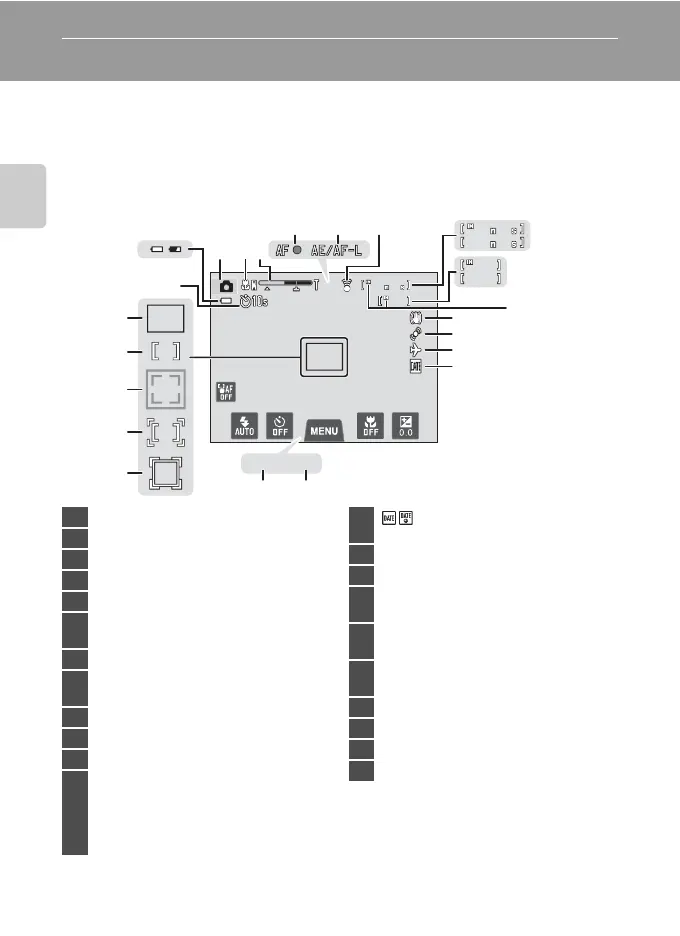
Indicators and Operations of the Monitor/Touch Panel
Shooting Mode (Information Indicators)
•
The information displayed on the monitor varies with the camera settings or status.
At the default setting, the indicators below are displayed when the camera is
turned on or is in operation, and they disappear after a few seconds elapse
(when Photo info is set to Auto info in Monitor settings (A88)). Tap A to
display them again.
1
Indicators displayed vary with current shooting mode.
2
Indicator is displayed when there are 50 or fewer exposures remaining.
0
29
50
50
1/
1/ F3.5
F3.5250
250
50
50
50
50
0
29
0
29
9
1415
16
18
19
17
20
21
22
213
654
7
8
10
11
12
13
1 Shooting mode
1
....................38, 41, 50, 51
2 Macro mode.................................................... 59
3 Zoom indicator...................................... 29, 59
4 Focus indicator ..............................................30
5 AE/AF-L indicator ...................................E4
6
Eye-Fi communication indicator
.................................................................90, E82
7 Movie lengths.................................................82
8
Number of exposures remaining
(still images)
2
...................................................22
9 Internal memory indicator...................... 22
10 Vibration reduction icon..........89, E71
11 Motion detection icon ..............89, E72
12
O
“Date not set” indicator
............................................24, E65, E88
Z
Travel destination icon .........88, E65
13
Print date indicator ................ 88, E70
14 Aperture .............................................................30
15 Shutter speed .................................................30
16
Focus area
(
subject tracking mode
)............. 39, E38
17
Focus area (touch AF/AE)
..........................................................39, 40, E40
18
Focus area
(face or pet detection)...............30, 49, 51
19 Focus area (center)
20 Focus area (auto) ..........................................30
21 n Self-timer indicator.............................57
22 Battery level indicator ................................22














 To Next Page