Reference Section
E30
Connecting the Camera to a Printer (Direct Print)
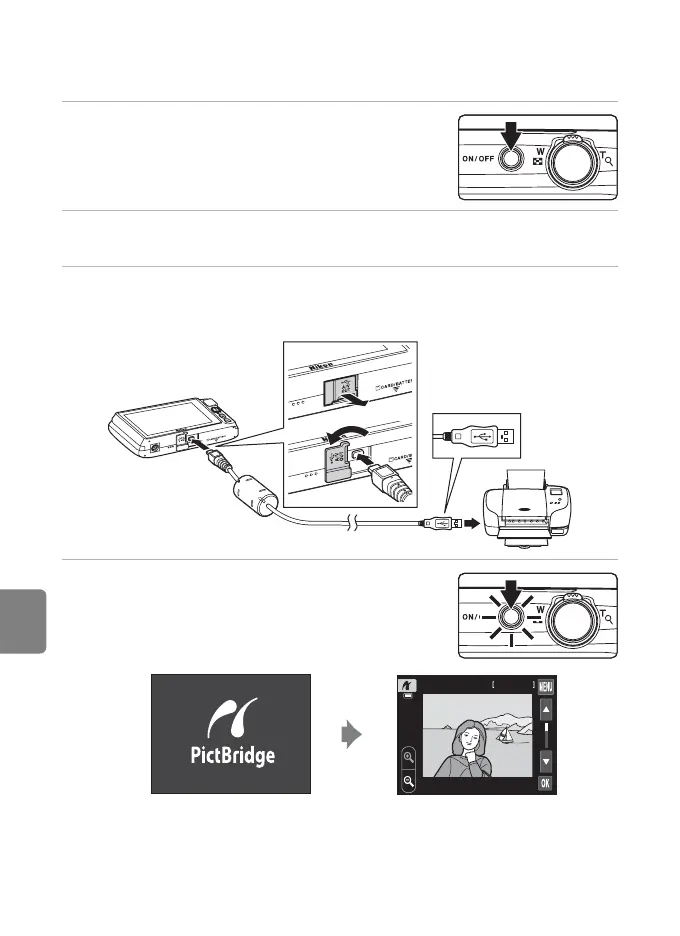
Connecting the Camera to a Printer
1 Turn off the camera.
2 Turn on the printer.
• Check printer settings.
3 Connect the camera to the printer using the included USB cable.
• Be sure that plugs are properly oriented. Do not attempt to insert plugs at an angle,
and do not use force when connecting or disconnecting the plugs.
4 The camera is automatically turned on.
• When properly connected, the PictBridge startup
screen (
1
) will be displayed in the camera monitor,
followed by the image selection screen (
2
).
B If the PictBridge Startup Screen Is not Displayed
Turn the camera off and disconnect the USB cable. Set the Charge by computer option (E78) in
the camera’s setup menu to Off, then connect the camera again.
4 / 4 15 / 05 / 2012
12














 To Next Page