Introduction to the X-ray system
24 XTM0011-F2 XT V 160 X-ray System
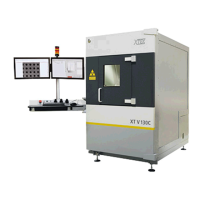
There are two access doors at the front of system.
• An operator door through which the operator loads and unloads samples.
This door has a special lead glass window so that the operator can safely view the inside
of the X-ray chamber.
• A service door that covers the front of the system.
This is used when greater access is required to the interior of the chamber for servicing
the X-ray source and manipulator.
A movable articulated arm is attached on the left-hand side of the cabinet. A monitor
extension carries a single 32” display. A shelf is mounted on the arm with a control console
mounted to the rear of this shelf. The control console includes the controls used to operate
the system and the joysticks used to move the sample manipulator. A PC keyboard and
mouse are also located on the shelf. The PC is located in the service area at the back of the
machine and accessible from the left side of the cabinet.
A signal tower mounted on the top of the arm extension indicates when X-ray generation is
imminent (amber light) and when X-rays are being generated (red light).
The system is not portable and is designed for indoor use only in a clean environment. It
requires a single electrical supply of between 100 V AC and 240 V AC. No other sources of
energy are required.
Cabinet dimensions, including monitor bracket and lamp tower (W x D x H) are 1,225 x 1,810
x 2,145 mm (48 x 71 x 84"). Weight is 2,100 kg (4629 lbs).
1. X-ray status indicators. When the red 'X-RAYS ON' lamp is lit, X-rays are being
produced. The orange 'PRE-WARNING' light warns that X-rays are about to be
produced.
2. Computer monitor. The monitor shows the Inspect-X software controls and X-ray
images.
3. Service door. Provides access to the manipulator and X-ray source for servicing.
4. Operator door. Samples are loaded through this door onto the manipulator. If the door is
not closed fully no X-rays are produced. The lead glass window provides safe viewing of
the inspection process.
5. Keyboard and mouse. To control Inspect-X.
6. Control console. Contains an emergency stop button, system power on/off buttons,
X-ray power on/off button, interlock key switch and USB 3 ports. The console also
includes joysticks to control the manipulator's X- and Y-axis, magnification, rotation and
imaging tilt. Virtual controls are available in Inspect-X.
7. Service access panels. These are located on the left and right side of the cabinet and
provide access to the service area for routine maintenance and servicing. The panel on
the left provides access to the PC; the panel on the right provides access to the backing
pump and cooling system. An access panel at the back of the cabinet provides access to
the electrical controls and fuses.
Access panels must not be opened unless the electrical supply is isolated. With suitable
training, a supervisor can check the vacuum pump oil and coolant levels, and air filters.


 To Next Page