Introduction to the X-ray system
34 XTM0011-F2 XT V 160 X-ray System
X-rays should be switched off using these controls prior to opening the
system door.
Do not use the interlocks to switch the X-rays off during normal use.
Doing so shortens the life of the filament.
4.5 Laser pointer
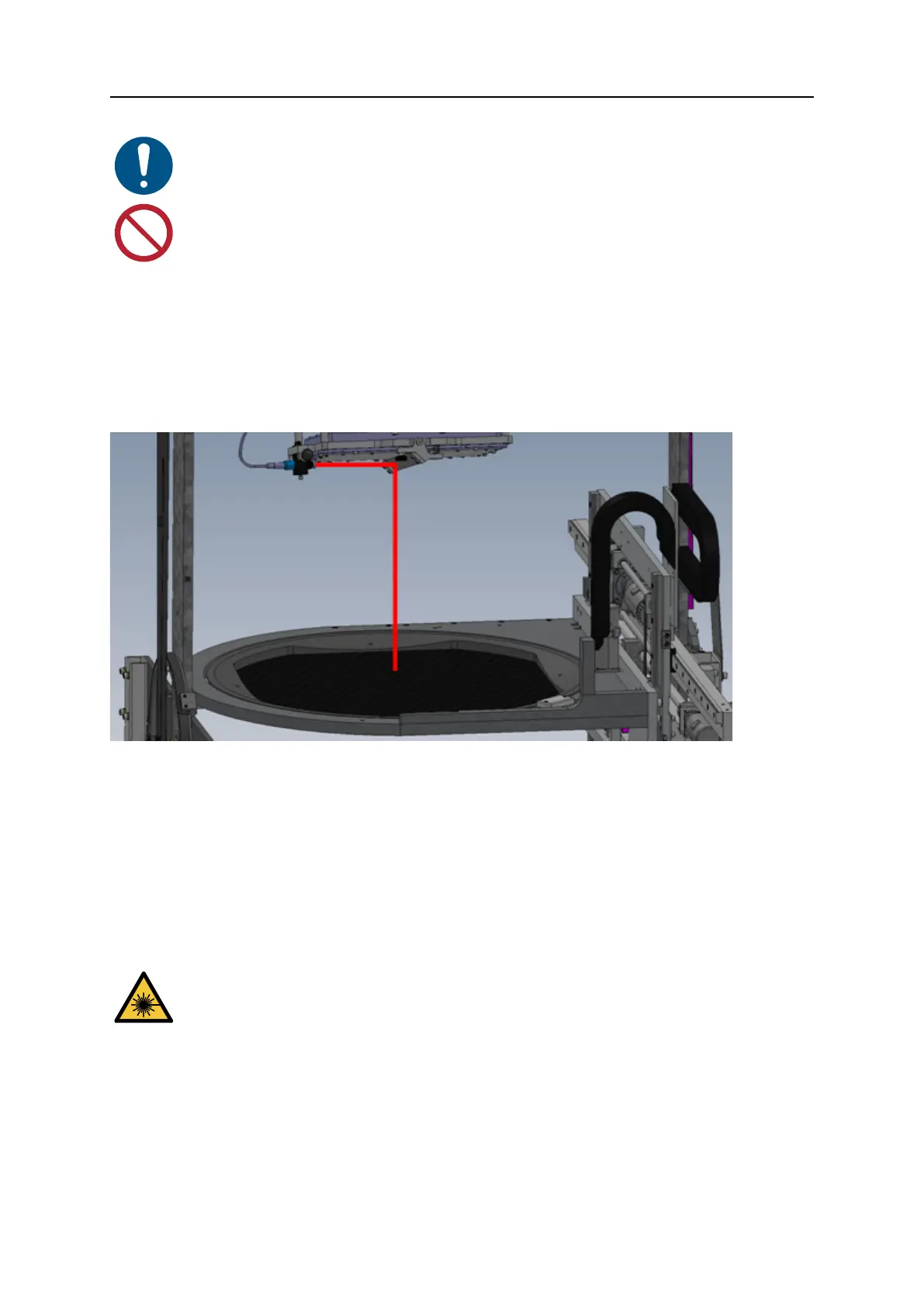
A laser pointer is an optional item, which may be fitted to the X-ray system. The laser pointer
system consists of a diode laser module mounted underneath the X-ray system imaging
system aimed at a Mylar foil mirror. This mirror directs the laser beam downwards onto the
upper side of the sample tray whilst being invisible in the X-ray image. The path of the laser
beam is aligned to coincide with the centre of the X-ray image as shown below:
4.5.1 Use the laser pointer
The laser pointer is aligned with the centre of the X-ray image to allow you to easily position
your sample for inspection. The part of the sample illuminated by the laser beam will appear
near the centre of the X-ray image.
4.5.2 Clean the laser optics
If the laser pattern becomes fuzzy or unclear you should check that the laser lens and Mylar
foil mirror are clean. Remove any contamination, as necessary.
Switch off power to the X-ray system before checking the laser optics.
Do not stare into the laser beam.


 To Next Page