15
DISCRIMINATION PATTERNS
SCORE offers advanced discrimination setting
to users for an easier operation.
By using the Pinpoint & Discrimination Button, you
can select one of the 3 different discrimination pre-set
patterns and 1 separation pattern that is completely
under the user’s control.
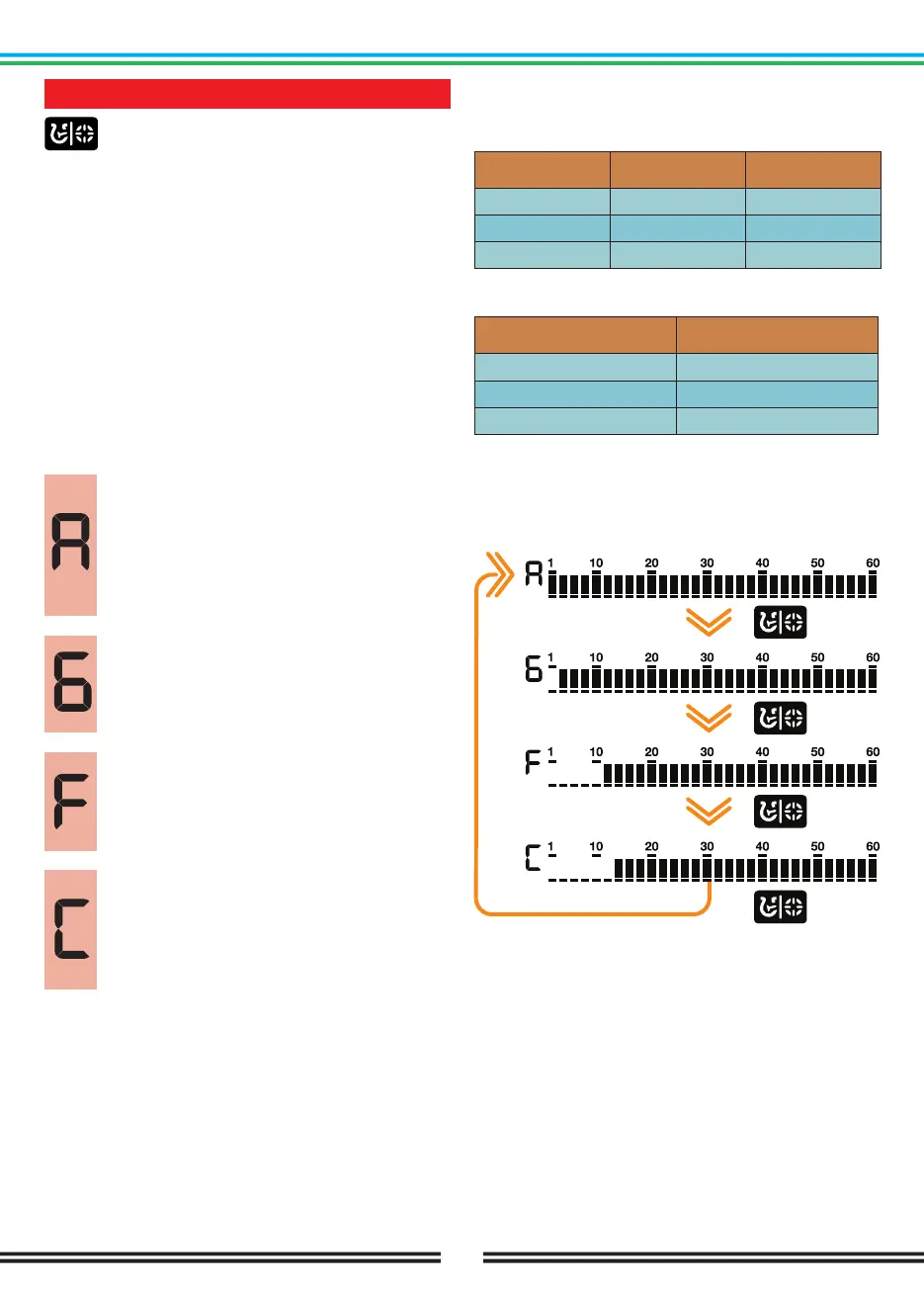
The default discrimination pattern for Park, Field, Beach
modes is the ‘’F’’ discrimination pattern which stands
for Ferrous Off.
In SCORE, two IDs are rejected or accepted at the same
time.
The discrimination setting only affects the mode
currently selected; changes made in one mode do not
affect the others.
All Metal Discrimination Pattern
In this pattern all ID’s are accepted on the
ID scale (1-60). In other words, all the lines
on the scale are visible and no ID is rejected.
The device will emit an audio response for all
metals as well as the ground and their IDs will
be displayed on the screen.
Ground Off Discrimination Pattern
In this pattern, the device will not receive
ground noise and will not provide any audio or
Target ID for it. Target IDs 1 and 2 are turned
off (rejected) and the rest are open (accepted).
Ferrous Off Discrimination Pattern
In this pattern, the device will not provide any
audio or Target ID for ferrous targets. Target
IDs 1 - 10 are turned off (rejected) and the rest
are open (accepted).
Custom Discrimination Pattern
This pattern allows users to create their own
discrimination pattern according to the type of
targets they would like to accept and reject.
Rejected IDs will vary based on the search
mode.
Accepting and rejecting IDs are also referred to
as ‘’notch’’ and this function is only available on the
DOUBLE SCORE model.
The default, accepted and rejected IDs in the Custom
Discrimination Pattern for each mode are shown in the
table below:
Rejected IDs
1-12
1-12
1-10
Accepted IDs
13-60
13-60
11-60
PARK
FIELD
BEACH
Default Discrimination Patterns
Search Mode
PARK
FIELD
BEACH
Discrimination Patterns
Ferrous Off (F)
Ferrous Off (F)
Ferrous Off (F)
Selecting a Discrimination Pattern
The discrimination pattern changes each time you
press the Pinpoint & Discrimination Button on the main
screen.



 To Next Page