3
3 BASIC UC4 OPERATION
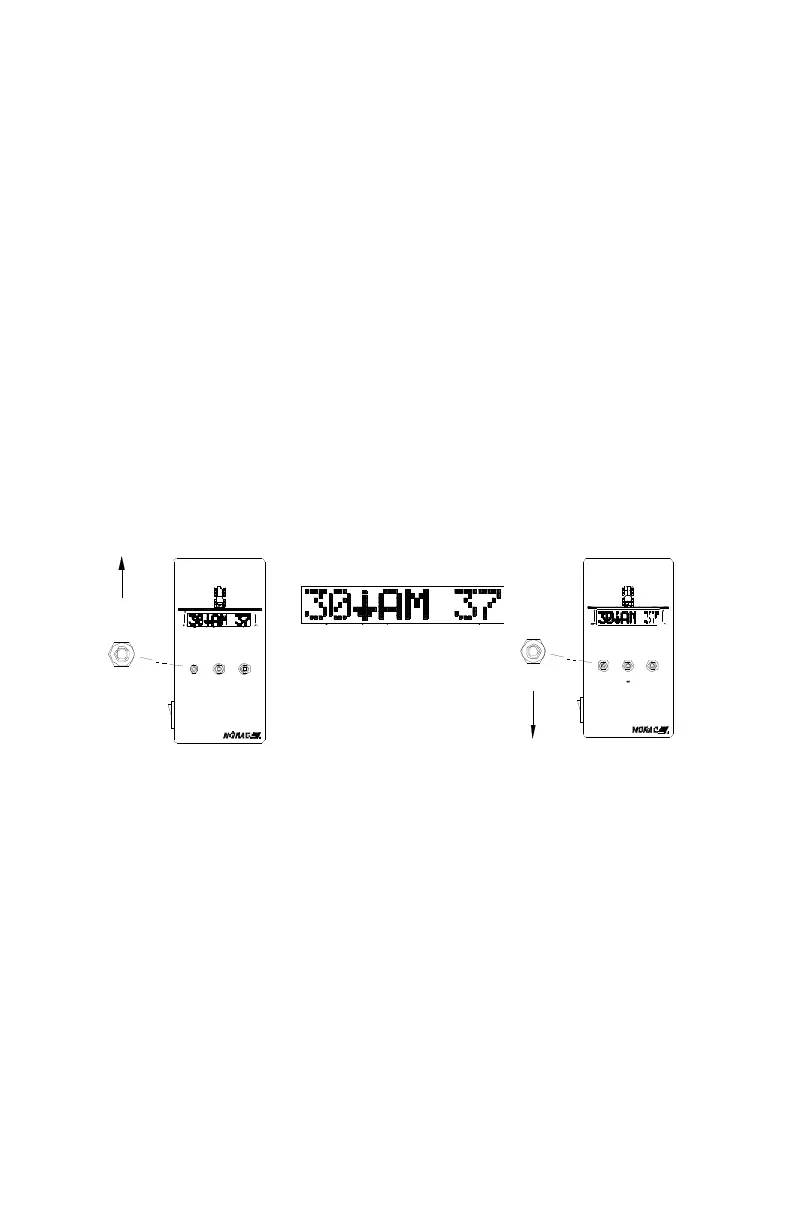
Upon power-up a sequence of messages are temporarily displayed on
the control panel LCD screen
- the system is ready for use once the Normal Operating Screen
(Figure 1) is displayed
To access either the SENSOR DISPLAY or SETUP menus ensure
you are at the Normal Operating Screen
- toggle toward the menu you wish to access
- adjust the menu settings using the " +/- " switch while the prompt
is displayed
After 30 seconds menu prompts will return to the Normal Operating
Screen
To return to the Normal Operating Screen toggle and hold the "SETUP
(NO)" switch for two seconds
New settings take effect once the Normal Operating Screen is displayed
Figure 1 – SENSOR DISPLAY / SETUP Switch and Normal Operationg
Screen
3.1 NORMAL OPERATING SCREEN
In AUTOMATIC mode the digits represent target boom height in
inches
In MANUAL mode the digits represent actual boom height in inches
DISPLAY
SENSOR
SET UP MANUAL
+
DISPLAY
SENSOR
AUT O
UC4
BO OM
CO NTROL
CONTROL
+
SETUP
SETUP
SENSOR
DISPLAY
MANUAL
AUTO
BOOM
UC4
(NO)
(YES)
(NO)
(YES)



 To Next Page