.,
:.i
,-.
-;’
:
,‘: .:
., .i
‘z- ”
(
.’
: . .
._
..).
.‘... ”
.; _,‘.
Administration /
69
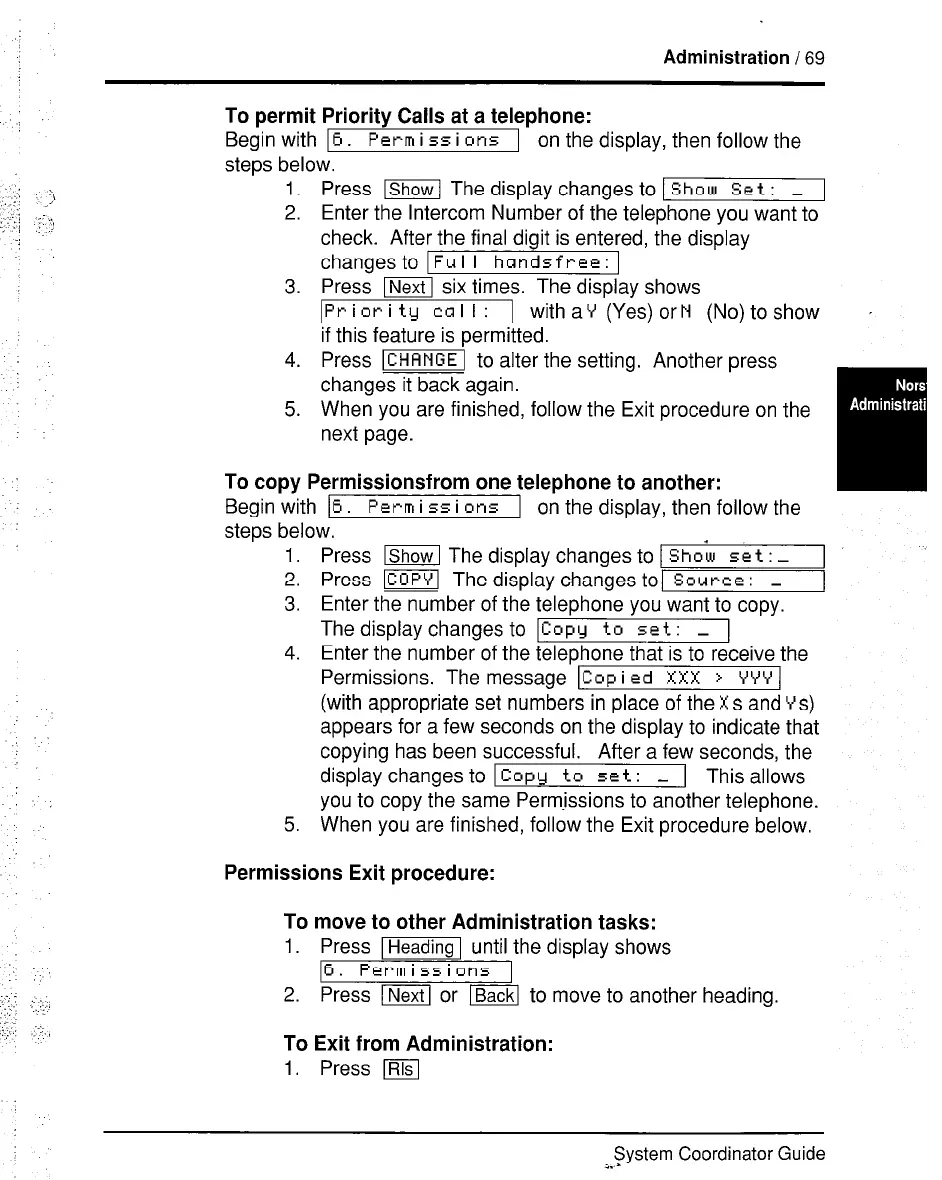
To permit Priority Calls at a telephone:
Begin with 16.
Pcrm
i 55 i ens 1 on the display, then follow the
steps below.
1. Press ~ The display changes to 1
Show Set : _ 1
2. Enter the Intercom Number of the telephone you want to
check. After the final digit is entered, the display
changes
to Ful I handsfree:
3. Press m six times. The display shows
IPriori ty cal I: I
with aY (Yes) or N (No) to show ,
if this feature is permitted.
4. Press m to alter the setting. Another press
changes it back again.
5. When you are finished, follow the Exit procedure on the
next page.
To copy Permissionsfrom one telephone to another:
Begin with
16. Perm
i 55 i 01-15
1 on the display, then follow the
steps below.
1. Press lShowl The display changes to 1
Shoi set : _ 1
2. Press m The display changes to] Source: _
3. Enter the number of the telephone you want to copy.
The display changes to ICOPY to set: _ 1
4. Enter the number of the telephone that is to receive the
Permissions. The message ICop
i ed XXX > YYY I
(with appropriate set numbers in place of the Xs and Ys)
appears for a few seconds on the display to indicate that
copying has been successful.
After a few seconds, the
display changes to I Copy to set: - 1 This allows
you to copy the same Permissions to another telephone.
5. When you are finished, follow the Exit procedure below.
Permissions Exit procedure:
To
1.
2.
To
1.
move to other Administration tasks:
Press m until the display shows
6. Permissions
Press I[ or ml to move to another heading.
Exit from Administration:
Press m
System Coordinator Guide
i. -



 To Next Page