-c,
‘:W
:;
:
.
70 / Administration
Programming Overview of Permissions
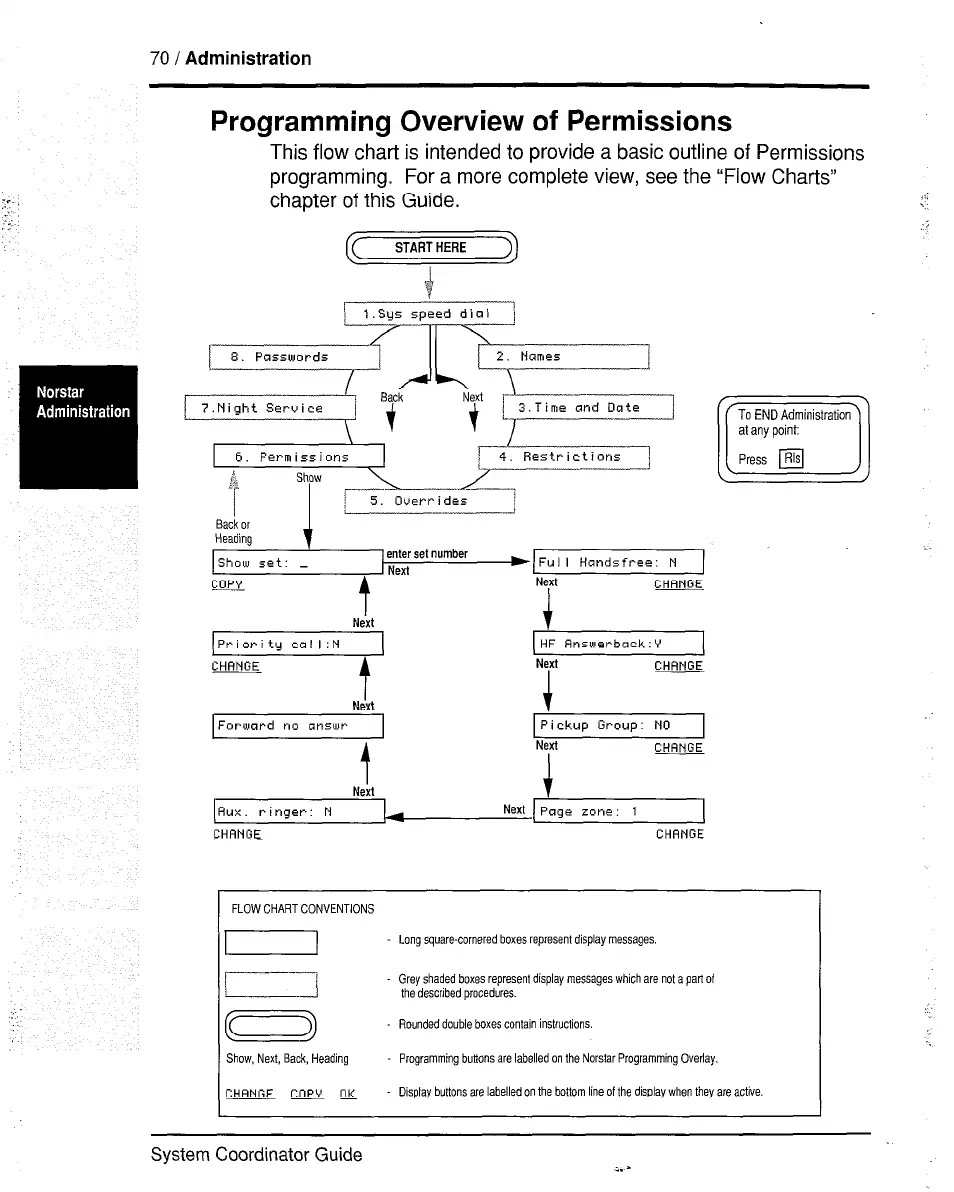
This flow chart is intended to provide a basic outline of Permissions
programming. For a more complete view, see the “Flow Charts”
chapter of this Guide.
START HERE
8. Passwords
f* .Bac-
i’.Night Service /
Next >
\t t,
3.Time and Date
6. Fermissions
4. Restrictions ’
2
b
1
- ---7
Overr i drs
Back or
Heading
Show set: _
Full Handsfree: N
copy
t
Next
Next
t
CHANGE
Priority call:N
HF Answerback:Y
CHANGE
t
Next
Next t
CHANGE
Forward no cinsu)t-
Pickup Group: NO
t
NM
CHANGE
r---y~$-Erl
Next
Aux. ringer: N
CHANGE CHANGE
FLOW CHART CONVENTIONS
Lang square-cornered boxes represent display messages.
IL__T?
Grey shaded boxes represent display messages which are not a pari 01
the described procedures.
CD
Rounded double boxes contain instructions.
Show, Next, Back, Heading
Programming butions are labelled on the Norstar Programming Overlay.
CHRNGE Copy OK
Display buttons are labelled on the bottom line of the display when they are adive
‘.
System Coordinator Guide



 To Next Page