11
SR1001 Installation Guide
Version 8.3.5
DUP Indicates the type of
duplex mode
Off = Half duplex
Green = Full duplex
Power Indicates system power
status
Green = power on
Off = power off
Compact Flash Port for compact flash
module
—
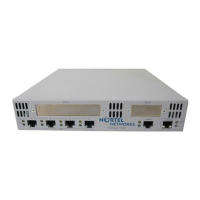
Table 7 1001 Back-Panel Ports
Connector Description
Backup WAN An ISDN backup option is supported. This option provides a backup if the
primary network connection is lost. This port accepts cables with RJ-45
connectors.
Serial Serial WAN connection port. This port accepts cables with D-style
connectors.
FE 0 / 1 Ethernet LAN connection ports. These ports accept cables with RJ-45
cable connectors.
AUX Reverse telnet connection. This port accepts a cable with an RJ-45 cable
connector.
Console Console management port. This port accepts a cable with an RJ-45 cable
connector.
DC power 12 VDC power connection. This port accepts the 2 mm. power connector
on the DC power supply cable that ships with the 1002 router.
Table 6 LED and Port Descriptions (continued)
Port Description Color


 To Next Page