24
CHAPTER
3
Installation Operator Interface
SR1001 Installation Guide
Version 8.3.5
Operator Interface
Local Management
The SR1001 can be locally configured, operated, and managed using an operator console
connected to the Console port. A terminal (VT-100 or equivalent) or workstation with terminal
emulation software can be used for the operator console. Connect the console to the SR1001
Console port using an RJ-45 cable with switched ends. If your terminal equipment requires a
special cable, see Table 24 on page 58 for connector pinout information.
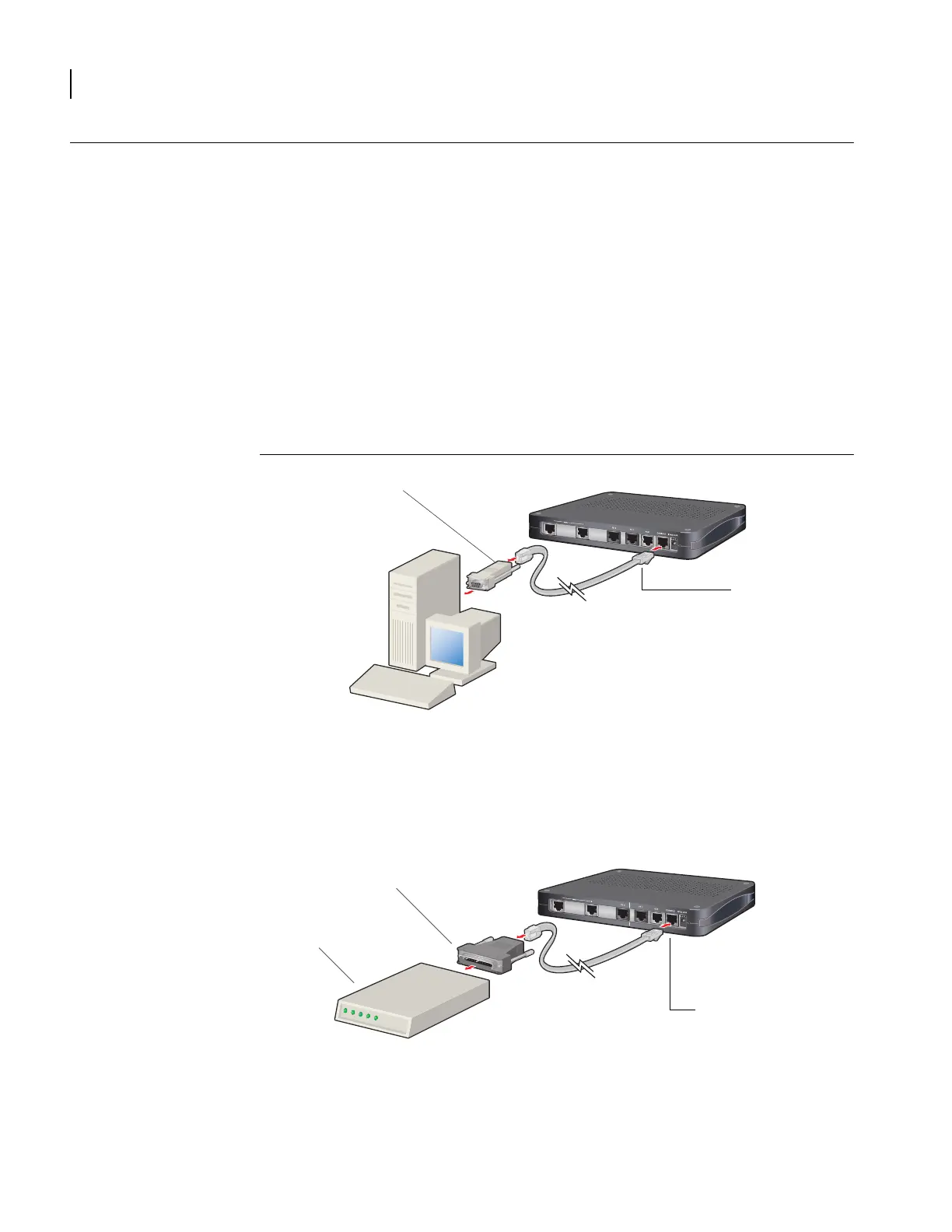
To connect the Console cable:
1
Connect the RJ-45 Console cable to the Console port on the router.
2 Connect the other end of the RJ-45 Console cable to the RJ-45 end of the adapter.
3 Connect the DB-9 end on the adapter to the management terminal or workstation.
Figure 17 Connecting the Console Cable (Local Management)
Remote Management
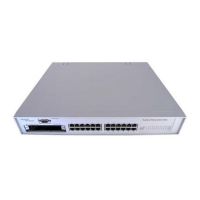
A modem can be connected to the Console port and used to configure, operate, and manage
the SR1001 remotely.
Figure 18 Connecting a Modem for Remote Management
%$&.83
RJ-45 to DB-9 Adapter
Console Port
%$&.83
Console Port
Modem
DB-25 Modem Adapter


 To Next Page