19 AFP-3030 Installation Manual — P/N DOC-01-037:B 25/08/2016
Installation Installing a Replacement Zone Mimic (ACM-ZM)
3. Secure the SGD assembly to the stand-offs using two 4-40 screws.
4. Connect the SGD assembly to the fire panel as specified in the SGD Schematic in Appendix C.
3.8 Installing a Replacement Zone Mimic (ACM-ZM)
The Zone Mimic is a device that can be fitted away from a fire panel, permitting an operator to see
the status of the available zones when the operator is working away from the panel.
1. Unscrew and remove the existing ACM-ZM from the panel.
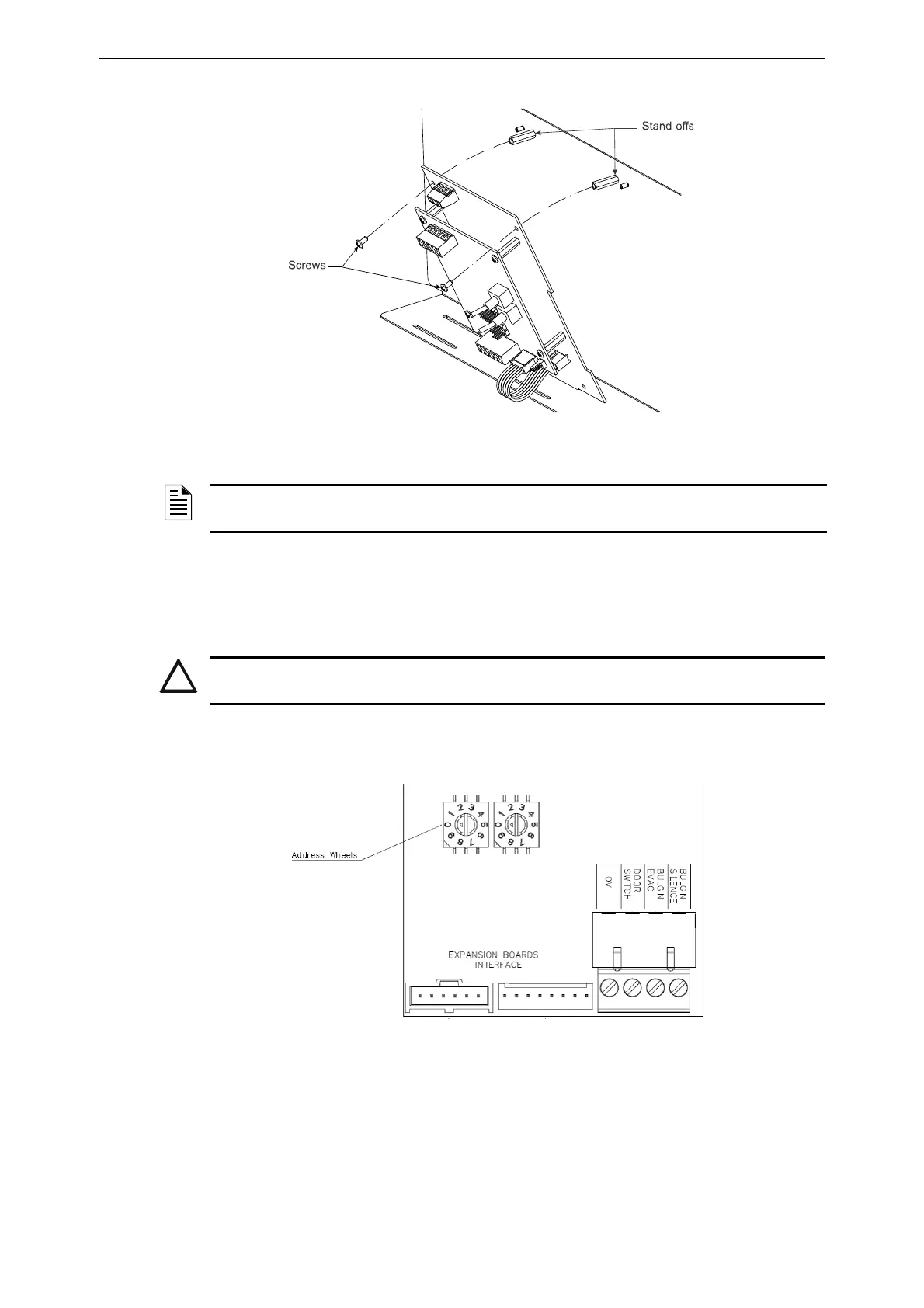
2. Set the address of the replacement card using the address wheels on the ACM-ZM.
3. Connect the replacement ACM-ZM to the fire panel as per the relevant drawing in
Appendix C, “Schematics”, on page 46.
Figure 3.10 Installing the SGD Interface Board
NOTE: The SGD Interface will need to be programmed into the panel to be operational. Consult
the AFP-3030 Programming Manual for details.
CAUTION:
POWER DOWN THE FIRE PANEL BEFORE ADDING OR REMOVING THE ACM-ZM.
Figure 3.11 Setting the ACM-ZM address wheels


 To Next Page
 Loading...