25
2. REMOTE CONTROL (TVMode)
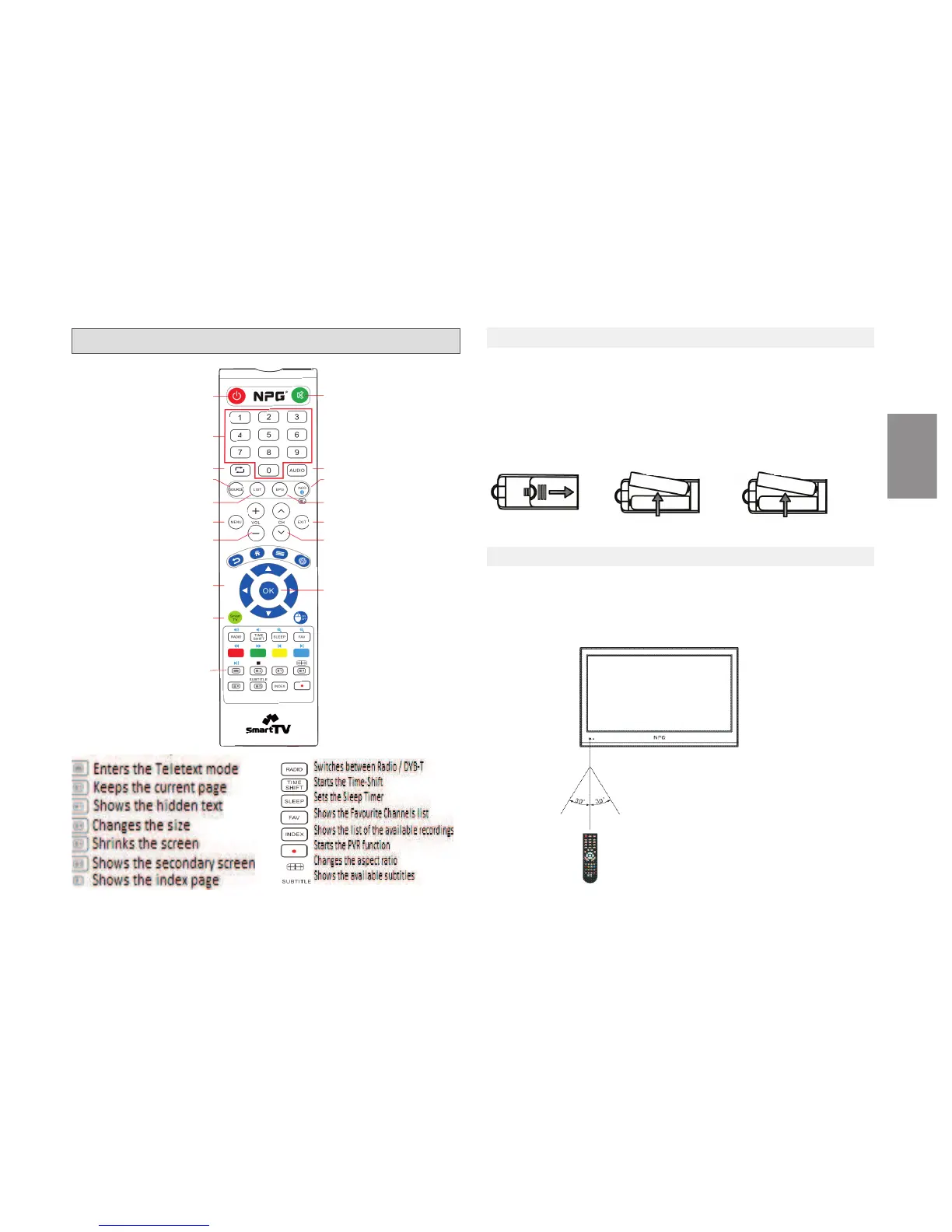
2.1 INSTALLING THE BATTERIES
Remove the baery cover from the rear of the Remote Contol and place
2xAAA size baeries inside the compartment.
Please make sure the baery polaries match the polarity markings inside
the compartment.
1) Open the cover 2) Install Baeries 3) Close the cover
2.2 USING THE REMOTE CONTROL
Make sure to point the remote control toward the remote control sen-
sor on the TV.
The Remote Control has a transmission range of up to 7 meters from the
TV at an angle of up to 60 degrees.
Power O
N/
O
FF
Channel direct access
Returns to the previous
channel
Display the list of the
available input sources
Channel List
Menu
Volume adjustment
Moves the selecons
cursor on the screen
Smart TV portal Access
Teletext keys
Mute
Switches between the
available audio tracks
Electronic Program
Guide
Exit
Channel +/ Channel -
OK/Enter
Programme Informaon
ENGLISH



 To Next Page