30
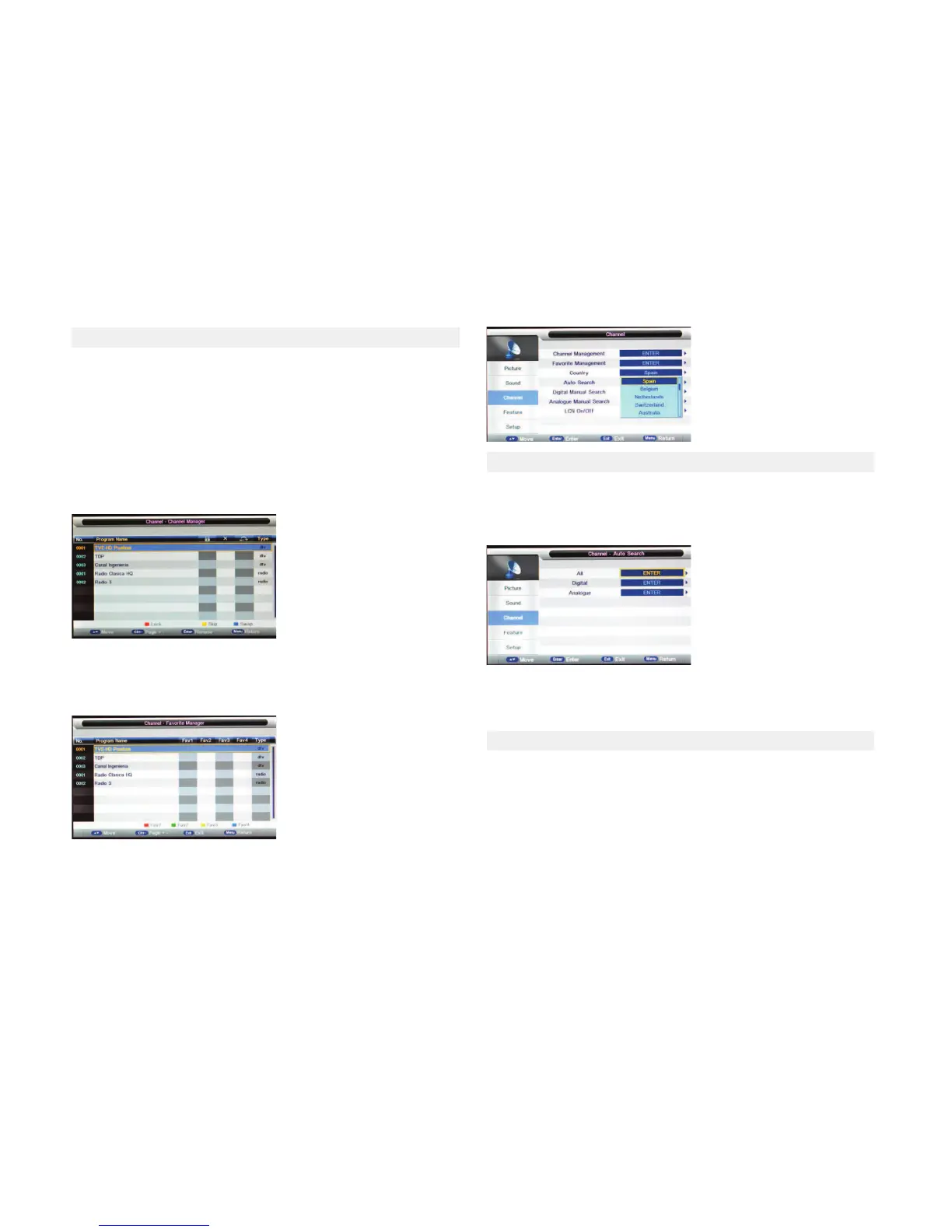
●Channel Management
Press the Enter buon to enter the menu
Press the ▼/ ▲buon to select items.
Press CH+/CH- to page up/down the list
Press the MENU buon to return to previous menu
Press the ENTER buon to rename the channel in TV mode
Press the red buon to remove the channel.
Press the yellow buon to skip the channel.
Press the blue buon to move the channel.
Press the green buon to block the channel.
●Favorite Management
Press the corresponding color buons on remote control to sort your favo-
rite channels.
The CH+/CH- buon can be used to select the following or preceding page
●Country
Select your country of residence
All: Choose this seng when you want to receive *ATV, DTV and Radio pro-
grams
Digital: This seng allows you to search DTV programs only
*Analogue: This seng allows you to search ATV programs only.
You can manually store digital channels
Press the ◄ / ► buon to select channel.
Press the ◄ / ►buon to move the cursor on to Start, press the ENTER but-
ton to start searching.
When a channel is found, the searching process will stop, and the found
channel will be saved with current channel number.
lf the program is not your expected one, please press the◄ / ► buon to
connue the searching. Press the EXIT buon to exit
Select the ENTER buon to start Auto Tuning.
The TV will memorize all available channels.
Once the progress bar is full,the found channeles will be saved
5.3 CHANNEL MENU
5.4 AUTO TUNING
5.5 DTV MANUAL TUNING



 To Next Page