27
4. BASIC OPERATION
1.Connect the mains and antenna.
2.Press the POWER buon on the RMC or on the TV control panel, to turn on
the TV.
1
2
3
4
5
6
7
8
9
1
0
11
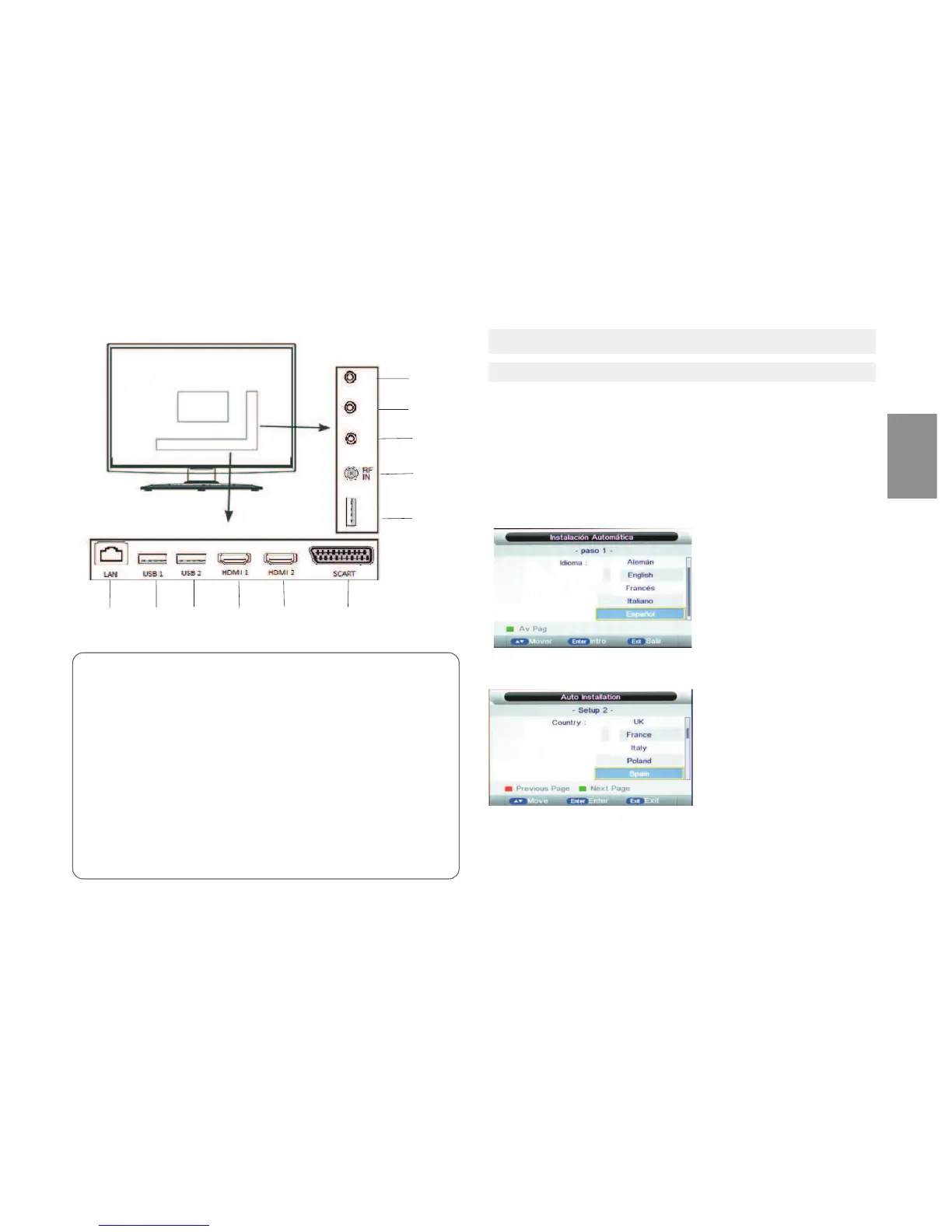
1. LAN,Ethernet
2,3,7 Compable USBports
Connect a USB device
4,5- Hdmi Input Terminals
Connect the HDMI signal
8.AV input terminal
To connect the AV signal input in composite mode.
9. Mini AV
10.Mini YPBPR
11.Earphone
2Press ▼/ ▲/ buon to select the country,then press ENTER buon
1.Select the desired OSD(On Screen Display)language.
Press ▼/ ▲buon to choose your preferred language,then press ENTER
buon.
3.Press▼/ ▲buon to choose auto power off me, then press the Enter
buon
4.1 CONNECTION
When the TV is inially powered on(Or no preset channels),a sequence of on-
screen prompts will assist in configuring the basic sengs.
Inial Setup
ENGLISH



 To Next Page