8
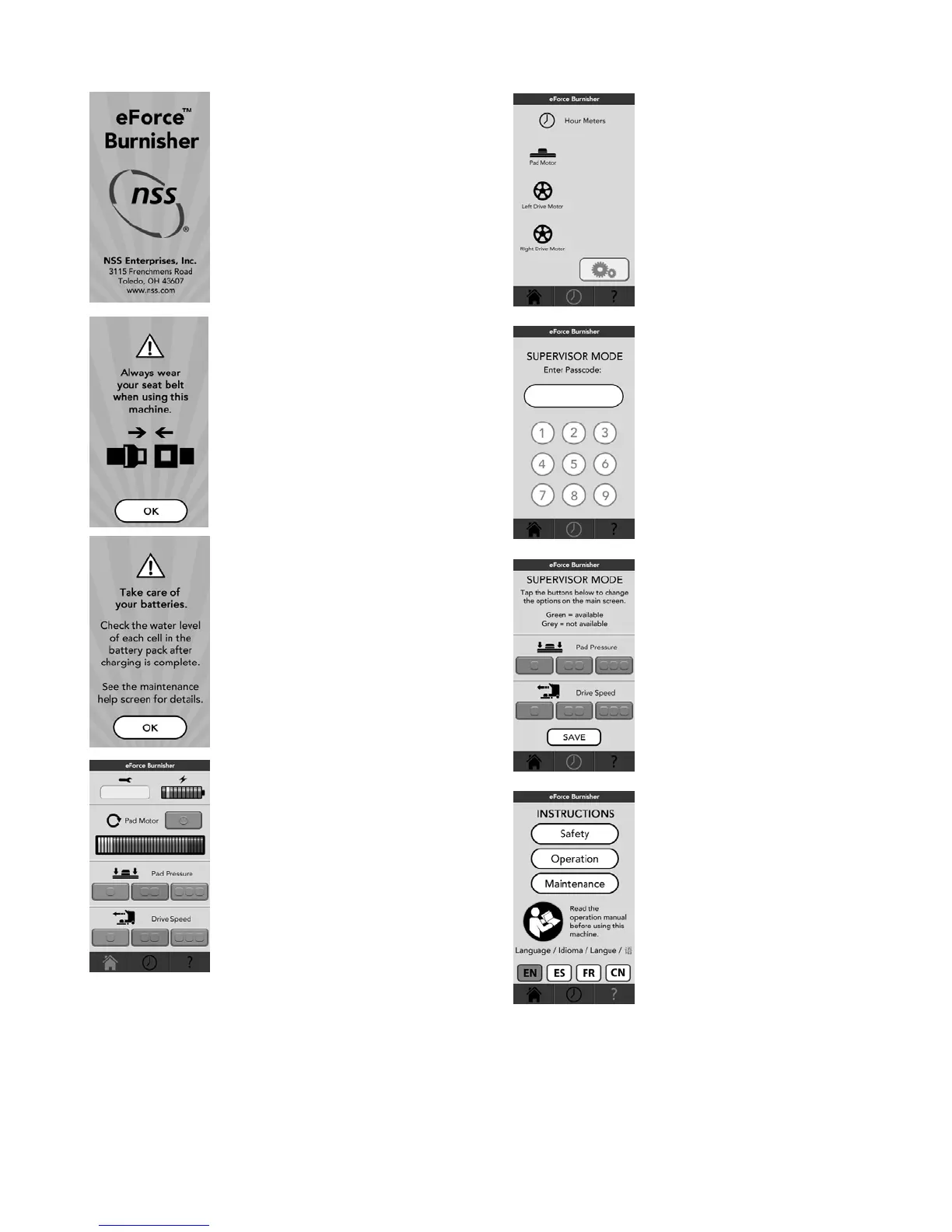
Touch Pad Screens
Splash Screen. Stays on the
screen for nominally two seconds
and then switches to the next
screen.
Seat belt Screen. Always wear
your seat belt when using this
machine. Push OK to continue to
the next screen.
Take care of your batteries
screen. Push OK to continue to
the Main or Home screen.
Main screen.
The service codes will be
displayed under the wrench.
The battery charge level is
represented by the battery. As the
battery is depleted, the number of
colored bars on the battery meter
decreases.
In the pad motor section, there is
a button that turns on and off the
pad motor. The amp meter
correlates to the amp motor
current. Always run in green area.
In the pad pressure section, there are three buttons.
The current setting is indicated by displaying the
button green.
In the drive speed section, there are three buttons.
The current setting is indicated by displaying the
button green.
The buttons at the bottom are the navigation buttons
Home, Clock and Help sections.
Hour Meter screen. This screen
is accessed by touching the clock
icon on the navigation bar at the
bottom. There are three hour
meters. The hour meter values
will be displayed to the right of the
icons.
Push the button with the gears on
it to go to the Supervisor Mode
access screen.
Supervisor Mode Access
screen. Enter the Passcode 1911
to access the Supervisor Mode
screen.
Supervisor Mode screen. The
purpose of this screen is to turn
off buttons not to be used by
operators. When turned off the
button will not appear on the Main
screen. Green buttons will appear
on the Main screen and grey
buttons will be removed from the
Main screen. After the selections
are made push the save button.
The Main screen will appear with
the new settings.
Help screen. This screen is
accessed by touching the help
icon on the navigation bar at the
bottom.
There are three buttons in the
middle of the screen. The Safety
button will take you to the Safety
section, the Operation button will
take you to the Operation section
and the Maintenance button will
take you to the Maintenance
section.
The four buttons at the bottom are the language
buttons. EN for English, ES for Spanish, FR for
French, CN for Chinese.




 To Next Page