9
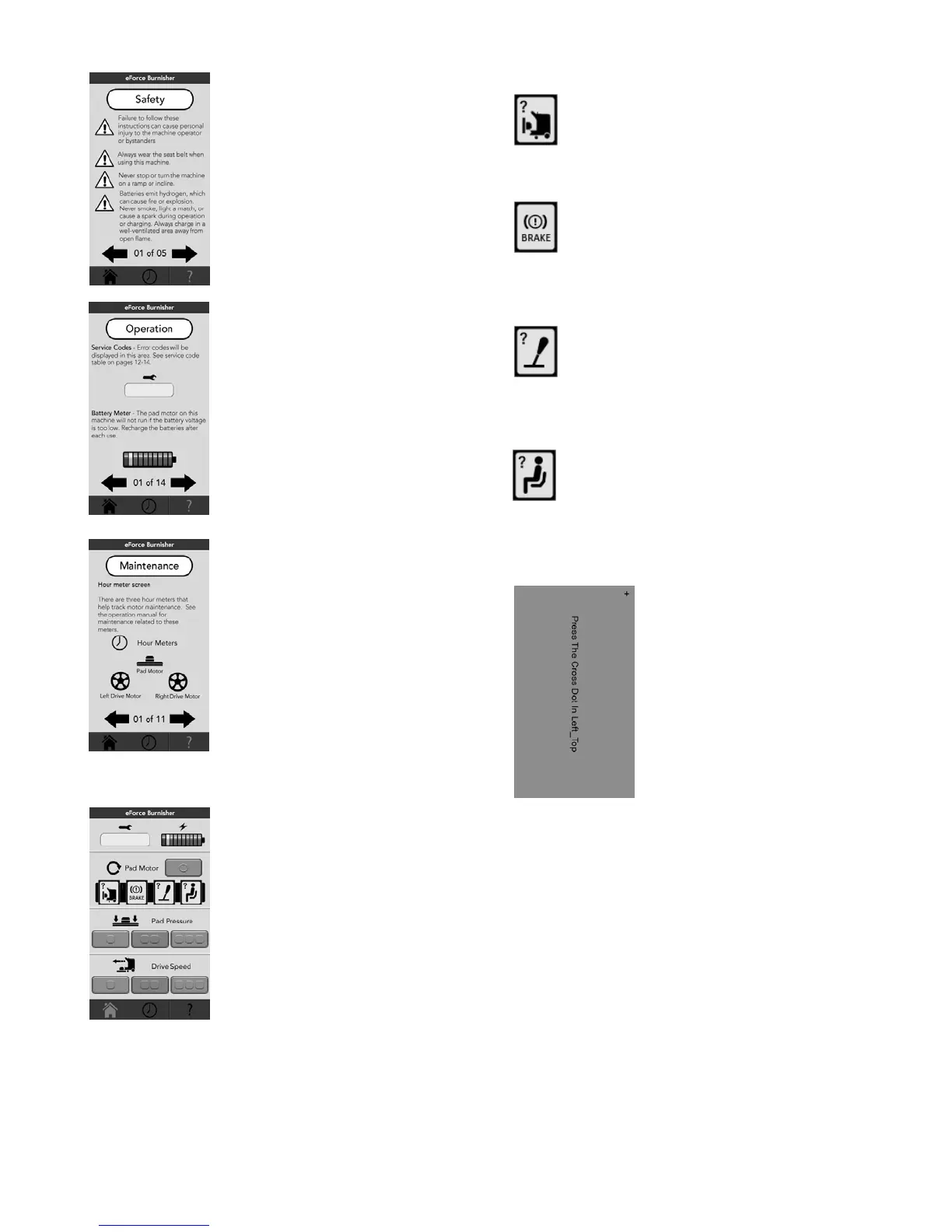
The Safety section appears after
pushing the Safety button on the
Help screen. There are 5 pages
of information. To navigate
through the pages push the arrow
on the right for next page and the
arrow on the left for previous
page. Push the Safety button at
the top to return to the Help
screen. Push any button on the
navigation bar to go to that
screen.
The Operation section appears
after pushing the Operation
button on the Help screen. There
are 14 pages of information. To
navigate through the pages push
the arrow on the right for next
page and the arrow on the left for
previous page. Push the
Operation button at the top to
return to the Help screen. Push
any button on the navigation bar
to go to that screen.
The Maintenance section appears
after pushing the Maintenance
button on the Help screen. There
are 14 pages of information. To
navigate through the pages push
the arrow on the right for next
page and the arrow on the left for
previous page. Push the
Operation button at the top to
return to the Help screen. Push
any button on the navigation bar
to go to that screen or section.
Pop Up Warnings
When the machine is turned on
and any of the following four
functions are out of place, a pop
up warning will appear on the
main Screen.
Pad motor in the up position. No power is
supplied to the pad motor or the drive
motors. The pad motor must be lowered
before the machine will move. This icon will
not appear when the pad motor is lowered.
The electric brakes are not engaged. No
power is supplied to the pad motor or the
drive motors. The electric brakes must be
engaged before the machine will move. This
icon will not appear when the electric brakes
are engaged.
The joystick is not in the center position at
start up. No power is supplied to the pad
motor or the drive motors. The joystick must
be in the center position before the machine
will move. This icon will not appear when the
joy stick is in the center position at start up.
No operator in seat. No power is supplied to
the pad motor or the drive motors. The
operator must be in the seat before the
machine will move. This icon will not appear
when the operator is in the seat.
Touch Screen Calibration
Tap on any screen with two
fingers very quickly until a beep is
heard and the touch screen turns
blue. The first blue screen will
read “Press The Cross Dot
Left_Top”. Tap the +. The next
blue screen will read “Press The
Cross Dot Right_Top”. Tap the +.
The next blue screen will read
“Press The Cross Dot
Right_Bottom”. Tap the +. The
touch screen will be calibrated
and return to the last screen you
were on.




 To Next Page