NTI ENTERPRISE ENVIRONMENT MONITORING SYSTEM
79
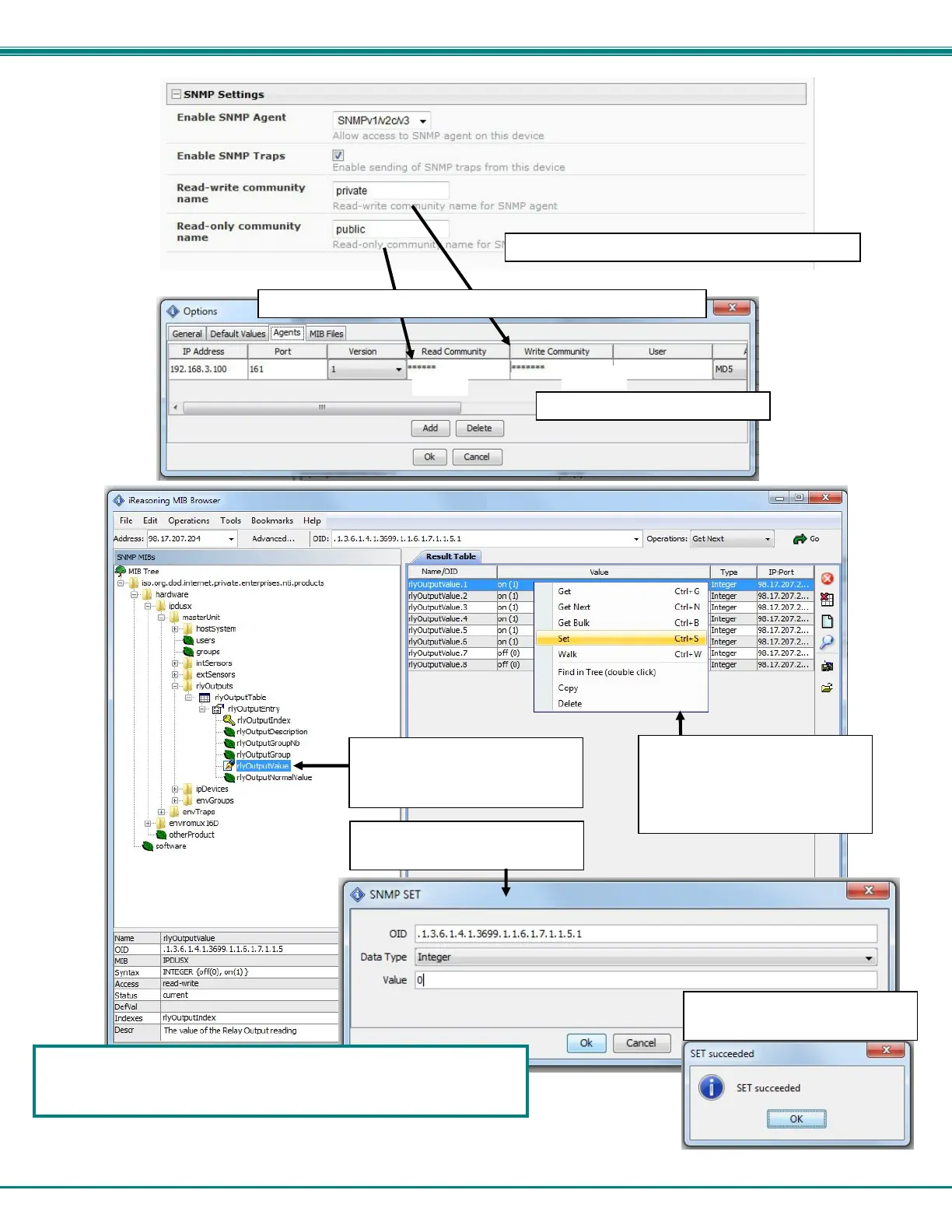
Figure 88- How to setup SNMP to control output relays
1. Confi
ure the
NVIROMUX
Network Settin
s
2. Confi
ure the MIB browser
Note: enter same values from ENVIROMUX to the MIB browser
(public)
(private)
3. Expand the tree to view the
relay output values (right click
-> Get Subtree)
4. Identify which Output to
change state (power On or
power Off), right click and
choose Set
5. Change “Value” to 1 (for On)
or 0 (for Off). Click “OK”.
6. Confirmation of state
change.
ENVIROMUX operating system CPU and memory usage data can be
viewed if the UCD-SNMP-MIB is loaded (firmware version 2.16 or later
required). See page 133 for more information.



 To Next Page