Installation and Operation Manual TFTN 085-199
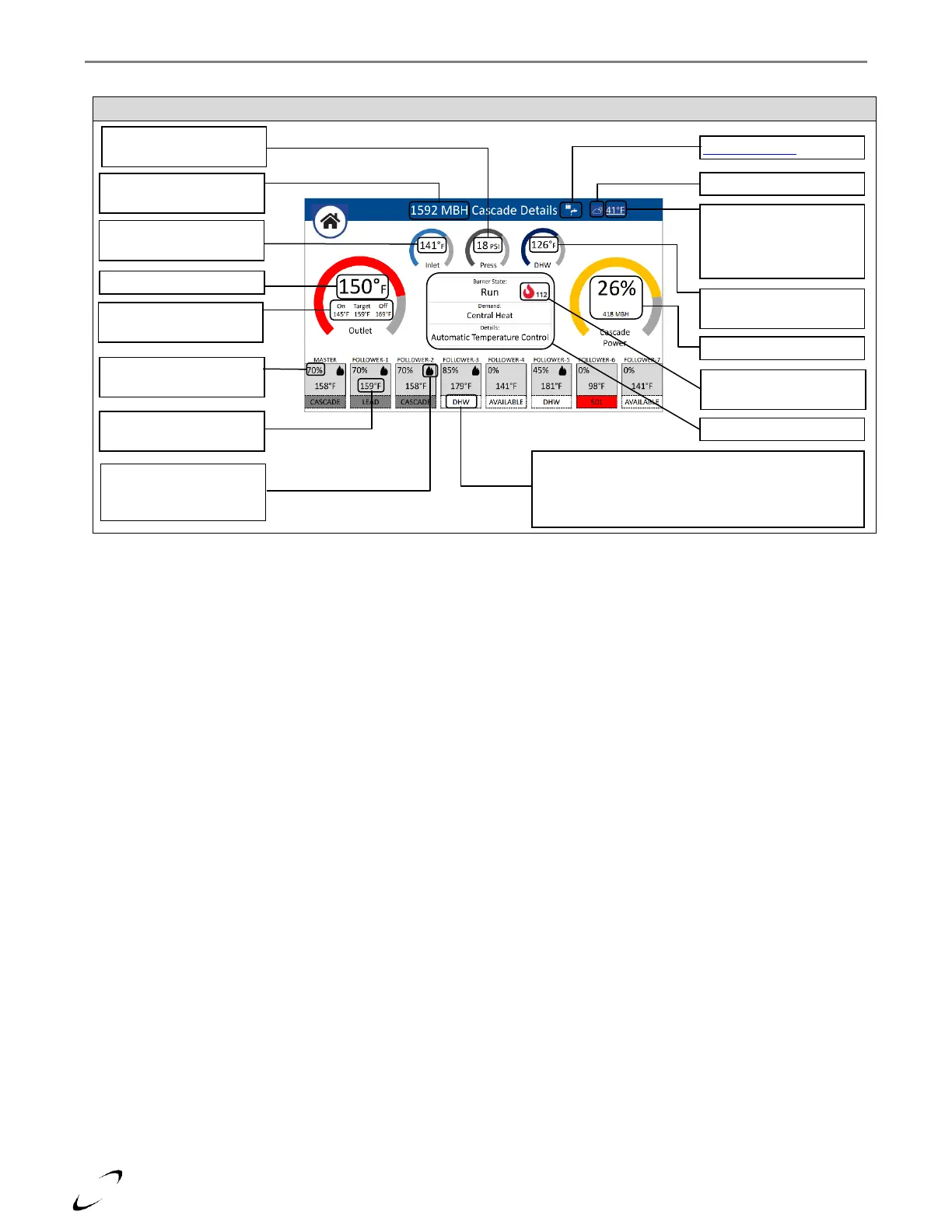
Figure 16-22 Cascade Details Screen
Inlet temperature of lead
boiler
System temp target &
burner on/off thresholds
Outdoor temp – press to
select Internet Weather or
to disable AUTO
Temperature Control Mode
DHW tank temp / Aquastat
state (downstream IWH)
Inlet water pressure of lead
boiler
Size of cascade – sum of all
boilers in cascade
Flame signal of Manager
boiler
Burner power of respective
cascaded boiler
Outlet temp of respective
cascaded boiler
Flame icon signifies that
the respective cascaded
boiler is firing
Operating status/availability of respective cascade boiler.
• Grey = servicing cascade
• Red = lockout
• White = DHW (local) or available


 To Next Page