TFTN 085-199 Installation and Operation Manual
16.3.2 Tech Menu
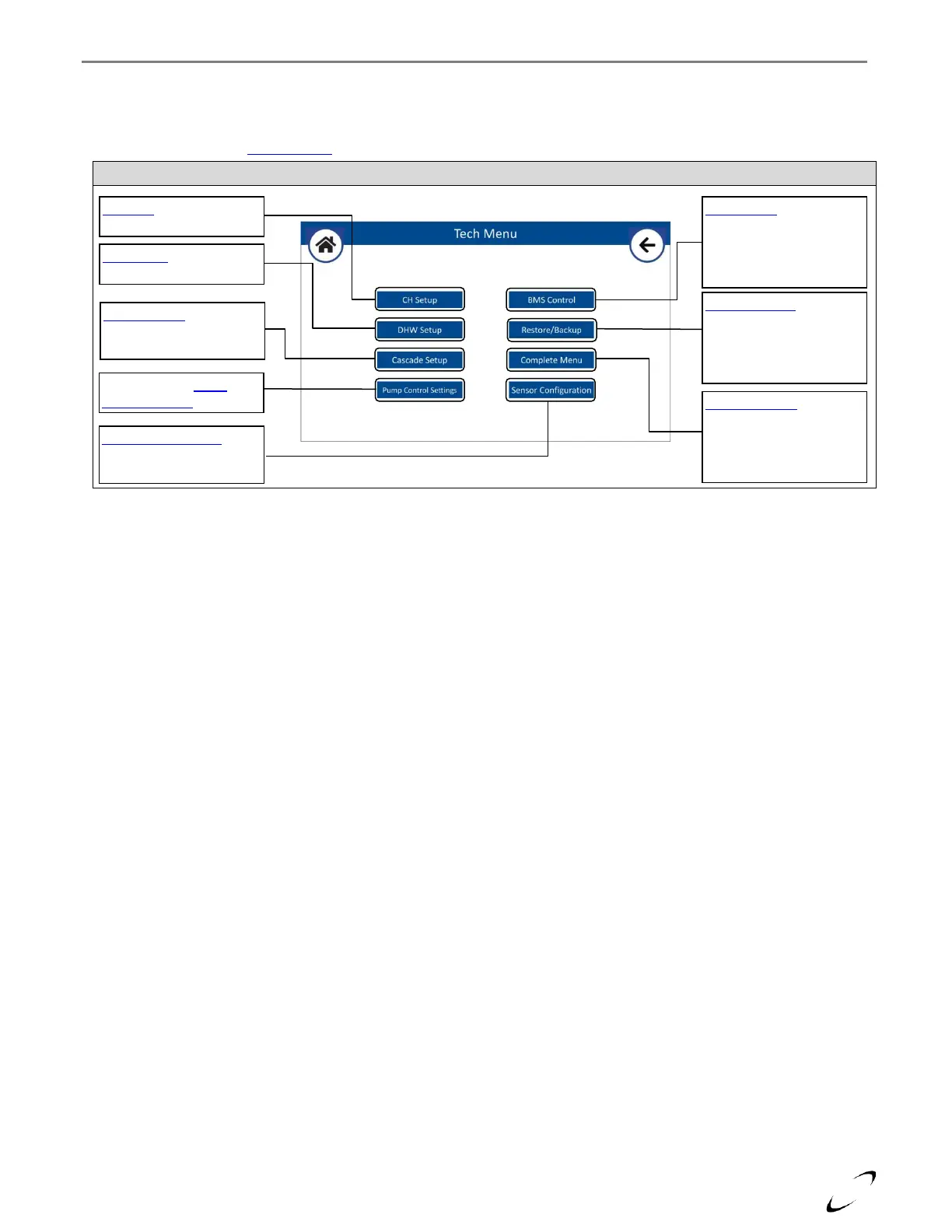
All technical parameters of the main controller are accessed from the Tech Menu.
Note: if you have not entered the “ntinet” passcode within the last 30 minutes, you will be asked to enter it again upon
selecting Tech Menu; see Setup Wizard section.
CH Setup - select to access
Central Heating settings
DHW Setup – select to
access DHW settings
Cascade Setup – select to
access cascade settings or
to set the Boiler Address
Select to access Pump
Control Settings
BMS Control – select to
configure the boiler’s
response to an external 0-
10V signal for controlling
the modulation/setpoint
Restore/Backup – select to
reset to factory defaults or
to restore/backup settings
from/to the display or
external memory
Complete Menu – select to
enter a specific parameter
number or to view the
complete list of parameters
listed numerically
Sensor Configuration –
select to configure AUX1
and AUX2 sensor inputs


 To Next Page