Installation and Operation Manual TFTN 085-199
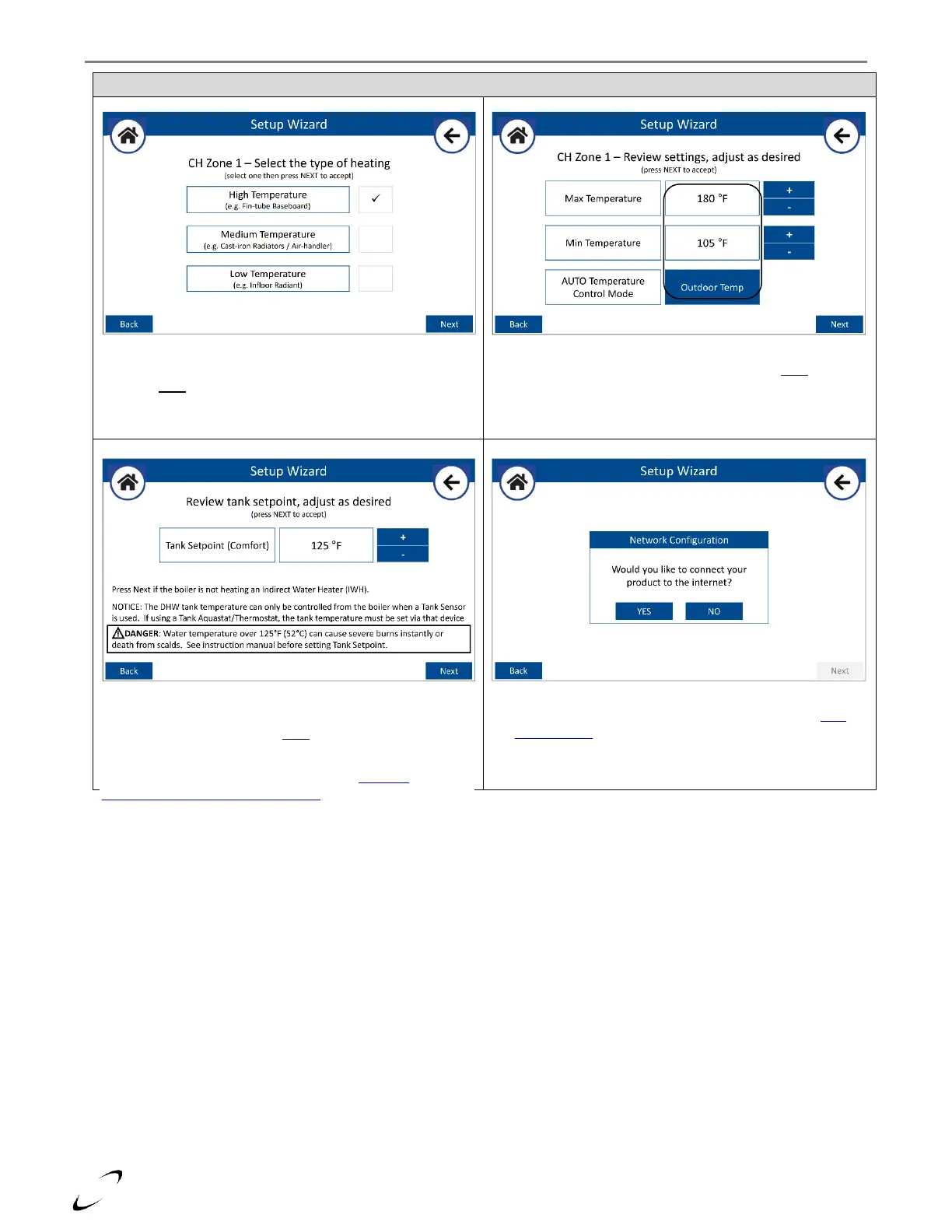
Figure 16-6 (Continued) Setup Wizard
Select the type of radiation for the 1
st
zone (i.e., zone
connected to T-STAT #1 input and ZONE 1 output), then
press Next.
The control will select default settings based on the type of
radiation selected, adjust if desired then press Next. Note: if
the number of heating zones selected was greater than 1,
you will be prompted to input the type of radiation for the
next zone (step 5).
After each CH zone is configured, the wizard will prompt you
to set the Tank Setpoint temperature (default = 125°F).
Adjust if desired then press Next.
DANGER: water temperature over 125°F can cause severe burns
instantly, or death from scalds. See section 1.6 –DHW
Temperature Adjustment and Scalding
Select NO to finish the Setup Wizard or select YES to start the
process of connecting the boiler to the internet – see WIFI
CONNECTION section. When the boiler is connected the
Setup Wizard is complete – select Finish to return to the
Home Screen.


 To Next Page