TFTN 085-199 Installation and Operation Manual
16.3.5 Connectivity
The Connectivity menu will need to be accessed to connect the boiler to WiFi unless you opted to “…connect your product
to the internet…” from the Setup Wizard. See section 17.0 WIFI CONNECTION for detailed instructions for connecting the
boiler to WiFi.
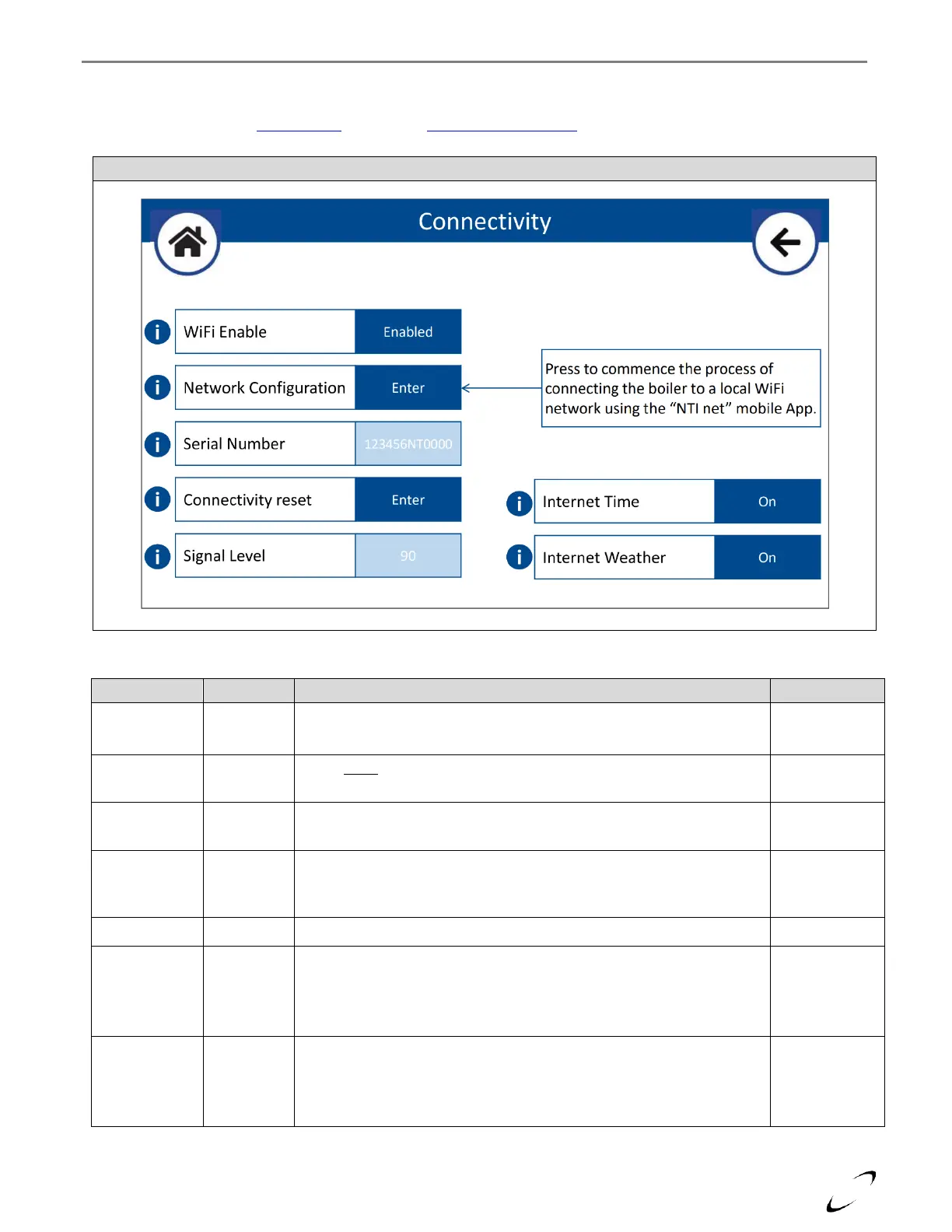
Figure 16-18 Connectivity Menu
On – connection to WiFi is possible
Off – disconnects boiler from WiFi
Select Enter to commence the process of connecting the boiler to a local
WiFi network using the “NTI net” mobile App
Serial number of the boiler's WiFi gateway. Serial number is required
when registering the boiler on the “NTI net” connectivity platform.
Select if you need to reconfigure the WiFi connection, i.e., if you need to
select a different WiFi network. To re-establish WiFi connection, enter
the Network Configuration.
Displays the WiFi router signal strength.
Set to "On" to have the time automatically set via the internet
connection based on the boiler's entered address.
Note: the address is entered when registering the boiler to an “NTI net”
End User or Service Center.
Set to "On" to have the outdoor temperature reading acquired via the
internet connection based on the boiler's entered address.
Note: the address is entered when registering the boiler to an “NTI net”
End User or Service Center.


 To Next Page