Installation and Operation Manual TFTN 085-199
16.1 Home Screen
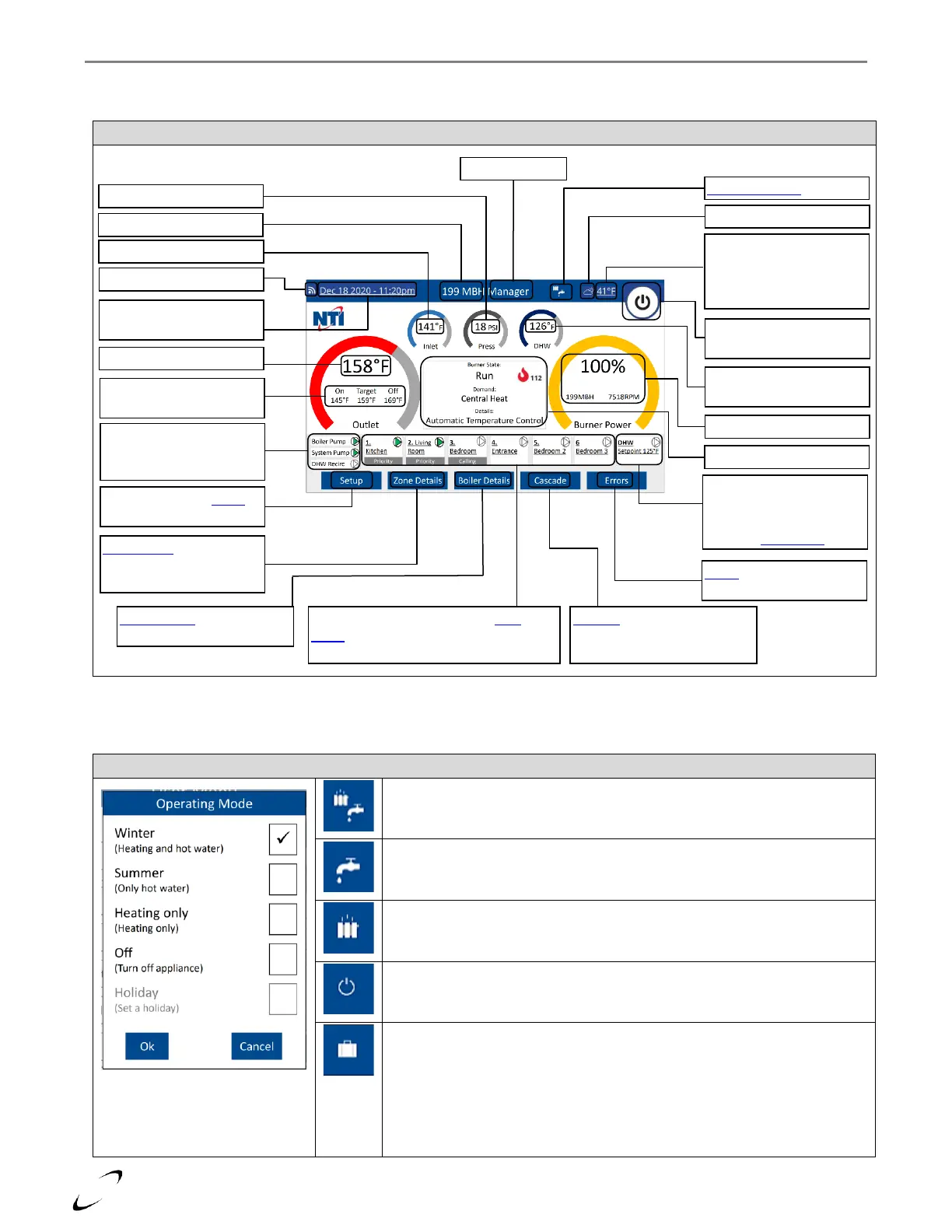
After power-up, following the initialization sequence (see Figure 16-1), the boiler defaults to the Home Screen.
16.2 Operating Mode (Scheduling)
Operating mode can be used to select the mode or modes that the boiler will operate for, i.e., CH, DHW, CH & DHW or OFF.
Figure 16-4 Operating Mode
Winter (default) – boiler operates for both central heating (CH) and domestic hot
water (DHW) demands, i.e., normal operation.
Summer – boiler only operates for domestic hot water (DHW) demands.
Heating only – boiler only operates for central heating (CH demands)
Off – boiler will only operate for Anti-freeze function (if set to Enabled)
Holiday – boiler will only run to maintain the room temperatures of zones with NTI
Room Sensors at the Holiday setpoint; other CH zones will remain off. DHW will
only be heated by the Anti-legionella Function (if set to On), or DHW frost
protection (tank temp < 46°F). Holiday operating mode is not selectable from the
display, only via the web or mobile app.
Note: the boiler will still perform the Anti-freeze Function with Operating Mode set
to Holiday.
Date & time – press to
adjust/select Internet Time
Outlet temp target &
burner on/off thresholds
Boiler, System and DHW
Recirc pump status – green
when pump is on
Outdoor temp – press to
select Internet Weather or
to disable AUTO
Temperature Control Mode
Burner enable/disable
button
DHW tank temp / Aquastat
state
DHW setpoint and pump
status – green when pump
is on. Press to enter DHW
screen of User Menu
Select to enter the Setup
menu
Zone Details – select to
view a summary of zone
settings & status
Boiler Details – select to view
a summary of the boiler I/O
Zone status – press to enter the User
Menu
for the given zone (6 visible in
cascade or with optional N-Link ZC3)
Cascade – select to view a
summary of the cascade
system (Manager boiler only)
Errors – select to view past
& present error details


 To Next Page