TFTN 085-199 Installation and Operation Manual
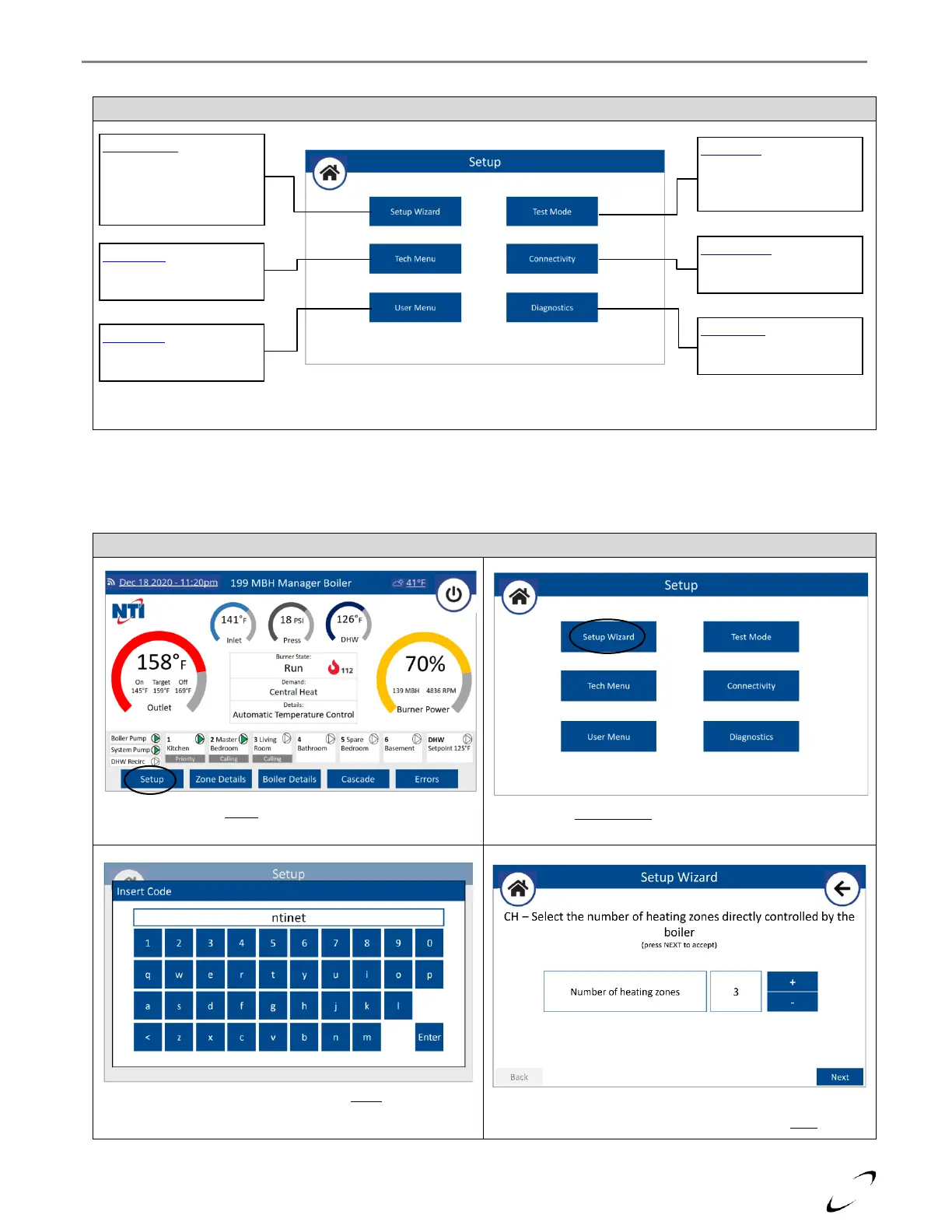
Select the number of heating zones controlled by the boiler
(i.e., number of T-STAT inputs used), then press Next.
16.3.1 Setup Wizard
It is recommended to use the Setup Wizard to walk you through the basic setup of the boiler controller, including CH and
DHW setup and connecting the boiler to WiFi.
Setup Wizard – select to
have the system walk you
through a step-by-step
setup procedure of the
controller
Tech Menu – select to
access all technical
parameters
User Menu – select to
access user adjustable
parameters
Test Mode – select to
access the Burner & Output
Test screens or the Air
Purge activation button
Connectivity – select to
view the WiFi settings or to
make the WiFi connection
Diagnostics – select to
access the Statistic, Service
and Version menus
Select Setup from the home screen
Select Setup Wizard from the Setup menu
Insert the password “ntinet” and press Enter.


 To Next Page