Installation and Operation Manual TFTN 085-199
16.3.6 Diagnostics
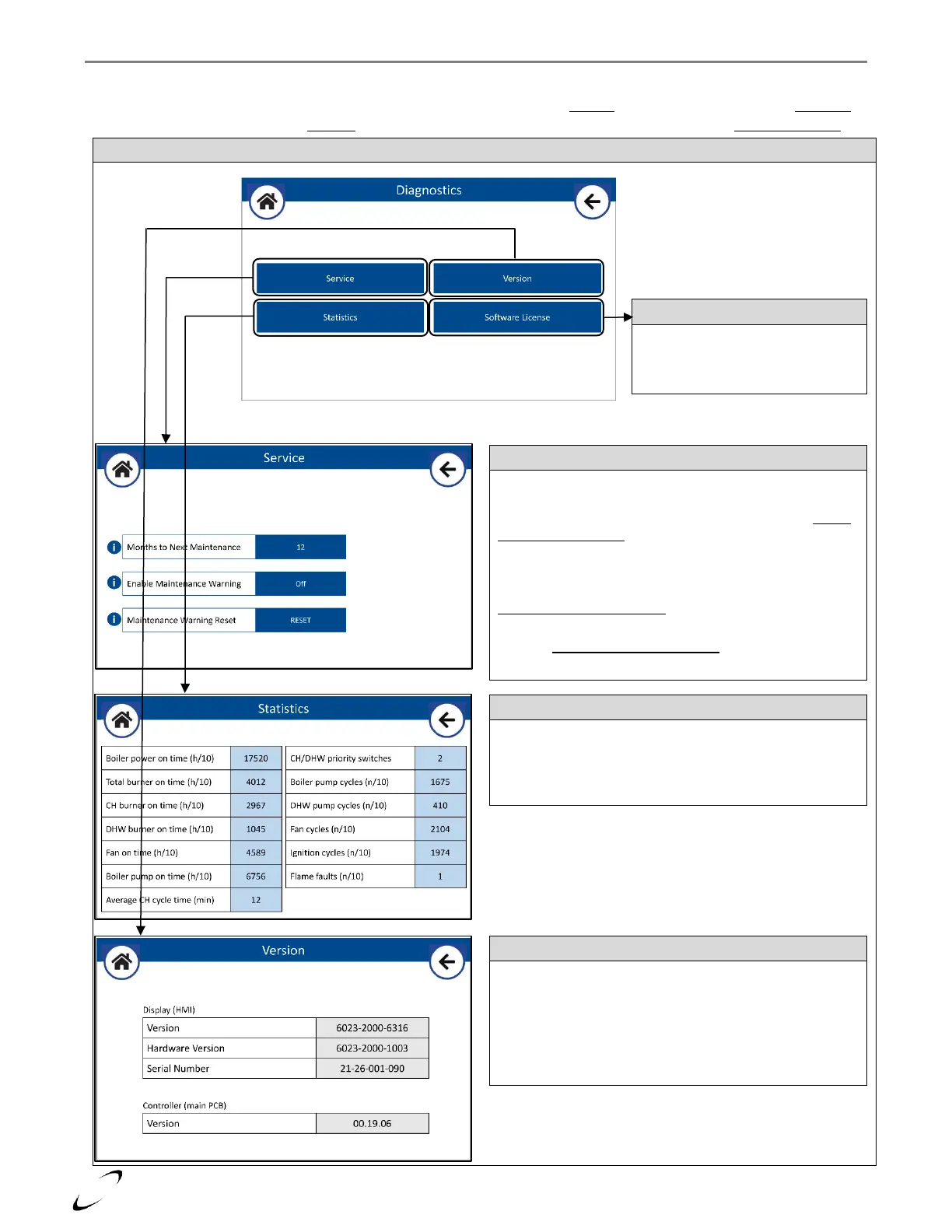
The Diagnostics menu provides access to the Maintenance Warning feature (Service), boiler operating statistics (Statistics),
display and PCB software versions (Version), and a list of the open-source licenses used by the display (Software License).
Figure 16-19 Diagnostics Menu
Months to Next Maintenance (parameter 24.17.0): Sets the
number of months until a Maintenance Warning is triggered;
number counts down over time. Only applicable when Enable
Maintenance Warning is set to On. Default = 12 months;
Range = 0-24 months.
Enable Maintenance Warning (parameter 24.17.1): When set
to On, a Maintenance Warning will occur at a frequency set by
Months to Next Maintenance. Default = Off.
Maintenance Warning Reset (parameter 24.17.2): Press to
reset the Months to Next Maintenance counter, i.e., after
completing the scheduled maintenance of the appliance.
Provides the open-source licenses
of the software components used
within the display.
List of all available boiler statistics stored on the main PCB.
Values are read only.
Note: if the main PCB is replaced the values will be reset, i.e.,
revert to the statistics of the replacement PCB.
Display (HMI): lists the software and hardware version, and
serial number of the display.
Controller (main PCB): lists the software version of the PCB.
Note: the display software can be updated by inserting a USB
flash drive, containing the new software, into the USB port of
the display.


 To Next Page