Installation and Operation Manual TFTN 085-199
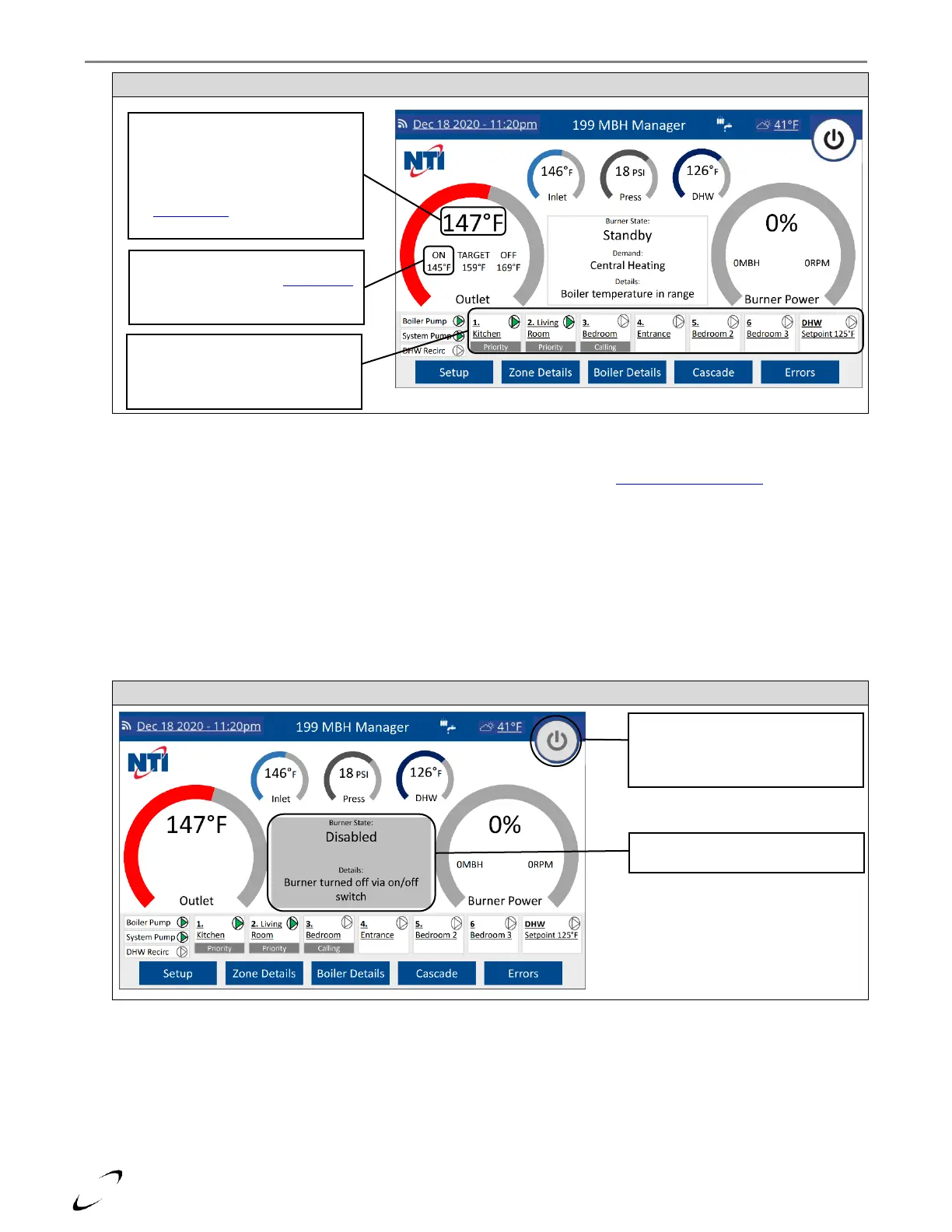
Figure 18-2 Boiler Temperature in Range
3. No Response to a Central Heat Demand – if the boiler is not responding to a CH demand, i.e., Zone Status does not
show “Priority” or “Calling” and the pump symbol does not turn green (see Figure 18-2), proceed as follows:
i. Check the Operating Mode to make sure it is set to “Winter”; see Section 16.2 – Operating Mode.
ii. Check the field wiring to the T-STAT #1-3 inputs; verify that 24VAC is present on R and W. If 24V is preset on R
but not on W, then the issue is with the thermostat. If 24V is not present on R, then check the 2 Amp blade-fuse
on the Low Voltage Connection PCB, see Figure 18-4.
NOTE: if the 2 Amp fuse on the Low Voltage Connection PCB is blown, check for correct field wiring to the T-STAT
#1-3 inputs.
iii. Check the Zone Controller Fuses; see Figure 18-4.
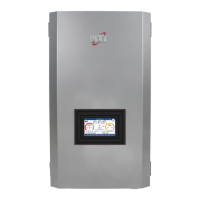
4. Boiler Turned Off Via On/Off Switch – if this message is shown on the Home Screen it means that the burner was
disabled via the on/off button at the top-right of the screen (see Figure 18-3); press the on/off button to enable the
burner.
Figure 18-3 Boiler Turned Off Via On/Off Switch
5. No Power to Zone Outputs:
i. Confirm that the jumper wire is connected between terminals ZONE INPUT and 120V, or ZONE INPUT and R (for
24V loads); see Figures 12-2 & 12-3.
ii. Check the Zone Output fused on the Control Panel; see Figure 18-4.
NOTE: if the display is not indicating that the zone output is on, i.e., pump symbol does not turn green (see Figure 18-
2) then the boiler is not attempted to turn the zone output on.
NOTE: zone outputs will not turn on if there is a priority demand for DHW.
Outlet Temp – if higher than ON temp
the burner will not attempt to reignite.
If using a System Sensor, the burner will
only attempt to reignite if the system
temp drops below the ON temp – check
the Boiler Details screen to view the
system temp.
ON Temp – for the active zone with
highest priority; check the Zone Details
screen for a summary of the ON
temperature for all zones.
Zone Status – summary of which zones
are calling and which have priority.
Green pump symbol signifies that the
zone is actively being serviced.
On/Off Button – background is grey
when burner is disable and is white
when burner is enabled. Press to
change setting.
Display gives this message when the
burner on/off button is set to disabled.


 To Next Page