TFTN 085-199 Installation and Operation Manual
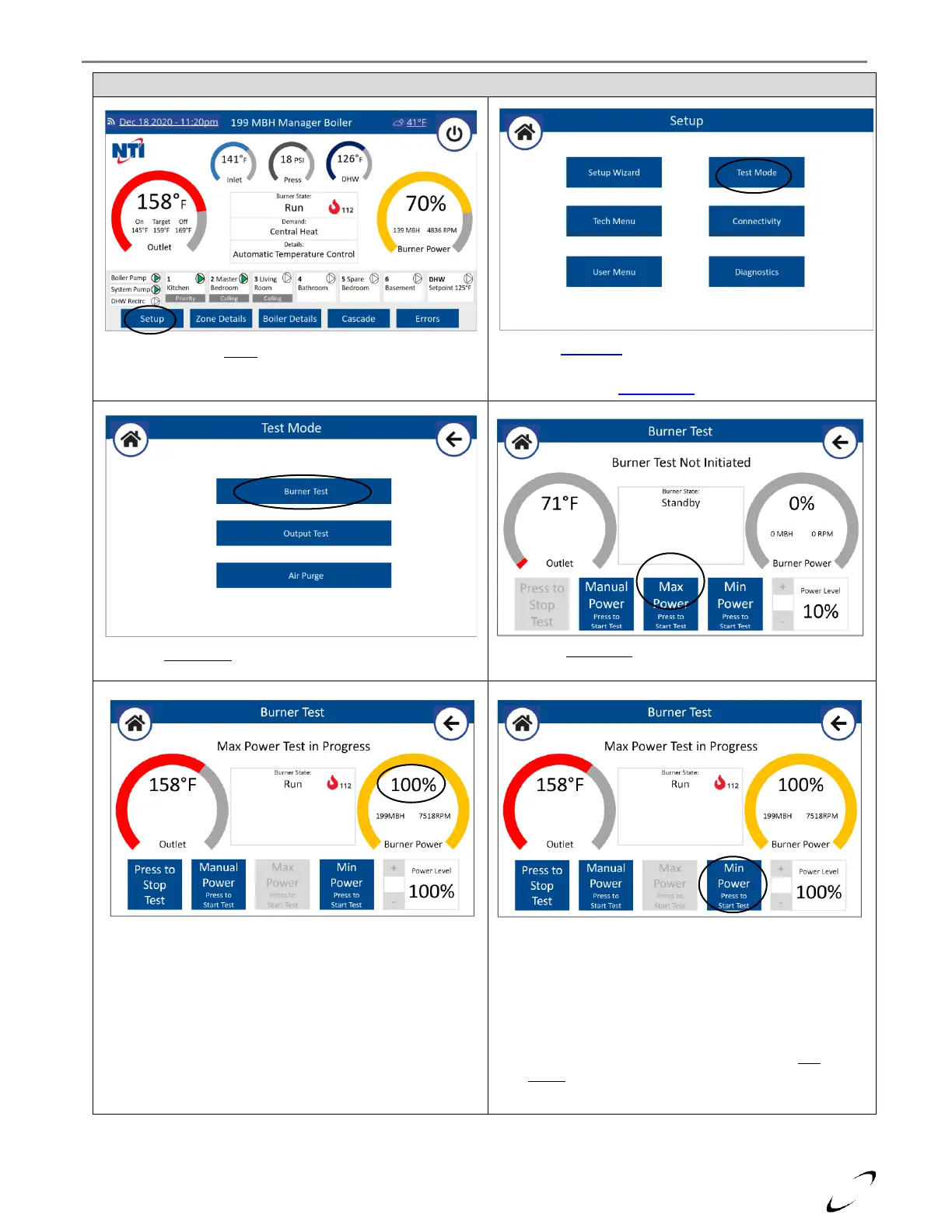
Select Burner Test from the Test Mode screen
Select Max Power from the Burner Test screen
Figure 9-1 Placing the Boiler in Firing Rate Test Mode
Select Setup from the home screen
Select Test Mode from the Setup menu
Note: if prompted, you will need to enter the password,
“ntinet”, see Setup Wizard section.
Verify Burner Power goes to 100% before proceeding with
Max Power combustion calibration (see Table 9-1).
Note: Use the Throttle Screw to adjust Max Power combustion –
see Figure 9-2.
Note: Verify gas line pressure to unit is within range while
operating at Max Power – see Table 9-1.
Note: If the Burner Power gauge and Power Level are
flashing, it means that the Power Limiting function is
active, and the burner power will not exceed 50%.
The Power Limiting function finishes after 5min of
normal burner operation.
Upon completing Max Power calibration, select Min
Power from the Burner Test screen.


 To Next Page