TFTN 085-199 Installation and Operation Manual
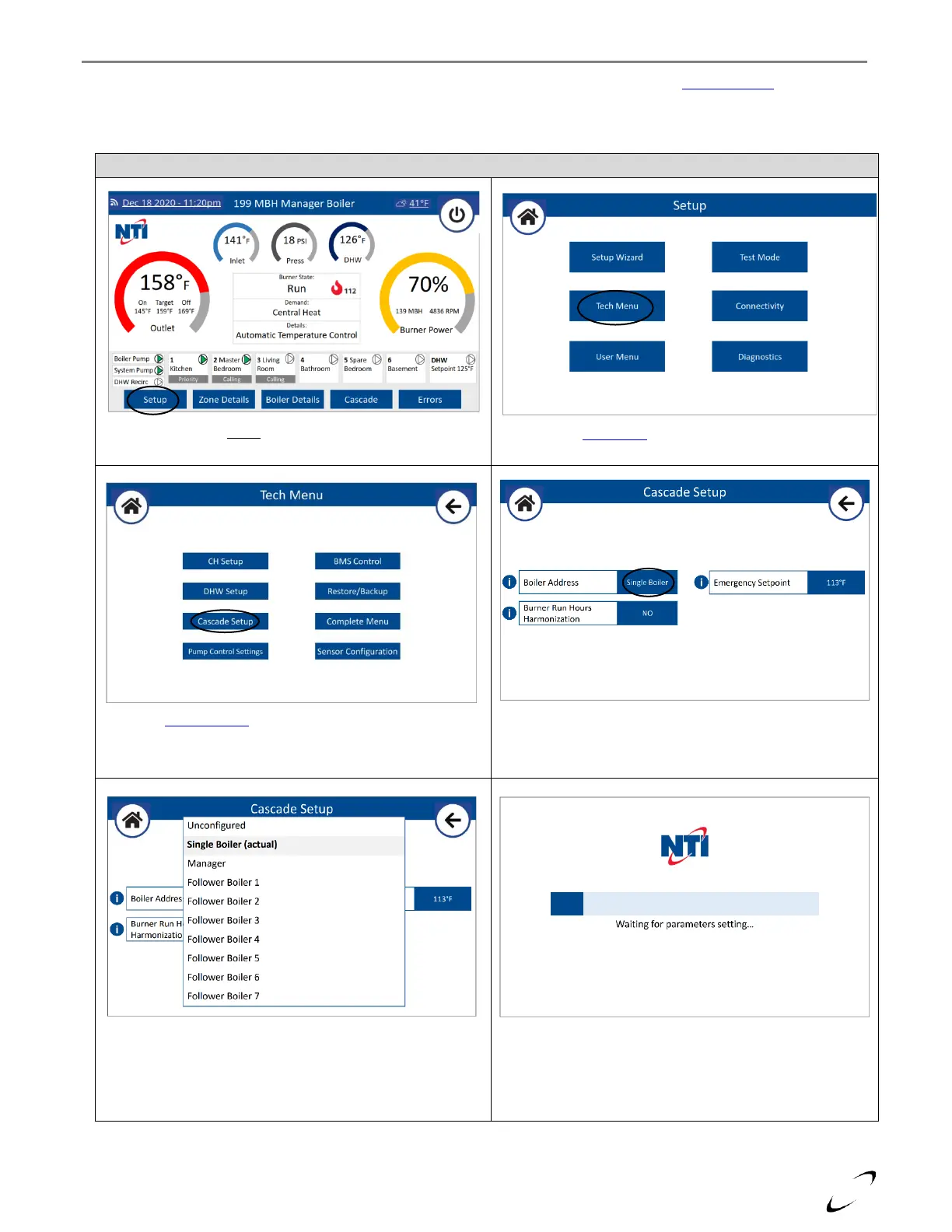
3. Set Boiler Address – turn the power on to each boiler and set the Boiler Address from the Cascade Setup menu. The
boiler chosen for connecting the System Sensor (and if applicable Outdoor, DHW Recirc or Buffer Tank Sensors and
System Pump) must be set as Manager, while the others must be set uniquely as Follower Boiler 1, 2…7. See Figure
11-3.
Figure 11-3 Setting Boiler Address
Select Setup from the home screen
Select Tech Menu from the Setup menu
Select Cascade Setup from the Tech Menu
Select the Boiler Address to access the configuration options.
When the controller starts the reboot sequence, turn
the power off.
Select from the dropdown menu a unique address for
each boiler, i.e., Manager, Follower Boiler 1, 2…7, then
select OK.


 To Next Page