Tx I&O Manual │Display Menu Guide
Installer Menu
The Installer Menu allows access to all settings for adjustment, as well as viewing of statistical data for
troubleshooting. Access the Installer Menu from any screen by pressing the MENU and OK buttons
simultaneously until “2-01” is displayed on the top left of the screen. Exit the Installer Menu by pressing and
holding the RESET button.
Installer Menu settings shall only to be adjusted by a qualified installer or service
technician that understands the repercussions of incorrect control settings. Improper
control settings may negatively affect the operation of the boiler and/or the heating system; resulting in property
damage, serious injury or even death.
Adjusting settings – once the Installer Menu is accessed; adjust settings using the following procedure:
1. Use the UP or DOWN button to scroll through the menu until the desired setting number is displayed in the
top-left of the screen (i.e. 2-01).
2. Press the OK button to access the setting; at this time the setting will flash (Note: if the value does not flash
after pressing the OK button, then the parameter is not adjustable – refer to Table 17-2).
3. With the value flashing, use the UP or DOWN button to increase or decrease the setting. Once the desired
value is displayed, press the OK button to enter/save the new value. At this point the value will stop flashing.
4. Repeat for the next setting. Once complete, return to the Main Screen by holding the RESET button.
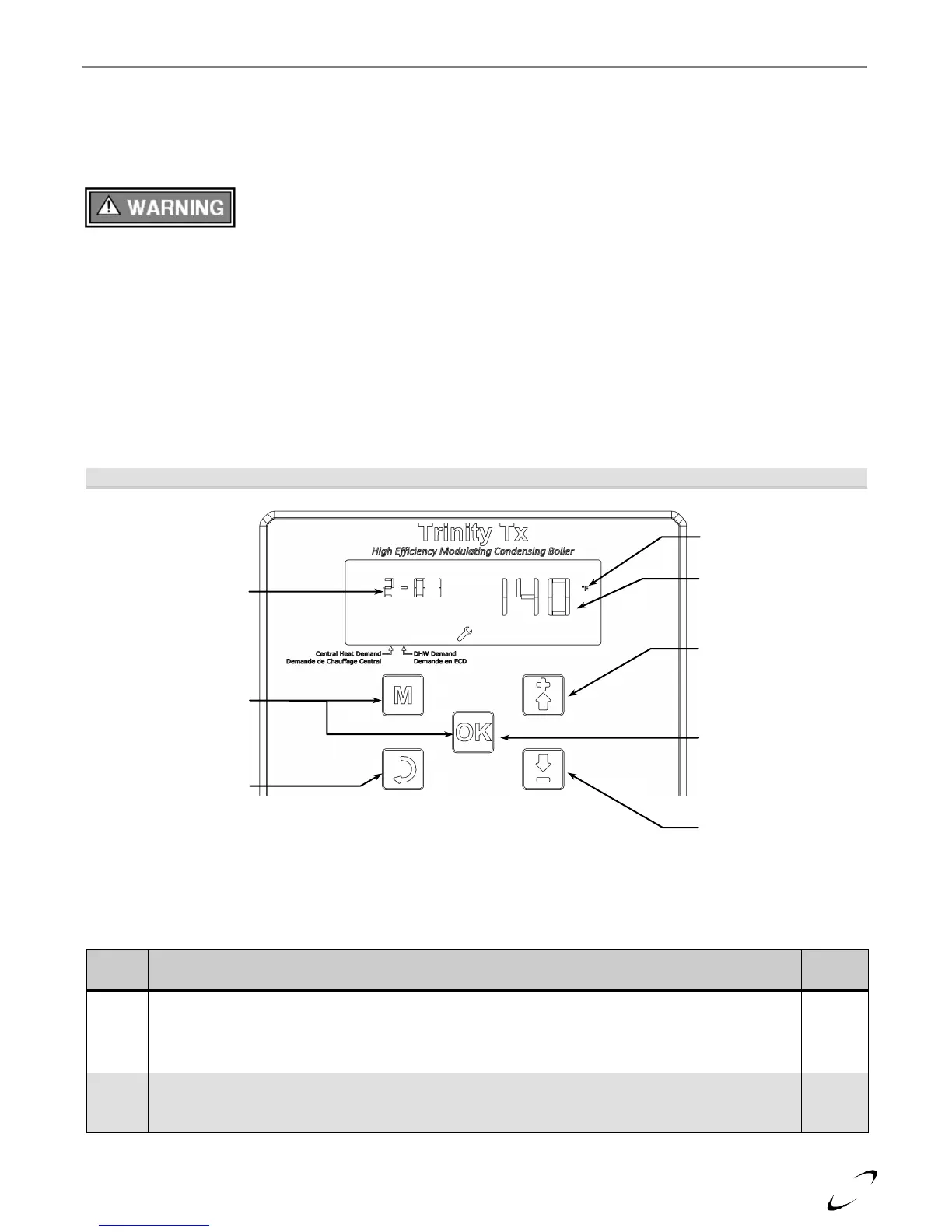
Figure 17-4 Installer Menu Navigation
Table 17-2 Installer Menu
CH setpoint (at OD = 0⁰F) – establishes the boiler operating temperature during central heat
demands when the outdoor temperature is 0⁰F or less. Set to the maximum desired boiler temperature
for the application, e.g. 100-120⁰F for infloor; 140-160⁰F for cast-iron; 160-190⁰F for baseboard.
Range = 80 to 190⁰F
CH setpoint differential – establishes how much the boiler outlet temperature must exceed the CH
setpoint before the burner is turned off. Also establishes how much the boiler outlet temperature must
drop below the CH setpoint before the burner is turned on. Range = 3 to 36⁰F
Item ID # - 35
parameters can be
viewed and/or adjusted
from the Installer Menu
(2-01 to 2-35), see
Table 17-2 for
description of each.
Value of displayed
parameter
Down button – press
to scroll down through
the menu parameters,
or to decrease selected
setting.
UP button – press to
scroll up through the
menu parameters, or to
increase selected
setting.
Installer Menu
Access – press and
hold MENU and OK
buttons to enter
Installer Menu.
OK button – press to
select parameter for
adjustment. Press
again to save new
setting.
Installer Menu Exit –
press and hold the
RESET button to exit
the Installer Menu.






 To Next Page