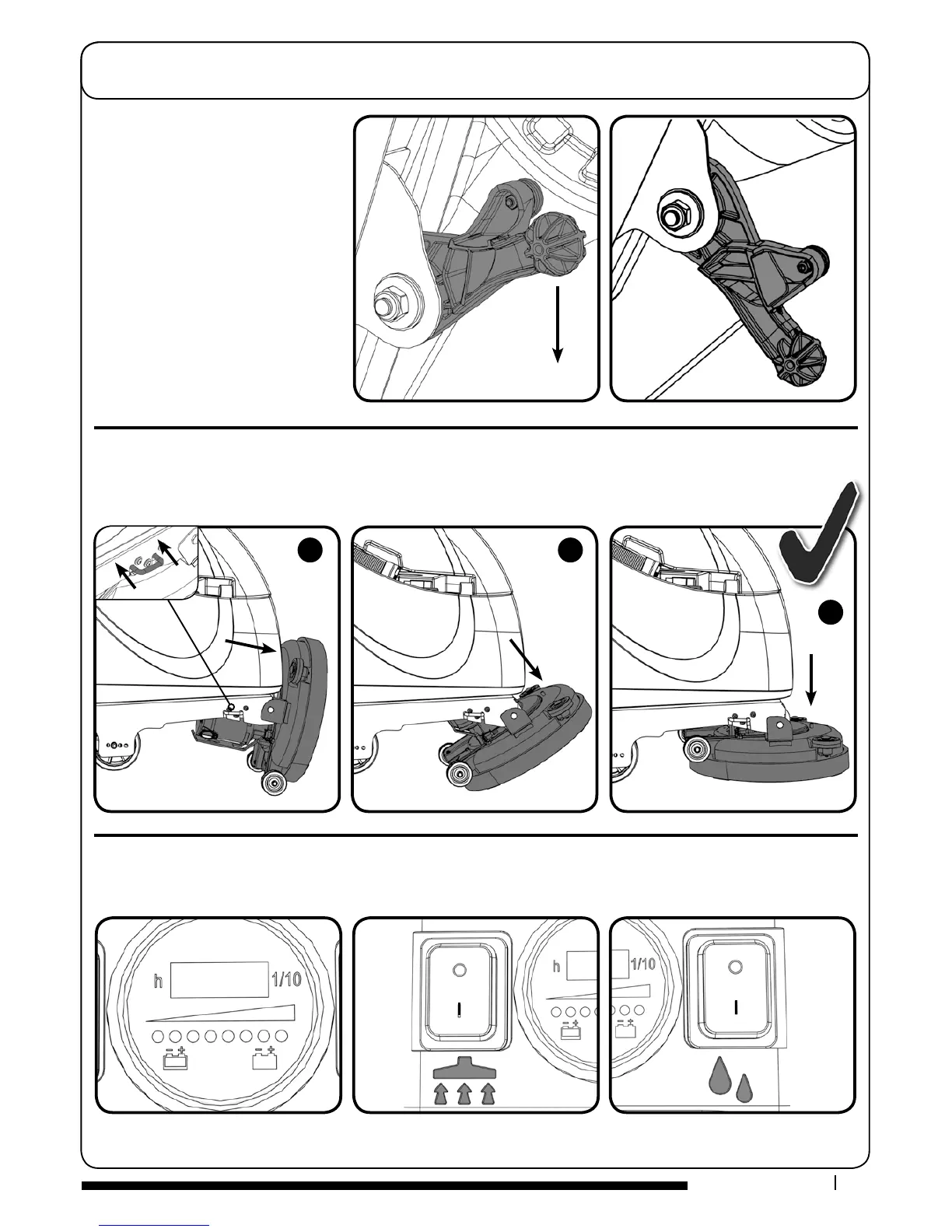
To tip the deck into the down position (Operating mode). Press in the brush deck locking pin (Fig.A)
and rotate the brush deck (Fig.B & C). To change to brush deck up position,
(Transit mode) simply lift the deck and the spring loaded locking pin will activate to hold the deck up.
After preparing the oor (see previous
section), we are now ready to set the
controls to suit the cleaning conditions.
Before any settings can be applied,
ensure the brush deck is lowered.
Move the oor tool lever to its
lower position.
NOTE: Do not pull the machine
backwards with the oor tool in the
lowered position, this could possibly
damage the blades.
Raising/Lowering
the Floor Tool
Raising/Lowering the Brush Deck
To start: hold down either trigger and press the yellow On / O Switch once
Hour meter and battery power.
Water On / OVacuum On / O
Setting the Cleaning Controls
o
o



 To Next Page