NewsCaster VT2 Operation
M17-0002-01A Rev 0.0 66 User Manual
5.5 TROUBLESHOOTING GUIDE
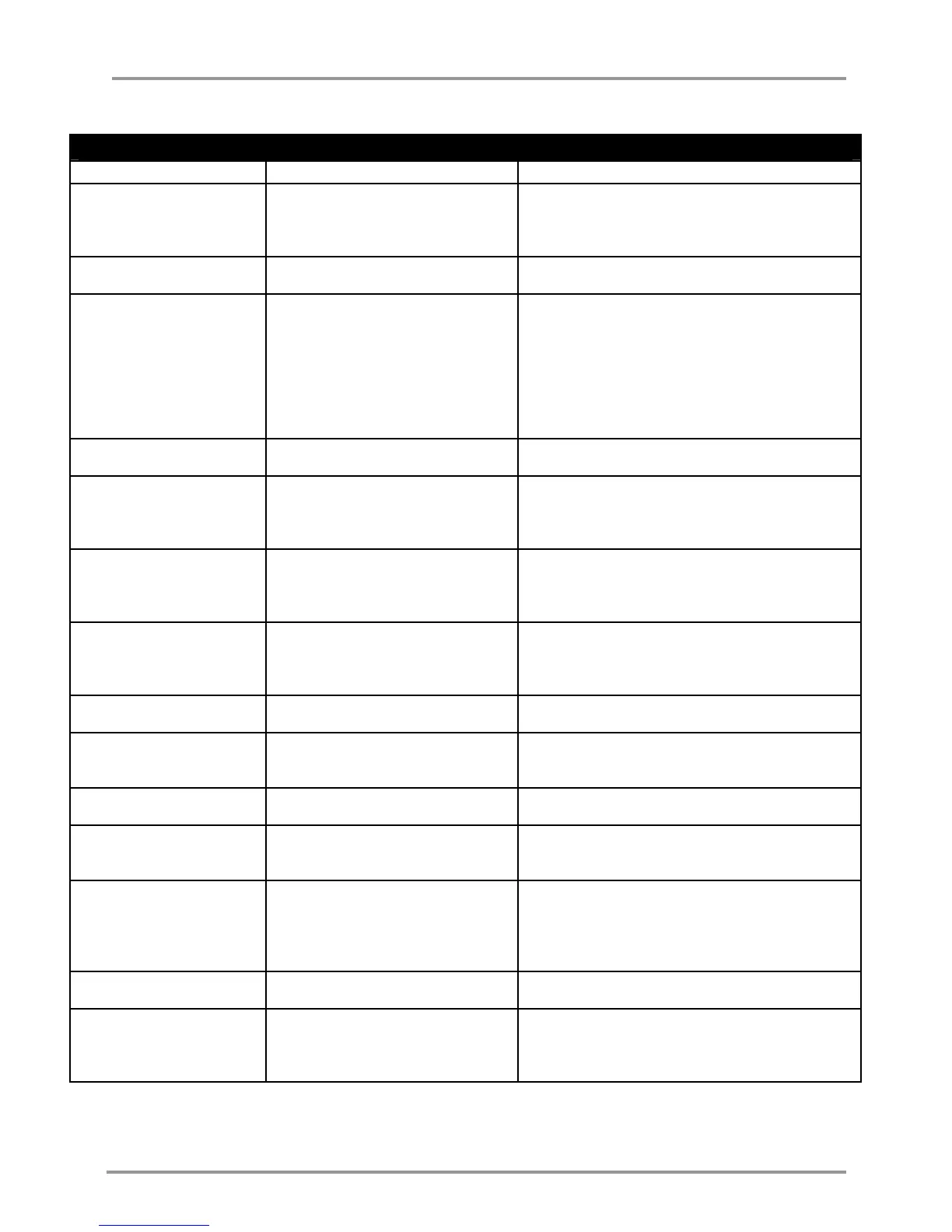
NewsCaster VT2 Alarms
Alarm Message Problem Probable Cause/Troubleshooting
FP: Data Error A setting is set to an illegal value. 1. Power cycle the radio.
2. Check modulation parameters.
3. Check all other settings.
4. Consult with factory
FP: I2C Error There is an internal communications
error.
1. Check for internal loose connectors.
2. Consult factory.
MOD: ASI OVERFLOW External ASI Data Rate is set higher
than the modulation will support.
1. Check ASI rate of the encoder and reduce below
or equal to the Max Rate. See Section 5.2; under
GOP settings.
2. Change the modulation parameters to support a
high bit rate. See Section 5.2; under COFDM
Parameters.
NOTE: Link reliability will be reduced as the data
rate is increased.
MOD: ASI UNLOCKED External ASI Signal Lock Error. 1. Check external ASI cabling.
2. Check maximum cable length (< 200 Meters).
MOD: AUDIO ERROR Problem with the Audio data. 1. Ensure there are no other Modulator or Encoder
errors.
2. Ensure the audio input is properly selected.
3. Contact the factory.
MOD: Data Error A setting is set to an illegal value. 1. Power cycle the radio.
2. Check modulation parameters.
3. Check all other settings.
4. Consult with factory
MOD: EMB RATE 1
or
MOD: EMB RATE 2
Embedded Audio (1 or 2) data rate
error.
1. Ensure audio parameters are set properly.
2. Ensure audio Embedding is enabled on source
device.
3. Consult factory.
MOD: FPGA FAIL FPGA failed software loading from
PROM.
1. Power cycle the radio.
2. Consult with factory.
MOD: LOADING ERR MOD microprocessor failed loading
data EPROM, or EPROM data not
recognizable.
1. Power cycle the radio.
2. Consult with factory.
MOD: I2C Error Fault in the Modulator/Encoder
Board.
Consult with factory.
MOD: NO AES AUDIO 1
or
MOD: NO AES AUDIO 2
No AES Audio (1 or 2) signal. 1. Check AES cabling.
2. Check pin-out on cable.
MOD: NO EMD AUDIO 1
or
MOD: NO EMD AUDIO 2
No embedded Audio (1 or 2) found
in the SDI stream.
1. Check the audio input selection and ensure it is
set to SDI.
2. Ensure Embedded Group is set to 1.
3. Ensure audio Embedding is enabled on source
device.
MOD: NO VIDEO INPUT Video signal missing. 1. Check for bad cable or connector.
2. Video standard.
MOD: VIDEO ERROR Problem with video data. 1. Ensure there are no other Modulator or Encoder
errors.
2. Ensure the video input is properly selected.
3. Contact the factory.
Table 18: NewsCaster VT2 Alarms


 To Next Page