24
Owner’s Manual
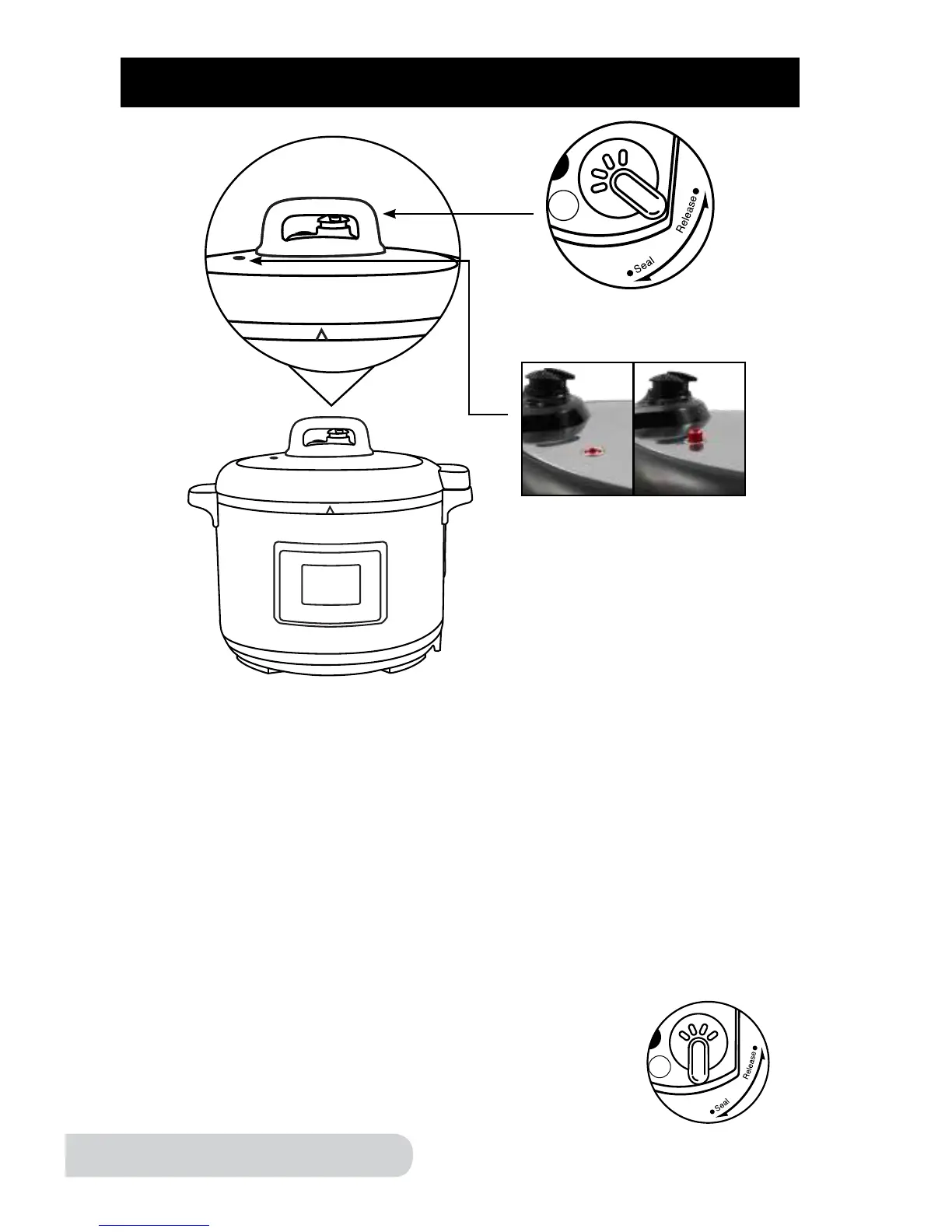
What is quick release? To quickly release the pressure, simply turn the
“Pressure Release Switch” to "Release". The switch will stay and steam will be
rapidly released. When the Floater Valve next to the Pressure Release Valve,
as well as the Pressure Indicator has dropped, indicating pressure has been
properly released, you can then safely open the pressure cooker.
What is natural release? To naturally release the pressure, simply wait for the
Floater Valve and the Pressure Indicator to drop. Doing so will allow the pressure
cooker to naturally release steam as it slowly cools. This allows you to nish the
cooking process as the pressure cooker gradually releases steam. The natural
release method can take up to 48 minutes. If any pressure remains in the
pressure cooker, simply turn the “Pressure Release Switch” to "Release"
for a quick release of any remaining pressure and follow the remaining
steps for “quick release.”
Resuming Pressure: When you are ready to cook under
pressure, turn Pressure Release Switch to “Seal” to
resume pressure. If set to “Release” pressure cannot build.
Quick Release
Pressure Indicator
NATURAL & QUICK RELEASE
When the pressure has
built up the Pressure
Indicator will pop up.


 To Next Page