15
Owner’s Manual
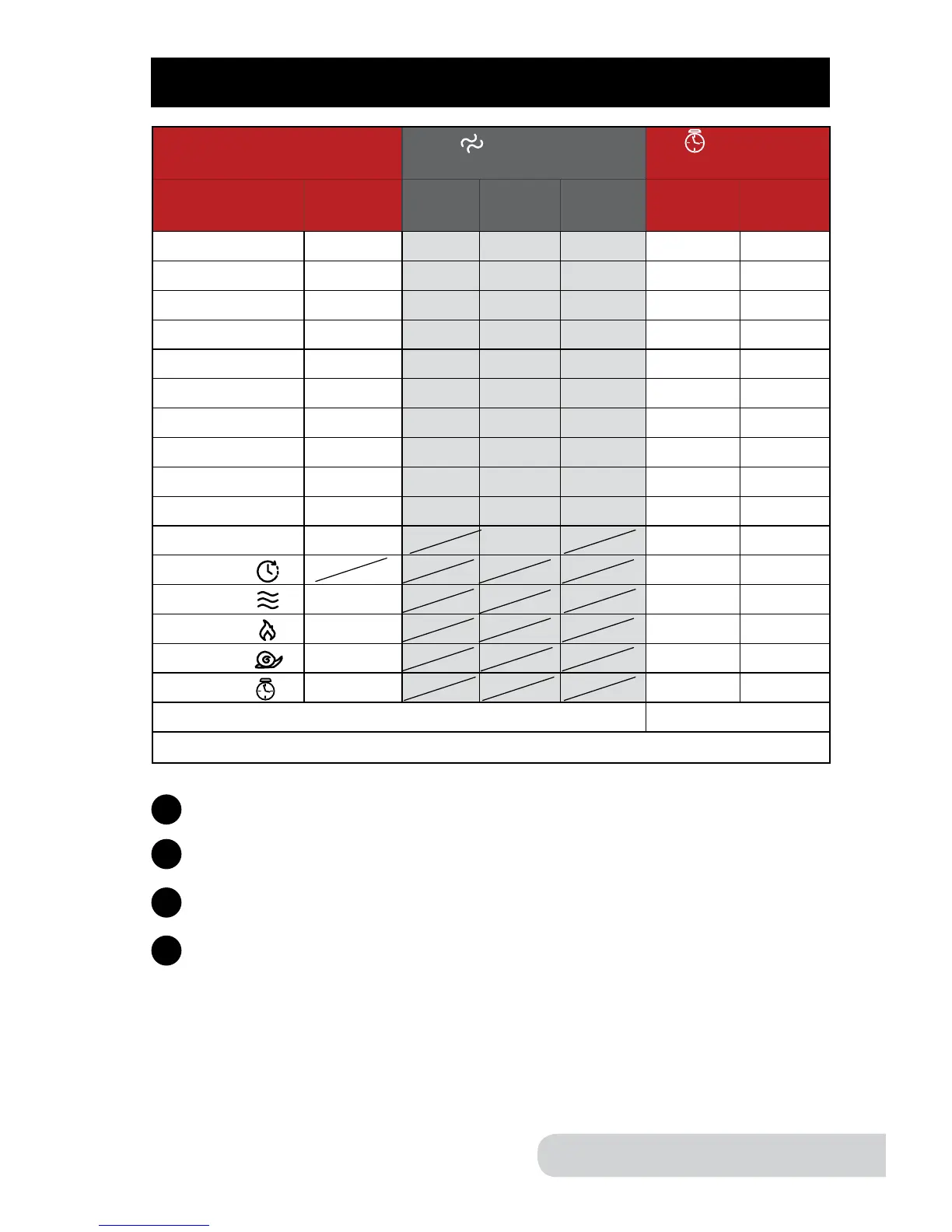
PRESETS
Default Time
Texture
(minutes)
Time
(minutes & hours)
Presets &
Functions
Hrs:Min Less Normal More Min.* Max
Rice 00:10 00:07 00:10 00:13 00:01 02:00
Multi Grain 00:30 00:27 00:30 00:32 00:01 02:00
Soup 00:20 00:15 00:20 00:25 00:01 02:00
Meat/Stew 02:00 01:30 02:00 02:30 00:01 03:00
Poultry 00:40 00:35 00:40 00:45 00:01 02:00
Beans 00:20 00:15 00:20 00:25 00:01 02:00
Fish 00:10 00:08 00:10 00:12 00:01 02:00
Steam/Veggies 00:10 00:08 00:10 00:12 00:01 02:00
Potatoes 00:10 00:08 00:10 00:12 00:01 02:00
Bake 00:40 00:30 00:40 00:50 00:01 02:00
Canning 00:20 00:20 00:01 02:00
Delay 00:05 24:00
Warm 04:00 01:00 24:00
Sear 00:10 00:01 00:30
Slow Cook 04:00 02:00 09:00
Time 00:01 00:01 01:40
*Minimum Time
*Only operable in one texture mode.
Select desired preset.
1
Adjust texture, if necessary. The default texture is “normal”. For
instructions on changing texture see page 17.
2
Close Lid and lock.
3
Begin by pressing “start/stop”.
4
For all Presets:
• Pressing the “-” or “+” buttons will switch to “manual” mode.
• Press “start/stop” twice to clear.
• The pressure cooker will clear in 30 seconds if “start/stop” is not pressed.


 To Next Page