LED
Beha
vior
Description Action Required
Solid
Gree
n
All power supply units are connected
and running normally.
N/A
Solid
Amb
er
One or both of the power supplies
are not operational or not powered
up/ the power cord is disconnected.
Make sure the power cord is plugged in
and active. If the problem resumes, refer
to Troubleshooting for further
instructions.
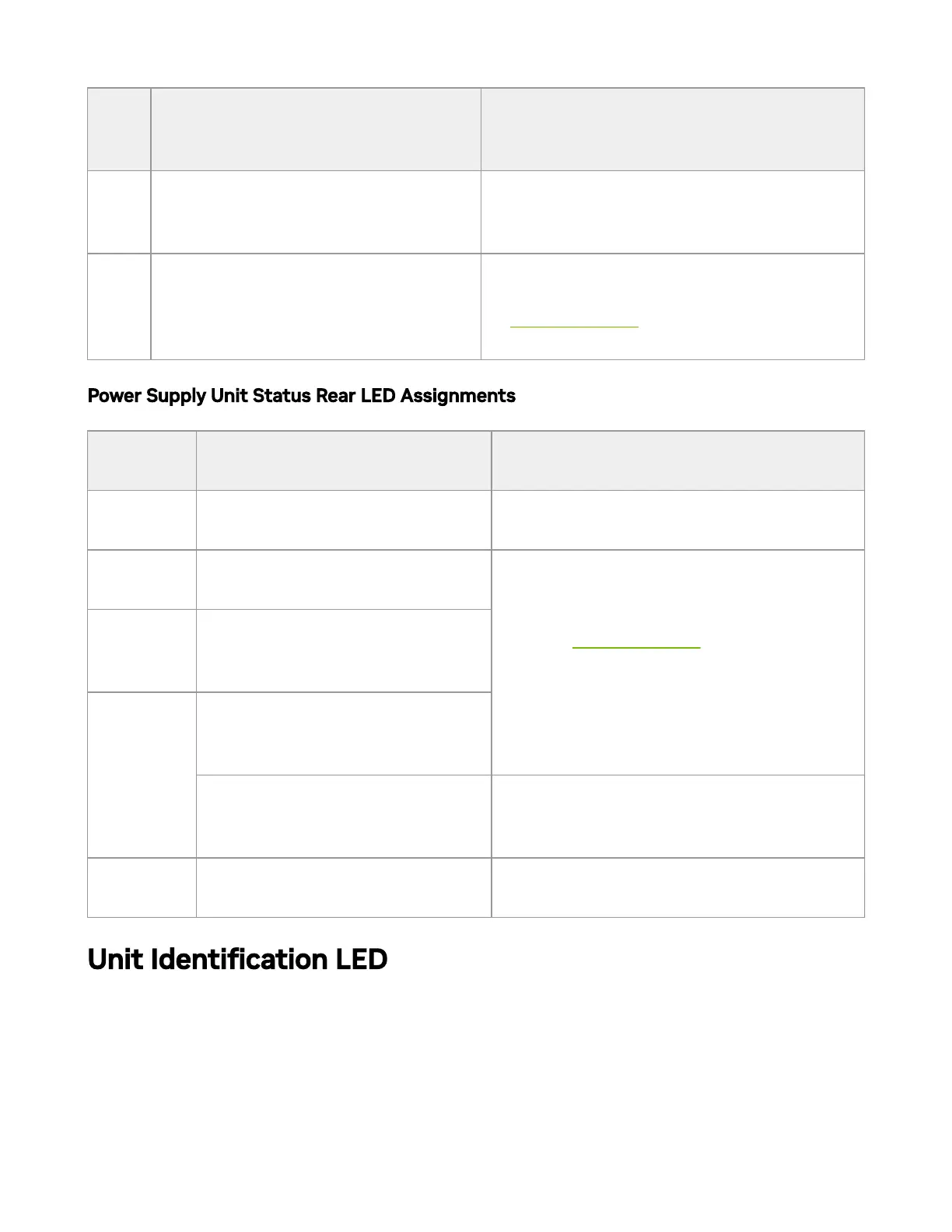
Power Supply Unit Status Rear LED Assignments
LED
Behavior
Description Action Required
Solid
Green
The PSU is running normally. N/A
Flashing
Green 1Hz
AC Present / 5VSB on (PSU is
o).
Refer to Troubleshooting. For further
assistance, call your NVIDIA
representative.
Flashing
Red/Amber
1Hz
PSU warning - events where the
PSU continues to operate.
Solid
Red/Amber
PSU failure (voltage, current,
temperature or fan related
issue).
AC cord unplugged or AC power
loss in one PSU while the other
PSU has AC input.
Plug in the AC cord for the faulty PSU.
O
No AC power to all power
supplies.
Plug in the AC cord.
Unit Identication LED
The UID LED is a debug feature, that the user can use to nd a particular system within a
cluster by turning on the UID blue LED.
To activate the UID LED on a switch system, run:



 To Next Page