Instruction Manual CyberScan pH 11 / 110
26
5
10
sec
sec
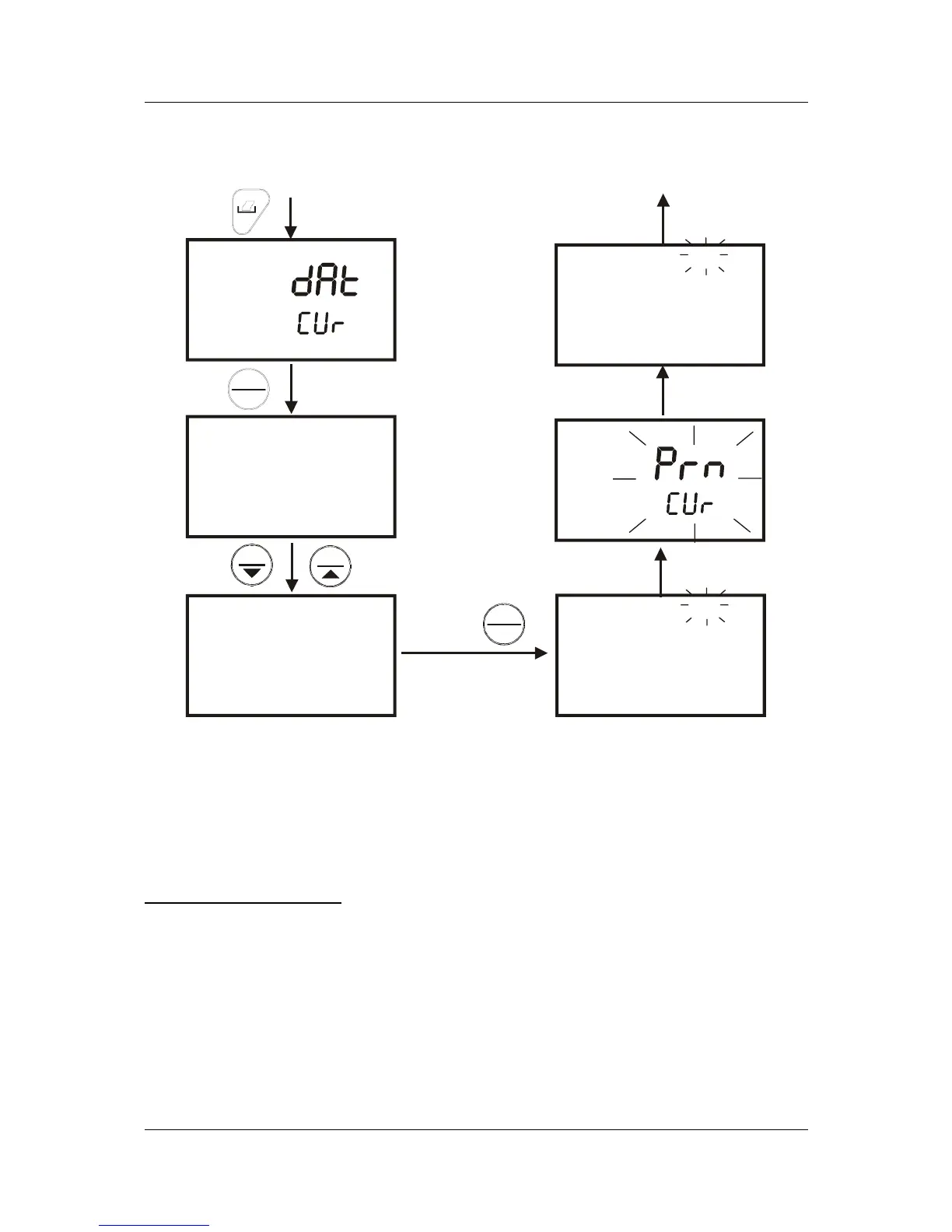
From measurement mode
"MEM" annunicator will keep
flashing during measurement
mode & data will be printed on
pre-set timed interval.
To stop, press PRINT key
ENTER
HOLD
ENTER
HOLD
MI
MR
Set timed interval for
printing, eg, every 10
seconds
pH
pH
MEAS
MEAS
MEM
MEM
READY
READY
21.0
21.0
4.75
4.75
°C
°C
Flash for 0.5 seconds
Print on set timed
interval
Figure 25: Print data on timed interval
8.2.3 Print Data from Stored Memory
The pH 110 meter can print data that is stored in the memory. You can print out all
stored data or selected data based on its memory location.
To Print All Stored Data
1. From measurement mode, press PRINT key.
2. Use MI/▲ or MR/▼ key, select “dAt – StO” option and press HOLD/ENTER
key. See Figure 23.
3. At the “SEC – 0” option, use MI/▲ or MR/▼ key to select number of seconds
to print each set of stored data. This setting gives flexibility to match the
meter to a printer’s or computer’s ability (or buffer size) to accept data and
prevent overflow.


 To Next Page