Instruction Manual CyberScan pH 11 / 110
38
9.3 P2.0: Viewing Previous Calibration Data
This mode lets you recall previous calibration data,
which helps you know when to re-calibrate your meter.
This is a “view only” mode.
From measurement mode:
1. Press the SETUP key to enter Set up mode.
2. Press the MI/▲ or MR/▼ keys to scroll through
subgroups until you view parameter P2.0.
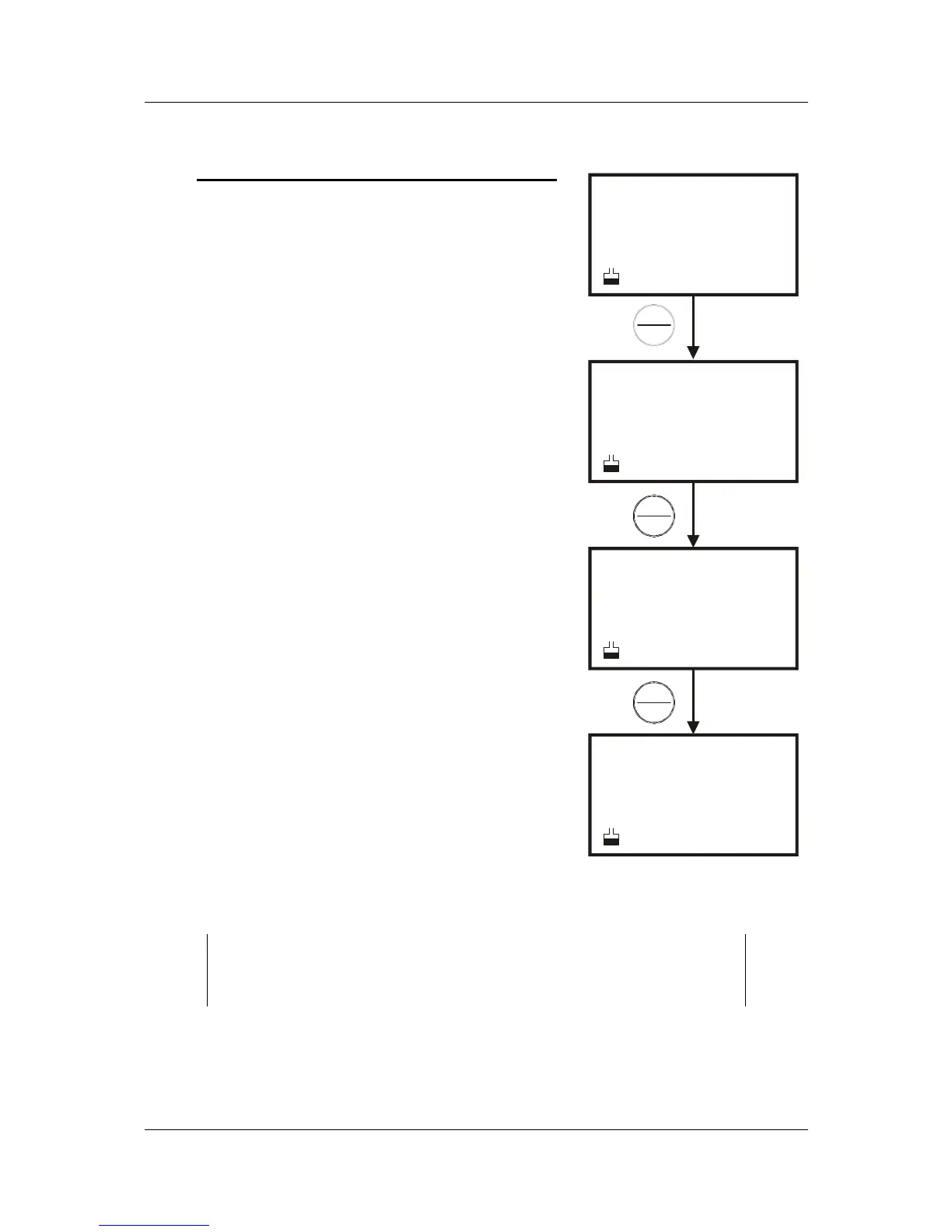
3. Press the HOLD/ENTER key repeatedly to
view previous calibration data. See Figure 34.
4. When you have scrolled through all calibration
data, you will automatically return to the
subgroup menu. Press CAL/MEAS key to
return to measurement mode.
NOTES:
If there is no previous calibration data at a particular point, the
primary display will show “ ----“.
SETUP
pH
cal
p 2.0
SETUP
pH
---
p 2.1
SETUP
SETUP
pH
pH
7.00
10.01
p 2.3
p 2.4
ENTER
HOLD
ENTER
HOLD
ENTER
HOLD
Figure 34: P2.0 - View


 To Next Page