2: Installation and Setup
12 225-00000-000-11-201604
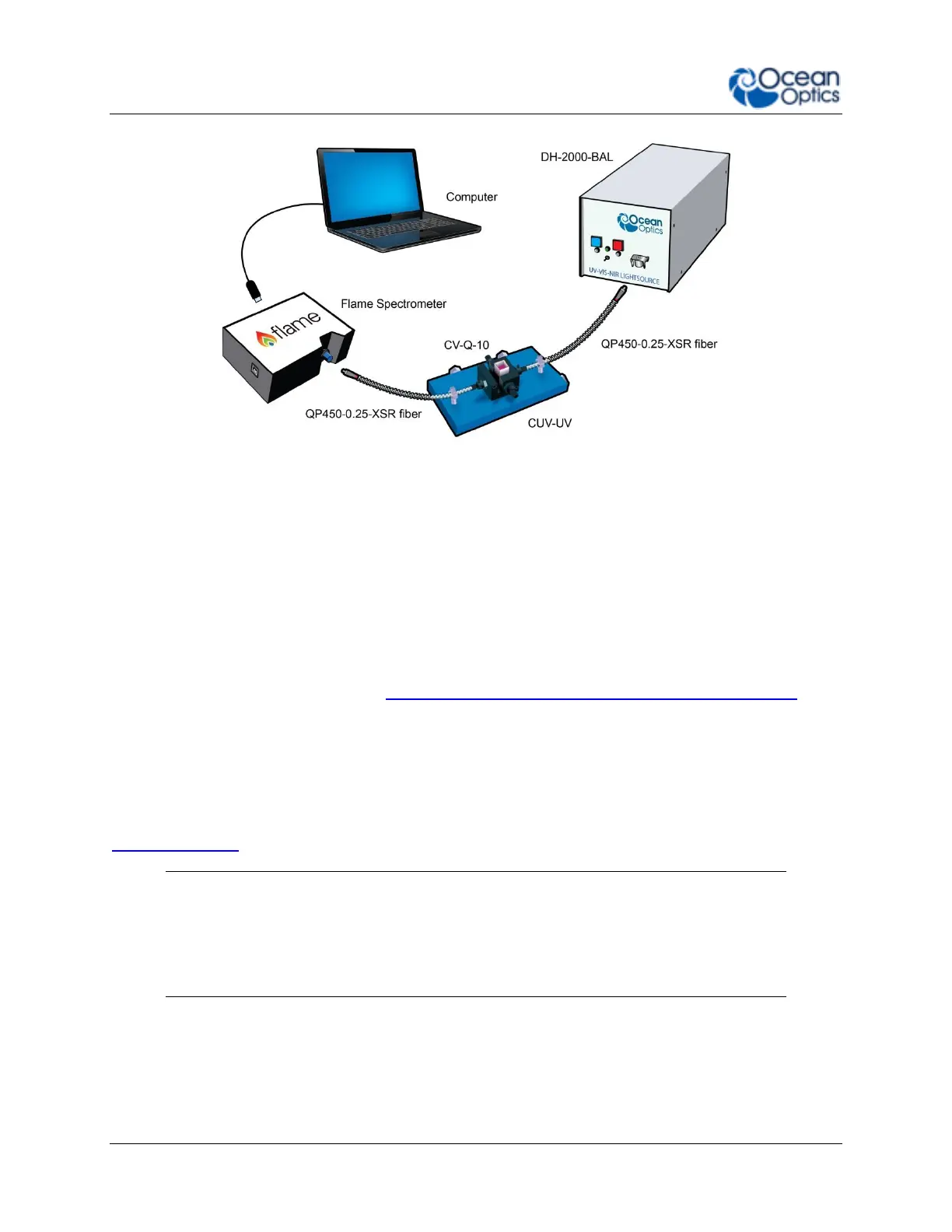
Ocean Optics Flame Fiber Optic Spectrometer Typical Set-up
Follow the steps below to connect the Flame to a computer via the USB port:
1. Install the spectrometer operating software on the destination computer.
2. Locate the USB cable (CBL-MICROTOA-USB) provided with the Flame.
3. Insert the micro connector end of the cable into the side of the Flame and the larger
end of the cable into the USB port of the computer.
4. Connect any spectroscopy accessories. To find operating instructions for Flame-
compatible products (such as light sources, sampling chambers, and probes), consult
the Ocean Optics website at http://oceanoptics.com/support/technical-documents/.
5. Attach the fiber to the fiber optic connector on the spectrometer.
If you installed the spectrometer operating software prior to connecting the Flame, the software
automatically installs the Flame drivers. If the drivers do not successfully install (or if you
connected the Flame to the computer before installing the software), consult Chapter 4:
Troubleshooting.
Note
The Flame driver appears as USB2000+ to your computer since a common driver
is used to ensure backwards and forwards compatibility. This does not affect
functionality.



 To Next Page