15
OCi OPERATING MANUAL
© 2002 Design, 2013 Doc. No. 12-5335-r02 (9/12/13)
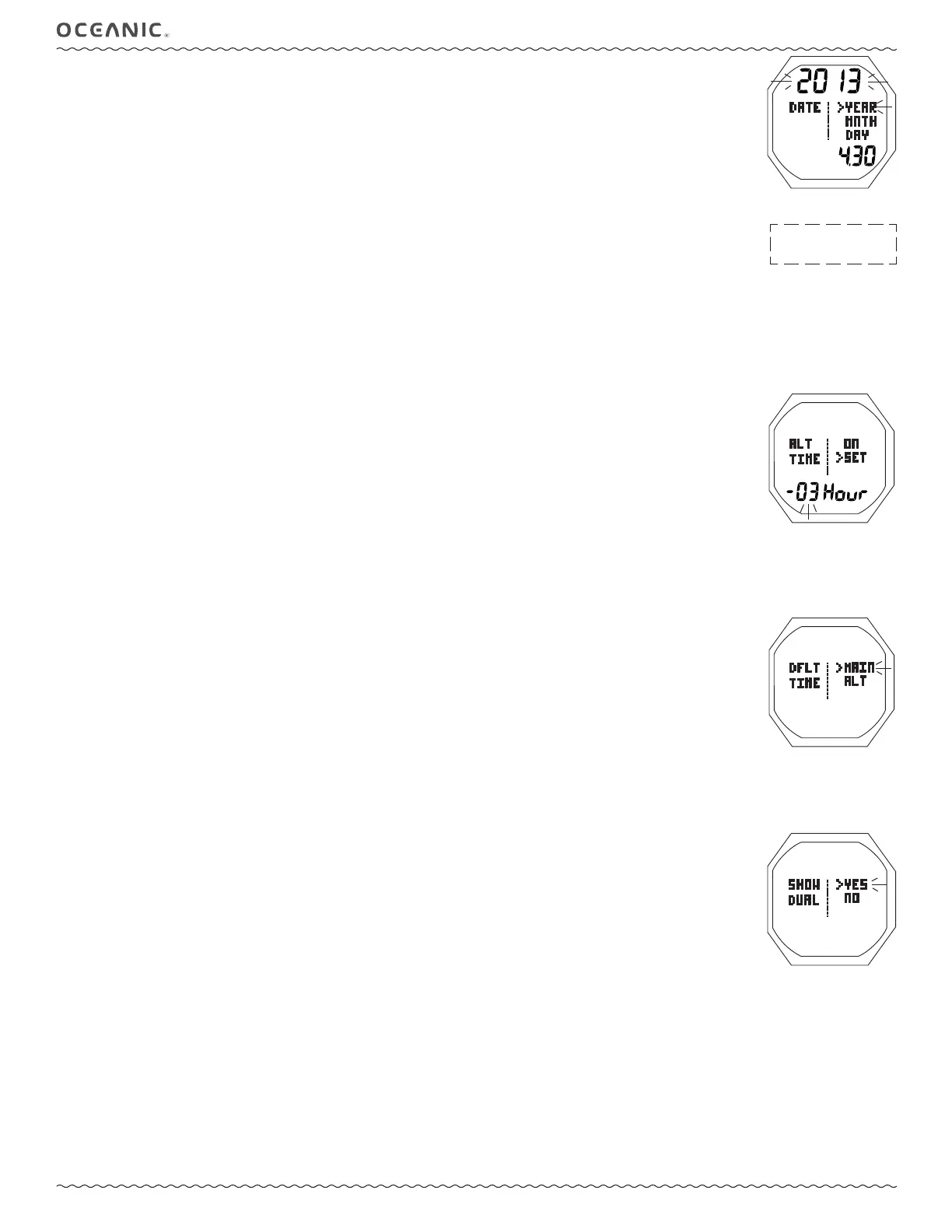
Set Date, information includes (Fig. 13):
The sequence for setting date is Year, then Month, then Day, regardless of the Date Format set.
> Graphic DATE.
> Graphics YEAR MNTH.DAY (or (DAY.MNTH).
> Date with Year digits fl ashing.
• A (hold) - to scroll upward through Year set points 8/sec from 2013 to 2056.
• A (< 2 sec) - to step upward through Year set points one at a time.
• M (< 2 sec) - to step back through Year set points one at a time.
• S (< 2 sec) - to save the Year setting and fl ash the Month digits.
• A (hold) - to scroll upward through Month set points 8/sec from 1 to 12 in increments of 1.
• A (< 2 sec) - to step upward through Month set points one at a time.
• M (< 2 sec) - to step back through Month set points one at a time.
• S (< 2 sec) - to save the Month setting and fl ash the Day digits.
• A (hold) - to scroll upward through Day set points 8/sec from 1 to 31 (max) in increments of 1.
• A (< 2 sec) - to step upward through Day set points one at a time.
• M (< 2 sec) - to step back through Day set points one at a time.
• S (< 2 sec) - to save the Date setting and revert to the Set Time Menu.
Set ALT (Alternate) Time, information includes (Fig. 14):
This feature sets an Hour based differential ranging from - 23 through 00 to + 23 (hours). Once the differential is selected/
saved, ALT (and Dual) Time values displayed are based on the Watch Default Time of Day set.
> Graphics ALT TIME solid, with ON fl ashing, and SET solid
> +/- numeric Hour differential with graphic Hour, solid.
• A or M (< 2 sec) - to toggle between ON and SET.
• S (< 2 sec) - to save the selection, and revert to the menu if ON is selected. If SET is selected/saved, the differential digits
will fl ash allowing them to be changed.
• A (hold) - to scroll upward through the set points 8/sec from - 23 to - 01 to 00 to + 01 to + 23 in increments of 1.
• A (< 2 sec) - to step upward through the set points one at a time.
• M (< 2 sec) - to step back through the set points one at a time.
• S (< 2 sec) - to save the differential setting (digits solid) and fl ash the graphic SET allowing ON to be selected/saved.
Set Default Time, information includes (Fig. 15):
This selection allows you to choose which time is to be displayed as the primary time of day, and which by diffferential.
> Graphic DFLT TIME.
> Graphics MAIN (home) and ALT (away) with the pointer icon ( > ) next to the one previously saved fl ashing.
• A or M (< 2 sec) - to toggle between MAIN and ALT.
• S (< 2 sec) - to save the settings and revert to the menu.
Show Dual Time, information includes (Fig. 16):
This selection determines whether the differential time set will be displayed on the main Watch screen with Default Time.
> Graphic SHOW DUAL.
> Graphics YES and NO with the pointer icon ( > ) next to the one previously saved fl ashing.
• A or M (< 2 sec) - to toggle between YES and NO.
• S (< 2 sec) - to save the settings and revert to the menu.
-----------------------------------------------------------------------------------------------------
Fig. 14 - SET ALT TIME
Fig. 15 - SET DEFAULT TIME
Fig. 16 - SHOW DUAL TIME
Fig. 13 - SET DATE
Day of the week is set
automatically based on the
Date set.



 To Next Page