22
OCi OPERATING MANUAL
© 2002 Design, 2013 Doc. No. 12-5335-r02 (9/12/13)
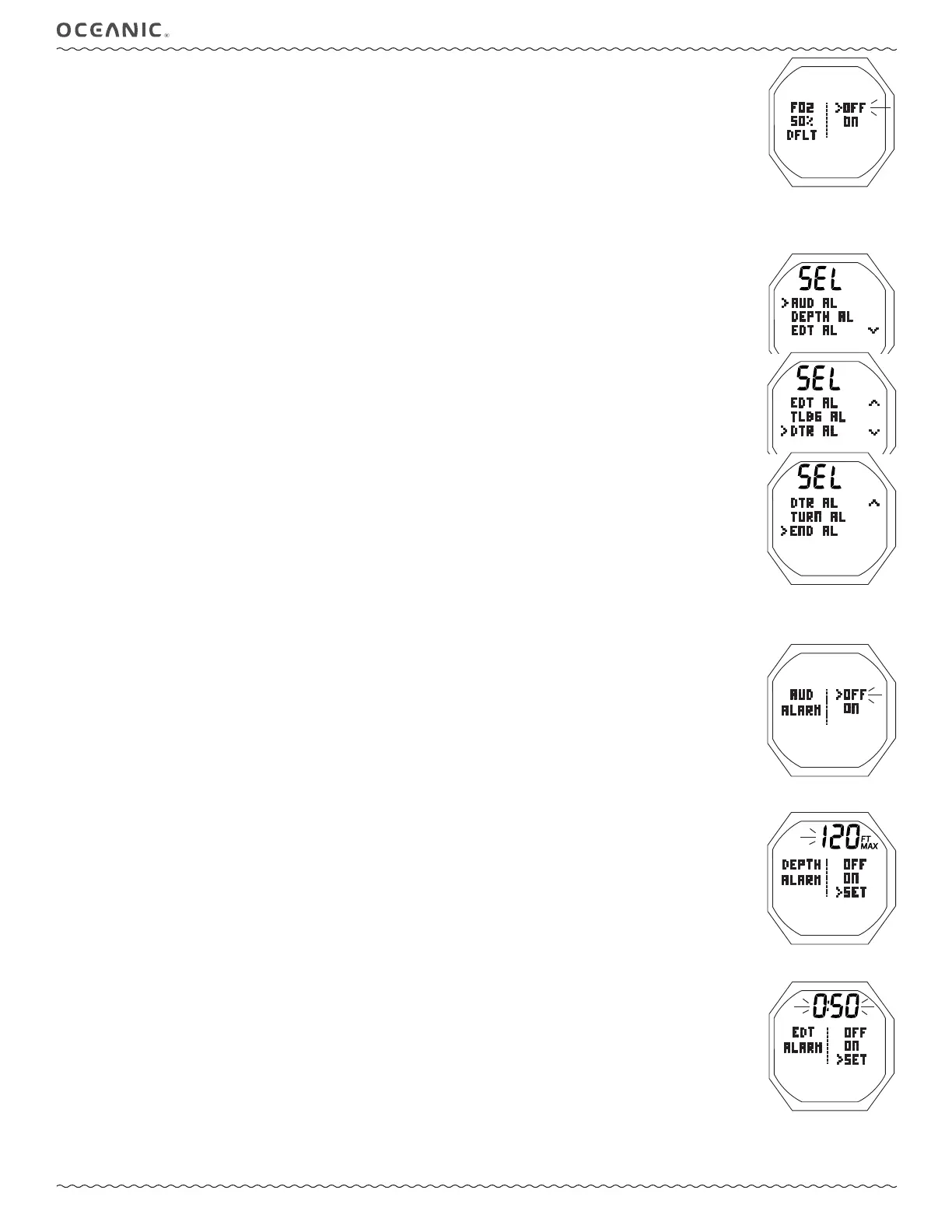
SET FO2 50% DEFAULT, information includes (Fig. 32):
> Graphics FO2 50% DFLT.
> Graphic OFF and ON, last one saved fl ashing.
• S (2 sec) - to revert to the Set Gas Menu without changing the setting.
• A or M (< 2 sec) - to toggle between OFF and ON.
• S (< 2 sec) - to save the setting and revert to the Set Gas Menu.
• M (2 sec), or 2 min of no button action, - to revert to the Surface Main.
SET ALARMS MENU - NORM & GAUG MODES (Fig. 33)
Menu selections include >> Audible >> Depth >> EDT >> TLBG* >> DTR >> Turn >> End.
*NORM Mode only.
Due to space limitations, settings are viewed by accessing individual alarm Set screens.
• S (< 2 sec) - to access the Menu while the pointer icon ( > ) is next to SET ALARMS on the NORM or GAUG Main Menu.
• A (< 2 sec) - to step down (forward) through selections.
• M (< 2 sec) - to step up (back) through selections.
• S (< 2 sec) - to access the selection indicated by the pointer icon ( > ).
SET AUDIBLE ALARM, information includes (Fig. 34):
> Graphics AUD ALARM.
> Graphics OFF and ON, last one saved fl ashing.
• S (2 sec) - to revert to the Set Alarms Menu without changing the setting.
• A or M (< 2 sec) - to toggle between OFF and ON.
• S (< 2 sec) - to save the setting and revert to the Set Alarms Menu.
• M (2 sec), or 2 min of no button action, - to revert to the Surface Main.
SET DEPTH ALARM, information includes (Fig. 35):
> Graphics DEPTH ALARM.
> Graphics OFF, ON, and SET; last saved (OFF or ON) fl ashing upon access.
> Depth value with FT (or M) and MAX icons.
• S (2 sec) - to revert to the Set Alarms Menu without changing the setting.
• A (< 2 sec) - to step forward (down screen) through the selections OFF, ON, SET.
• M (< 2 sec) - to step back (up screen) through the selections.
• S (< 2 sec) - save the selection.
>> If OFF or ON is selected, operation reverts to the Alarms Menu.
>> If SET is selected, the Depth digits will fl ash.
• A (hold) - to scroll through set points 8/sec from 30 to 330 FT (10 to 100 M) in increments of 10 FT (1 M).
• A (< 2 sec) - to step upward through set points one at a time.
• M (< 2 sec) - to step back through set points one at a time.
• S (< 2 sec) - to save the setting with the Depth digits solid and SET fl ashing allowing ON or OFF to be selected.
• M (2 sec), or 2 min of no button action, - to revert to the Surface Main.
There is a separate alarm associated with exceeding the MOD (max operating depth) which is a violation described later.
FREE modes have separate Depth Alarms, also descibed later, that are not affected by this setting.
SET EDT (ELAPSED DIVE TIME) ALARM, information includes (Fig. 36):
> Graphics EDT ALARM.
> Graphics OFF, ON, and SET; last saved (OFF or ON) fl ashing upon access.
> EDT value (hr:min), last set.
• S (2 sec) - to revert to the Set Alarms Menu without changing the setting.
• A (< 2 sec) - to step forward (down screen) through the selections OFF, ON, SET.
• M (< 2 sec) - to step back (up screen) through the selections.
• S (< 2 sec) - save the selection.
>> If OFF or ON is selected, operation reverts to the Alarms Menu.
>> If SET is selected, the Time digits will fl ash.
• A (hold) - to scroll through set points 8/sec from 0:10 to 3:00 (hr:min) in increments of 0:05 (:min).
• A (< 2 sec) - to step upward through set points one at a time.
• M (< 2 sec) - to step back through set points one at a time.
• S (< 2 sec) - to save the setting with the Time digits solid and SET fl ashing allowing ON or OFF to be selected.
• M (2 sec), or 2 min of no button action, - to revert to the Surface Main.
FREE Modes have separate EDT Alarms.
Fig. 32 - SET FO2 50%
DEFAULT
Fig. 34 - SET AUDIBLE AL
Fig. 35 - SET DEPTH AL
Fig. 36 - SET EDT AL
Fig. 33 - SET ALARMS MENU



 To Next Page