57
OCi OPERATING MANUAL
© 2002 Design, 2013 Doc. No. 12-5335-r02 (9/12/13)
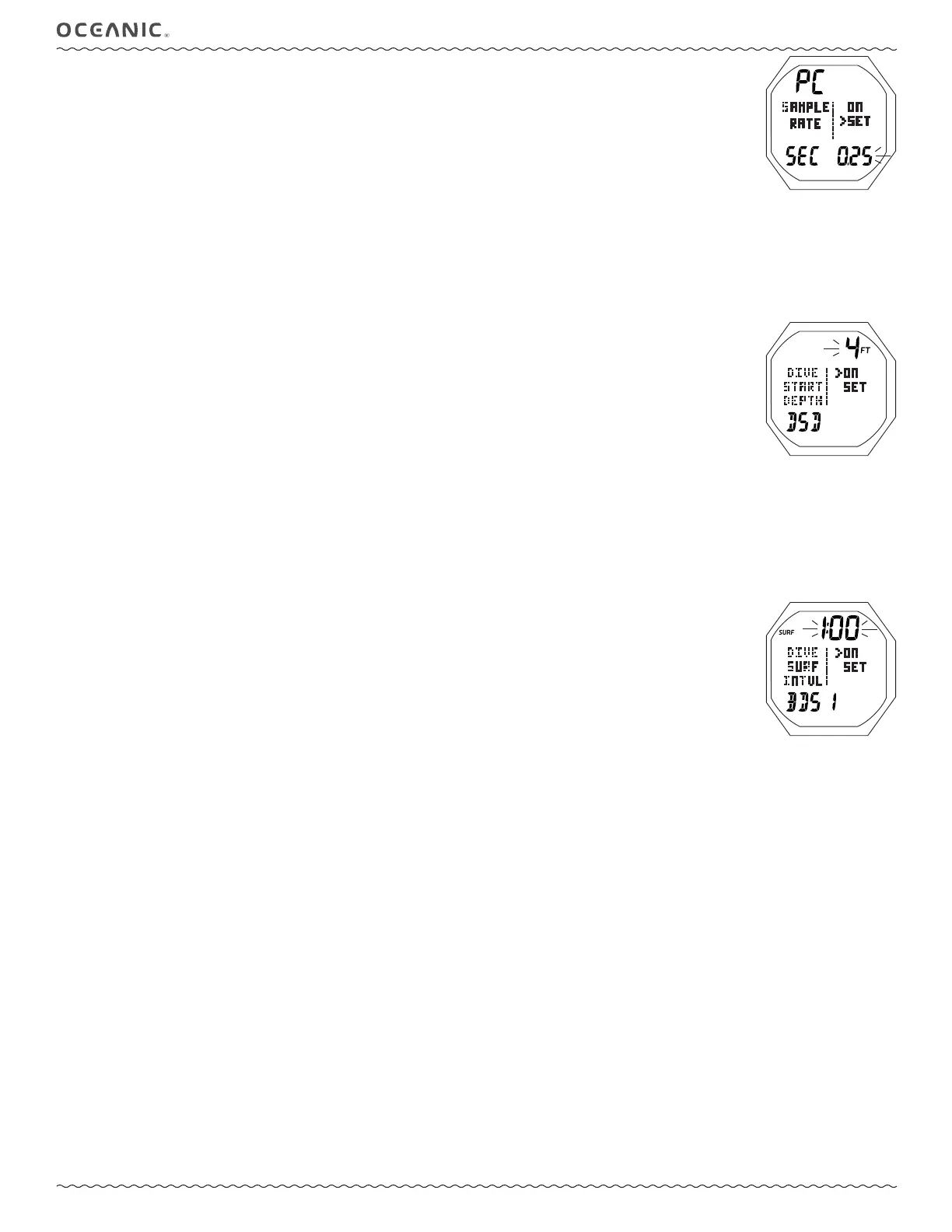
SET SAMPLING RATE (TECH FREE only), information includes (Fig. 143):
> Graphics PC SAMPLE RATE.
> Graphics ON and SET, with ON fl ashing upon access.
There is no OFF setting for this feature.
> Graphic SEC with Time (seconds).
• A or M (< 2 sec) - to toggle between ON and SET.
• S (2 sec) - to step back to the Set Utilities Menu without changing the setting.
• S (< 2 sec) - to save the selection.
> If ON is selected, operation will revert to the Set Utilities Menu.
> If SET is selected, the time digits will fl ash.
• S (2 sec) - to step back to SET fl ashing.
• A (< 2 sec) - to step through the time set points 0.25, 0.50, 1.00, 2.00 (seconds) one at a time.
• M (< 2 sec) - to step back through the set points one at a time.
• S (< 2 sec) - to save the setting and fl ash the graphic SET allowing ON to be selected/saved.
SET DSD (DIVE START DEPTH), information includes (Fig. 144):
> Depth with FT (or M) icon.
> Graphics DIVE START DEPTH and DSD.
> Graphics ON and SET, with ON fl ashing upon access.
There is no OFF setting for this feature.
• A or M (< 2 sec) - to toggle between ON and SET.
• S (2 sec) - to step back to the Set Utilities Menu.
• S (< 2 sec) - to save the selection.
> If ON is selected, operation will revert to the Set Utilities Menu.
> If SET is selected, the Depth digits will fl ash.
• S (2 sec) - to step back to SET fl ashing.
• A (< 2 sec) to step upward through the set points of 2, 4, 6 FT (0.6, 1.2, 1.8 M) one at a time.
• M (< 2 sec) to step back through set points one at a time.
• S (< 2 sec) - to save the setting and fl ash the graphic SET allowing ON to be selected/saved.
SET BDSI (BETWEEN DIVE SURFACE INTERVAL), information includes (Fig. 145):
> Graphics DIVE SURF INTVL and BDSI.
> Time (min:sec) with SURF icon.
> Graphics ON and SET; with ON fl ashing upon access.
• A or M (< 2 sec) - to toggle between ON and SET.
• S (2 sec) - to step back to the Set Utilities Menu.
• S (< 2 sec) - to save the selection.
> If ON is selected, operation will revert to the Set Utilities Menu.
> If SET is selected, the Time digits will fl ash.
• S (2 sec) - to step back to SET fl ashing.
• A (hold) to scroll upward through the set points 8/sec from 0:01 to 1:00 (min:sec) in increments of :01 (1 second).
• A (< 2 sec) to step upward through the set points one at a time.
• M (< 2 sec) to step back through set points one at a time.
• S (< 2 sec) - to save the setting and fl ash the graphic SET allowing ON to be selected/saved.
-----------------------------------------------------------------------------------------------------------
SELECT OP (OPERATING) MODE, same as NORM/GAUG - refer to page 26.
OCi ID (SERIAL NUMBER), same as NORM/GAUG - refer to page 27.
---------------------------------------------------------------------------------------------------------
---------------------------------------------------------------------------------------------------------
Upon descent to the DSD (Dive Start Depth) set for 5 seconds, operation will enter Dive Mode.
Fig. 144 - SET DSD
Fig. 145 - SET BDSI
Fig. 143 - SET SAMPLING
(TECH FREE only)



 To Next Page