35
OCi OPERATING MANUAL
© 2002 Design, 2013 Doc. No. 12-5335-r02 (9/12/13)
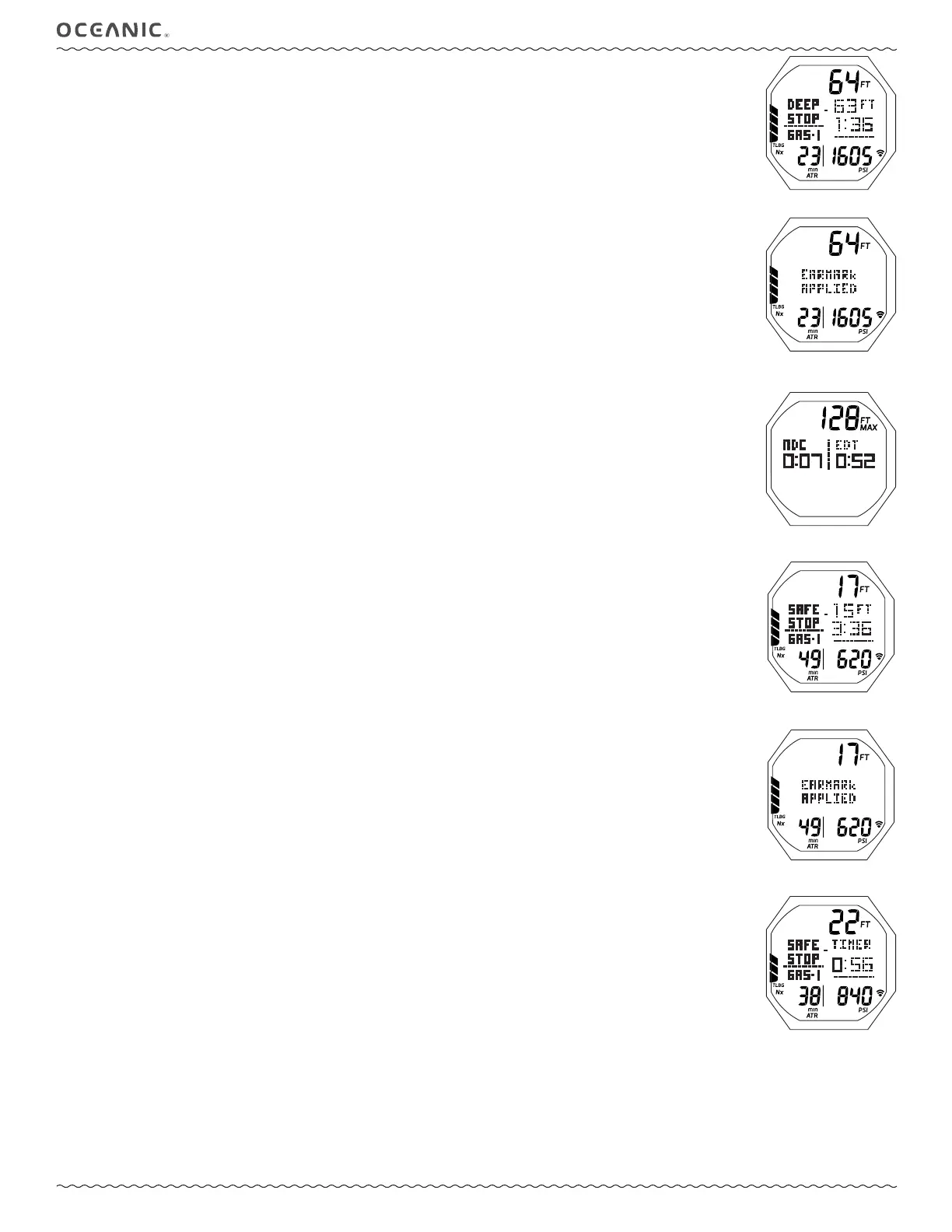
DEEP STOP MAIN, information includes (Fig. 76A) -
> Current Depth with FT (or M) icon.
> Graphics DEEP STOP.
> Stop Depth with graphic FT (or M)
> Stop Time (min:sec), counting down from 2:00 to 0:00.
> Graphic GAS - 1 (or 2, 3, 4), the one currently in use.
> NX icon, if any Gas is set for Nitrox.
> Air Time Remaining (up to 99 min) with min and ATR icons, blank if no TMT in use, 99 when => 99.
> Tank Pressure, for the TMT currently in use, with PSI (or BAR) and Link icons; or graphic SPG.
> TLBG with icon.
> VARI with icon, if ascending.
• A (< 2 sec) - to access ALTs.
• M (< 2 sec) - to apply a snapshot Earmark to the PCI data recorded at that time. The graphics EARMARK APPLIED will be
displayed in place of Stop Depth/Time for 3 seconds (Fig. 76B).
• M (2 sec) - to access the Gas/TMT Switch Menu.
• S (< 2 sec) - to acknowledge alarms.
• S (2 sec) - to access the Compass Operating Main.
• L (< 2 sec) - to toggle the Backlight On/Off.
• L (2 sec), while the Backlight is On - to reset the timer and keep it On for the duration time set.
DEEP STOP ALT 1, information includes (Fig. 77) -
> Max Depth with FT (or M) and MAX icons.
> DTR (hr:min) with graphic NDC (or OTR), whichever is less at the time.
> Elapsed Dive Time (hr:min) with graphic EDT.
• A (< 2 sec) - to access ALT 2.
• M (< 2 sec) - to step back to the Main.
• Revert to the Main after 10 seconds, if A or M is not pressed.
• L (< 2 sec) - to toggle the Backlight On/Off.
• L (2 sec), while the Backlight is On - to reset the timer and keep it On for the duration time set.
DEEP STOP ALT 2 & 3 are similar to NO DECO ALT 2 & 3.
SAFETY STOP MAIN (if Stop Depth/Time is set On), information includes (Fig. 78A) -
> Current Depth with FT (or M) icon.
> Graphics SAFE STOP.
> Stop Depth with FT (or M).
> Stop Time (min:sec) set, counting down to 0:00.
> Graphic GAS - 1 (or 2, 3, 4), the one currently in use.
> NX icon, if any Gas is set for Nitrox.
> Air Time Remaining (up to 99 min) with min and ATR icons.
> Tank Pressure, for the TMT currently in use, with PSI (or BAR) and Link icons; or graphic SPG.
> TLBG with icon.
> VARI with icon, if ascending.
• A (< 2 sec) - to access ALTs.
• M (< 2 sec) - to apply a snapshot Earmark to the PCI data recorded at that time. The graphics EARMARK APPLIED will be
displayed in place of Stop Depth/Time for 3 seconds (Fig. 78B).
• M (2 sec) - to access the Gas/TMT Switch Menu.
• S (< 2 sec) - to acknowledge alarms.
• S (2 sec) - to access the Compass Operating Main.
• L (< 2 sec) - to toggle the Backlight On/Off.
• L (2 sec), while the Backlight is On - to reset the timer and keep it On for the duration time set.
SAFETY STOP MAIN (if set for Timer use), information includes (Fig. 79) -
> Current Depth with FT (or M) icon.
> Graphics SAFE STOP.
> Stop Depth with FT (or M).
> Graphic TIMER with Run Time counting up to 9:59 max (min:sec) then - : - - .
> Graphic GAS - 1 (or 2, 3, 4), the one currently in use.
> NX icon, if any Gas is set for Nitrox.
> Air Time Remaining (up to 99 min) with min and ATR icons.
> Tank Pressure, for the TMT currently in use, with PSI (or BAR) and Link icons; or graphic SPG.
> TLBG with icon.
> VARI with icon, if ascending.
• A (< 2 sec) - to access ALTs.
• A (2 sec) - to reset the Timer to 0:00.
• M (< 2 sec) - to apply a snapshot Earmark to the PCI data recorded at that time. The graphics EARMARK APPLIED will be
displayed in place of the Stop Timer for 3 seconds (similar to Fig. 78B).
• M (2 sec) - to access the Gas/TMT Switch Menu.
• S (< 2 sec) - to acknowledge alarms.
• S (< 2 sec) - to start/stop the Timer, except when S is pressed to acknowledge alarms.
• S (2 sec) - to access the Compass Operating Main.
Fig. 78A - SAFETY STOP MAIN
(Stop Depth/Time set)
Fig. 79 - SAFETY STOP MAIN
(set for Timer use)
Fig. 76A - DEEP STOP MAIN
Fig. 77 - DEEP STOP ALT 1
Fig. 76B - DEEP STOP MAIN
(shown for 3 seconds)
Fig. 78B - SAFETY STOP MAIN
(shown for 3 seconds)



 To Next Page