18
OCi OPERATING MANUAL
© 2002 Design, 2013 Doc. No. 12-5335-r02 (9/12/13)
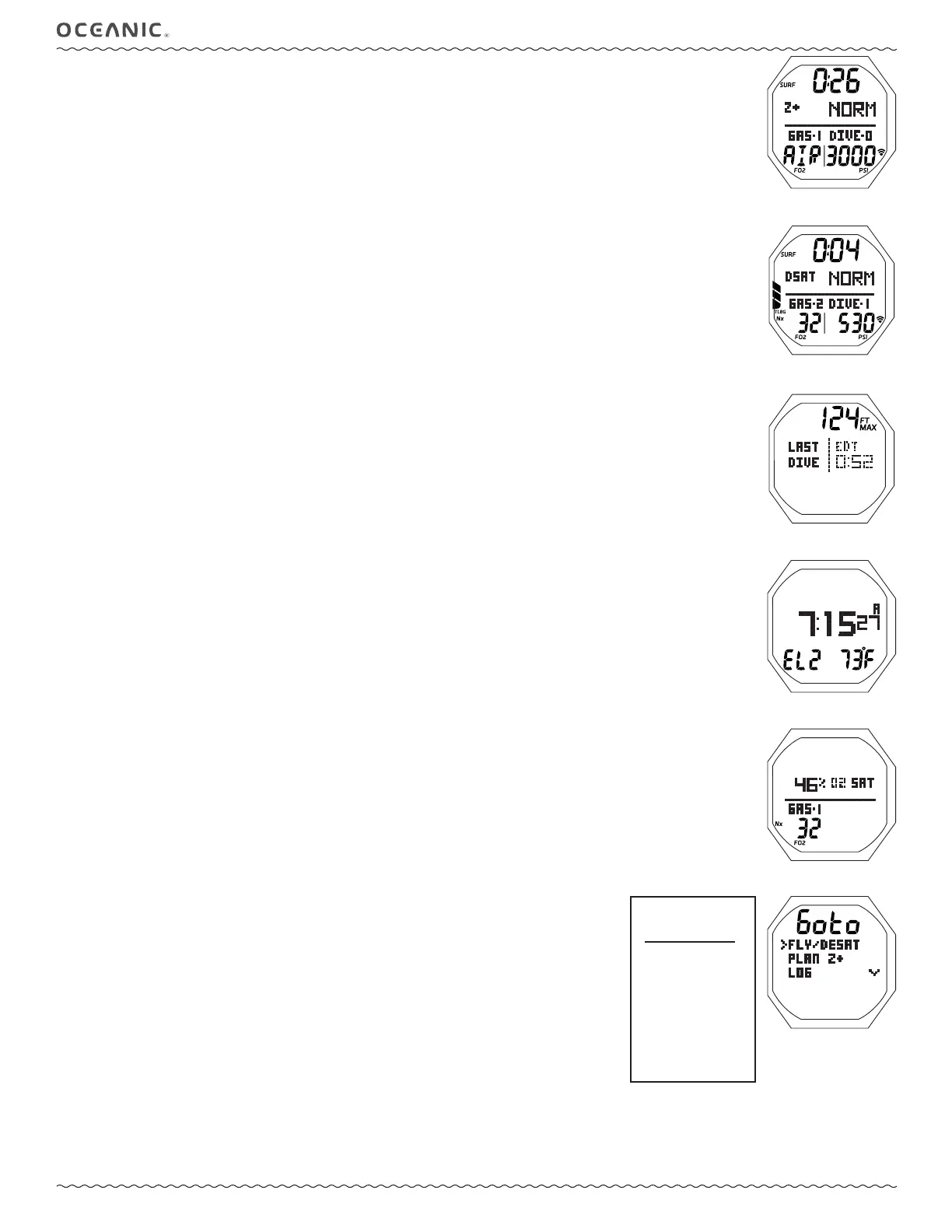
NORM SURF MAIN, information includes (Fig. 17A/B):
> Surface Interval Time (hr:min) with SURF icon; if no dive yet, this is time since access to NORM.
> Graphic Z+ or DSAT, the Algorithm selected.
> Graphic NORM.
> Graphic GAS-1* and the FO2 set for that gas with FO2 icon.
> Graphic DIVE and number of the dive just completed during that operating period, up to 24 (0 if no dive made yet).
> Nx icon, if any Gas is set for Nitrox.
> Pressure* with PSI (or BAR) and Link icons.
> TLBG with icon, if any after a NORM or FREE dive.
> Battery icon, if voltage is low.
*Gas #1 and Tank #1 Pressure are the defaults before dives & 10 minutes after surfacing.
During the fi rst 10 minutes after surfacing, the Gas and Pressure represent the Gas & Tank in use.
• A (< 2 sec) - to access ALT 1.
• M (< 2 sec) - to access NORM Menu,
except during 10 minutes after surfacing from dives
.
• M (2 sec) - to access Watch Main.
• S (2 sec) - to access Compass Mode.
• L (< 2 sec) - to toggle the Backlight On/Off.
Will be On for the duration time set.
• L (2 sec), while the Backlight is On, - to reset the timer to keep it On for the full duration time set.
NORM SURF ALT 1 (Last), information includes (Fig. 18):
> Graphic LAST DIVE, indicating that data is from the dive previously conducted while in NORM mode.
> Max Depth with FT (or M) and MAX icons, 2 dashes ( - - ) if no previous dive.
> Elapsed Dive Time (hr:min) with graphic EDT, 3 dashes ( - : - - ) if no previous dive.
• A (< 2 sec) - to access ALT 2.
• 10 sec - revert to Main, if A is not pressed.
• L - to activate Backlight.
NORM SURF ALT 2, information includes (Fig. 19):
> Time of Day (hr:min_sec) with A (or P).
> Altitude graphic, if EL2 (to EL7), blank if Sea level.
> Temperature with ° icon and graphic F (or C).
• A (< 2 sec) - to access ALT 3 (if set for Nitrox), or revert to Main (if set for Air).
• 10 sec - revert to Main, if A is not pressed.
• L - to operate the Backlight.
NORM SURF ALT 3, information includes (Fig. 20):
> Current % O2 SAT (saturation) with graphic.
> Graphic GAS-1 with FO2 setting and icon.
> Nx icon.
> O2BG with O2 icon, if any after a dive.
• 10 sec or A (< 2 sec) - to revert to Main.
• L - to operate the Backlight.
---------------------------------------------------------------------------------------------------------------------------------------------------------------
NORM MAIN MENU (Fig. 21)
Button operations:
• M (< 2 sec) - to access the Menu, while viewing the Surface Main.
• A (< 2 sec) - to step down (forward) through selections.
• M (< 2 sec) - to step up (backward) through selections.
• S (< 2 sec) - to access a selection indicated by the pointer icon ( > ).
• S (2 sec), while viewing the menu - to revert to Surface Main.
• M (2 sec) any time - to revert to Surface Main.
• 2 min (no button action) - will revert to Surface Main.
Fig. 17B - NORM SURF MAIN
(4 minutes after dive 1)
Fig. 17A - NORM SURF MAIN
(no dive yet)
Fig. 19 - NORM SURF ALT 2
Fig. 18 - NORM SURF ALT 1
(Last dive's data)
Fig. 20 - NORM SURF ALT 3
NORM
MAIN MENU
>
FLY/DESAT
PLAN
LOG
SET GAS
SET ALARMS
SET UTILITIES
OP MODE
HISTORY
OCi ID
BATT/TMT
Fig. 21 - NORM MAIN MENU
(sample screen, 1st 3 items)



 To Next Page