63
OCi OPERATING MANUAL
© 2002 Design, 2013 Doc. No. 12-5335-r02 (9/12/13)
OVERVIEW
> S (2 sec) - to access the Compass OP (operating) Main from the Watch, Surface, or Dive Main.
> S (2 sec) or no button action (2 min*) - to revert to the Watch, Surface, or Dive Main.
*During the fi nal 15 seconds, the remaining On time is displayed. If a button is pressed during that time, the 2 minute On
time will reset allowing operation to continue in Compass Mode for another full 2 minutes.
> The Compass OP Mode selected (North, Reference) remains until changed.
> Reference OP Mode is used to set a course, also to Reverse the course set by 180°
> Numeric values are displayed as 3 digits (000 to 360°), have a resolution of 001°, and an accuracy of +/- 005°.
> Operation will be normal and display of values will be within specifi ed tolerances up to a 20° tilt.
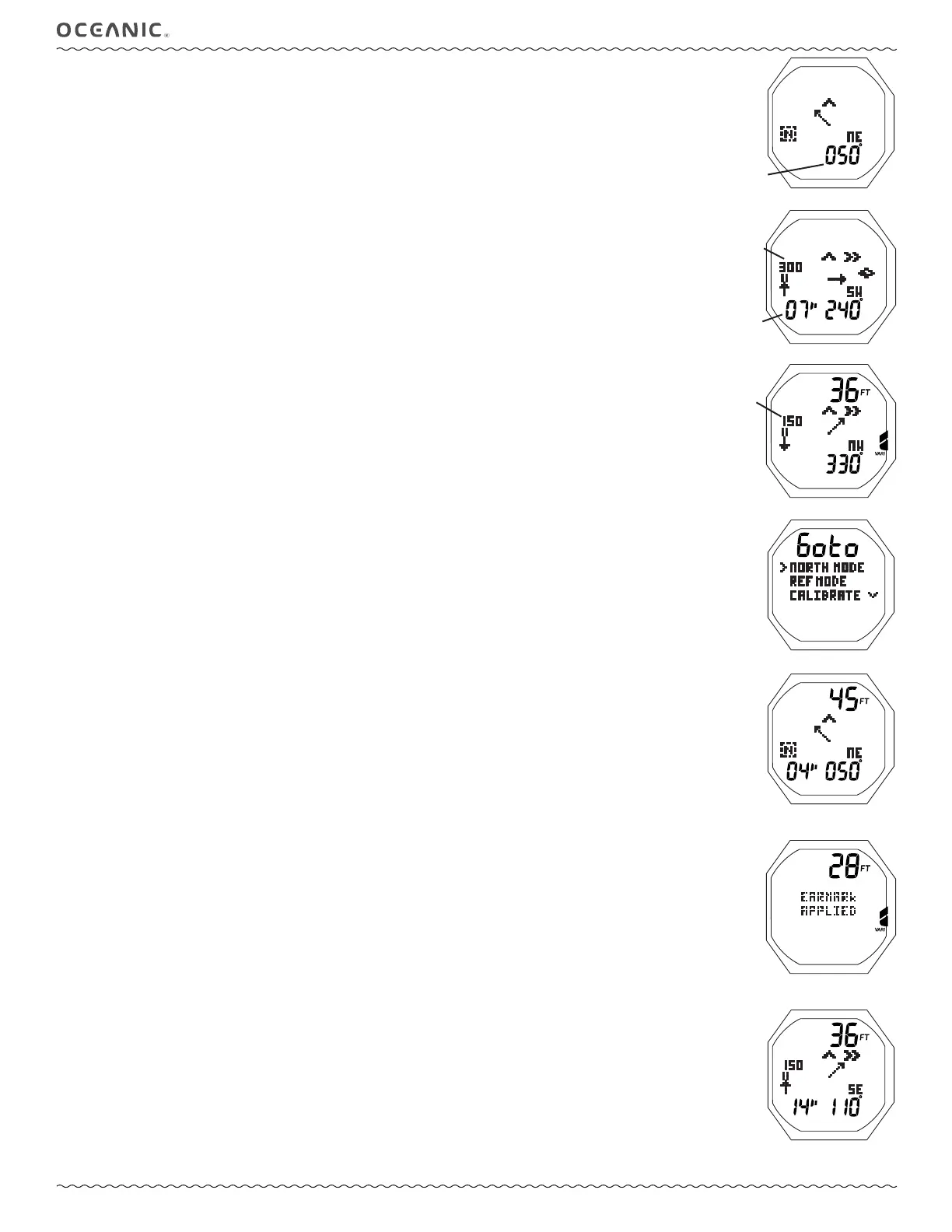
Upon accessing the Compass, the OP (operating) Main of the last mode selected will be displayed >> North Mode (Fig. 158),
Reference Mode (Fig. 159), or Reverse Reference Mode (Fig. 160).
To access the Compass Menu, when viewing the OP Main while on the surface, press M (< 2 sec).
COMPASS MENU, information includes (Fig. 161):
> Graphic Goto, with selections >>
> NORTH MODE - to select as the Operating Mode with no set heading.
> REF MODE - to select as the Operating Mode allowing a heading to be set.
> CALIBRATE - to access a Calibration start screen.
> SET DECLIN - to access to Declination Set Menu.
• A (< 2 sec) - to step forward (down) through selections.
• M (< 2 sec) - to step back (up) through selections
• S (< 2 sec) - to select the item indicated by the pointer ( > ) icon.
If NORTH or REF MODE is selected, that mode will be saved and its OP Main will be displayed.
• S (2 sec), while viewing the Menu - to revert to the Compass OP Main.
• M (2 sec), at any time, except while in Calibration - to revert to the Compass OP Main.
• No button action (2 min) - revert to Watch, Surface, or Dive Main.
• L (< 2 sec) - to toggle the Backlight On/Off.
• L (2 sec), while the Backlight is On - to reset the timer and keep it On for the duration time set.
NORTH OP MAIN, information includes (Fig. 162A):
> Current Depth with FT (or M) icon, blank on surface.
> North Mode icon (letter N in box).
> Static Arrow icon (at 12 o'clock), diver direction of travel.
> Dynamic (moving) Arrow, relative direction of magnetic North.
> Tilt icon*, when the Compass is at an angle => 20° off level.
> Numeric heading (diver's current direction), 001 to 360°, with position graphic (N, E, SE, etc.). *
Blank when the Tilt icon
is displayed
.
> On time remaining, counting down, if 15" to 01" ( " means seconds).
Blank when > 15 seconds.
• M (< 2 sec), while on the surface - to access the Compass Main Menu.
• M (< 2 sec), during dives - to apply a snapshot Earmark to the PCI data recorded at that time. The graphics EARMARK
APPLIED will be displayed in place of Compas information for 3 seconds (Fig. 162B).
• S (2 sec) or 2 minutes of no button action - will revert to the Watch, Surface, or Dive Main.
• L (< 2 sec) - to toggle the Backlight On/Off.
• L (2 sec), while the Backlight is On - to reset the timer and keep it On for the duration time set.
REFERENCE OP MAIN, information includes (Fig. 163):
> Current Depth with FT (or M) icon, during dive mode, 00 during fi rst 10 min on surface, blank on surface > 10 min.
> Reference Mode icon (2 bars with arrow) with numeric Reference heading (course) set above it.
> Static Arrow icon (at 12 o'clock), diver direction of travel.
> Turn Arrow icon (left or right) fl ashing during any time the diver deviates => 10° off the heading set.
> Dynamic (moving) Arrow, tracking the Reference direction set.
> Tilt icon*, when the Compass is at an angle => 20° off level.
> Numeric heading (diver's current direction), 001 to 360°, with position graphic (N, E, SE, etc.). *
Blank when the Tilt icon is
displayed.
> On time remaining, counting down, if 15" to 1".
Blank when > 15 seconds.
• M (< 2 sec), while on the surface - to access the Compass Main Menu.
• M (< 2 sec), during dives - to apply a snapshot Earmark to the PCI data recorded at that time. The graphics EARMARK
APPLIED will be displayed in place of Compas information for 3 seconds (similar to Fig. 162B).
• A (< 2 sec) - to access the Reference Menu, surface or dive.
• S (2 sec) or 2 minutes of no button action - will revert to the Watch, Surface, or Dive Main.
• L (< 2 sec) - to toggle the Backlight On/Off.
• L (2 sec), while the Backlight is On - to reset the timer and keep it On for the duration time set.
Fig. 158 - NORTH OP MODE
Fig. 160 - REVERSE REF
Fig. 159 - REF OP MODE
Fig. 162A - NORTH OP MAIN
(at 050°)
Fig. 161 - COMPASS MENU
Fig. 163 - REF OP MAIN
(at 110°, turn right to 150°)
actual
heading
course
set
180° opposite
course set
On time
remaining
Fig. 162B - NORTH OP MAIN
(shown for 3 seconds)



 To Next Page