52
OCi OPERATING MANUAL
© 2002 Design, 2013 Doc. No. 12-5335-r02 (9/12/13)
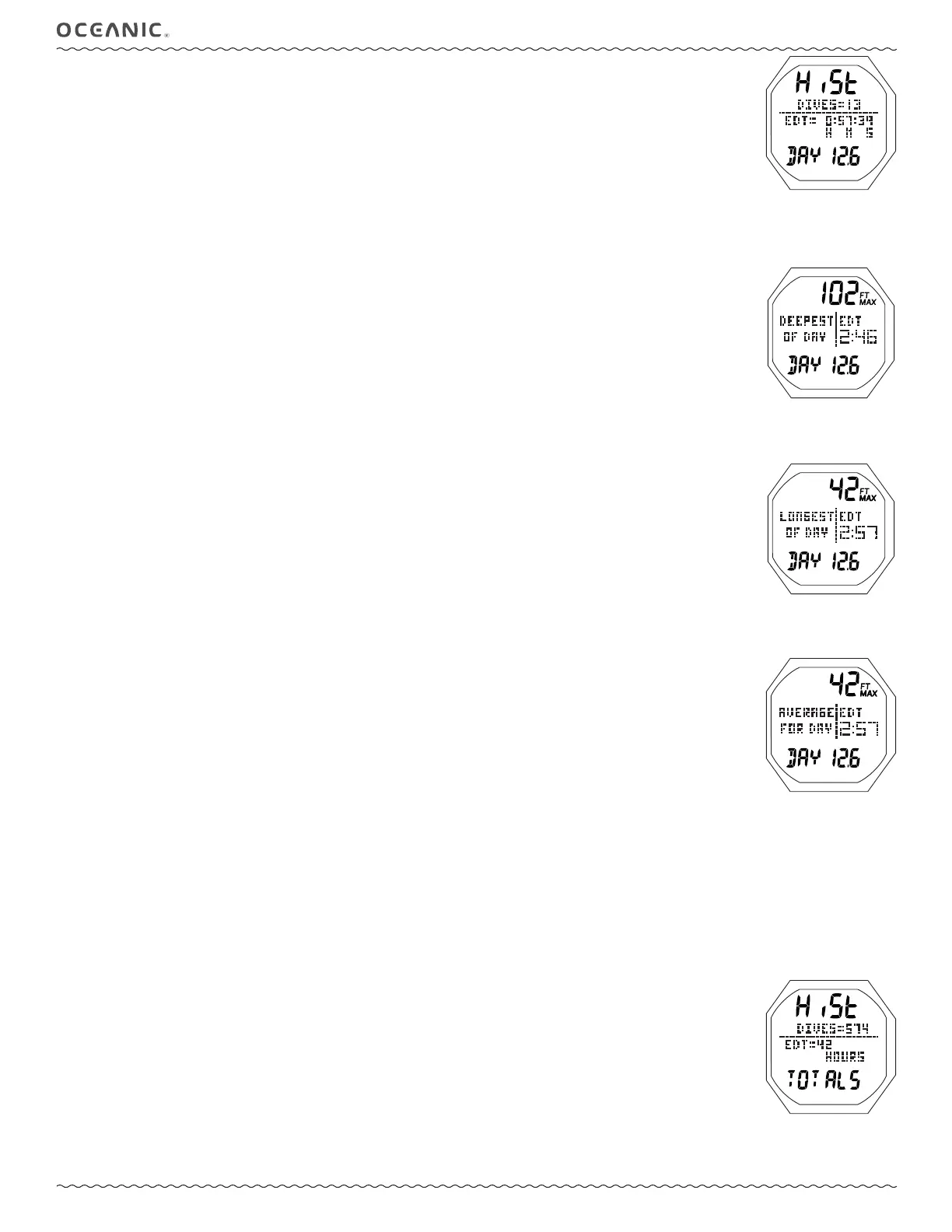
DAY HISTORY DATA 1, information is to include (Fig. 123):
> Graphic HiSt.
> Graphic DIVES = with the total number of dives conducted during that calendar day, or session of the day if reset.
> Graphic EDT = with the total accumulated Elapsed Dive Time for that day starting at 0:00:01 up to 23:59:59 (hr:min:sec)
with graphics H M S (meaning Hours, Minutes, Seconds).
> Graphic DAY and Date (Month.Day or Day.Month) identifying that day.
• S (< 2 sec) - to access the Day History Data 2 screen.
• S (2 sec) - to exit and revert to the Log/History Menu.
• M (2 sec), or 2 min of no button action, - to exit and revert to the Surface Main.
• L (< 2 sec) - to toggle the Backlight On/Off.
Will be On for the duration time set.
• L (2 sec), while the Backlight is On, - to reset the timer to keep it On for the full duration time set.
DAY HISTORY DATA 2, information is to include (Fig. 124):
> Max Depth achieved that day with FT (or M) and MAX icons.
> Graphics DEEPEST OF DAY, indicating that the information displayed is for the deepest depth recorded that day and the
Dive Time displayed is associated with that Max Depth.
> Elapsed Dive Time (min:sec) for that dive, with graphic EDT icon.
> Graphic DAY and Date (Month.Day or Day.Month) of the dive.
• S (< 2 sec) - to access the Day History Data 3 screen.
• S (2 sec) - to exit and revert to the Log/History Menu.
• M (2 sec), or 2 min of no button action, - to exit and revert to the Surface Main.
• L (< 2 sec) - to toggle the Backlight On/Off.
Will be On for the duration time set.
• L (2 sec), while the Backlight is On, - to reset the timer to keep it On for the full duration time set.
DAY HISTORY DATA 3, information is to include (Fig. 125):
> Max Depth for that dive with FT (or M) and MAX icons.
> Graphics LONGEST OF DAY, indicating that the information displayed is for the longest Dive Time recorded that day and
the Max Depth displayed is associated with that Dive Time.
> Elapsed Dive Time (min:sec) for that dive, with graphic EDT.
> Graphic DAY and Date (Month.Day or Day.Month) of the dive.
• S (< 2 sec) - to access the Day History Data 4 screen.
• S (2 sec) - to exit and revert to the Log/History Menu.
• M (2 sec), or 2 min of no button action, - to exit and revert to the Surface Main.
• L (< 2 sec) - to toggle the Backlight On/Off.
Will be On for the duration time set.
• L (2 sec), while the Backlight is On, - to reset the timer to keep it On for the full duration time set.
DAY HISTORY DATA 4, information is to include (Fig. 126):
> Max Depth for that dive with FT (or M) and MAX icons.
> Graphics AVERAGE FOR DAY, indicating that the information displayed represents Averages for all dives conducted during
that calendar day, or session of the day if reset.
> Elapsed Dive Time (min:sec) for that dive, with graphic EDT.
> Graphic DAY and Date (Month.Day or Day.Month) of the dive.
• S (< 2 sec) - to access the Day History Data 1 screen.
• S (2 sec) - to exit and revert to the Log/History Menu.
• M (2 sec), or 2 min of no button action, - to revert to the Surface Main.
• L (< 2 sec) - to toggle the Backlight On/Off.
Will be On for the duration time set.
• L (2 sec), while the Backlight is On, - to reset the timer to keep it On for the full duration time set.
------------------------------------------------------------------------------------------------------------------------
FULL HISTORY DATA 1, information is to include (Fig. 127):
> Graphic HiSt.
> Graphic DIVES = with the total number of dives ever conducted (up to 9999).
> Graphic EDT = with the total accumulated Elapsed Dive Time (up to 9999 hours) with graphic HOURS.
> Graphic TOTALS.
• S (< 2 sec) - to access the Full History Data 2 screen.
• S (2 sec) - to exit and revert to the Log/History Menu.
• M (2 sec), or 2 min of no button action, - to exit and revert to the Surface Main.
• L (< 2 sec) - to toggle the Backlight On/Off.
Will be On for the duration time set.
• L (2 sec), while the Backlight is On, - to reset the timer to keep it On for the full duration time set.
Fig. 123 - DAY HIST DATA 1
Fig. 124 - DAY HIST DATA 2
Fig. 125 - DAY HIST DATA 3
Fig. 126 - DAY HIST DATA 4
Fig. 127 - FULL HIST DATA 1



 To Next Page