EN-34 Ohaus Discovery
3.7.2 Calibration (Cont.)
Calibration Adjust
Calibration Adjust may be used to adjust the result of the internal calibration by ±100 divisions.
Note: Before making a calibration adjustment, perform an internal calibration. To verify whether an adjustment is needed, place a test mass
on the pan and note the difference (in divisions) between the nominal mass value and the actual reading. Refer to Calibration Masses Table
and use the highest value from the Span Calibration Points column as the test mass. If the difference is within ±1 division, calibration adjust-
ment is not required. If the difference exceeds ±1 division, calibration adjustment is recommended. Following a calibration adjustment, repeat
the internal calibration and verification procedures.
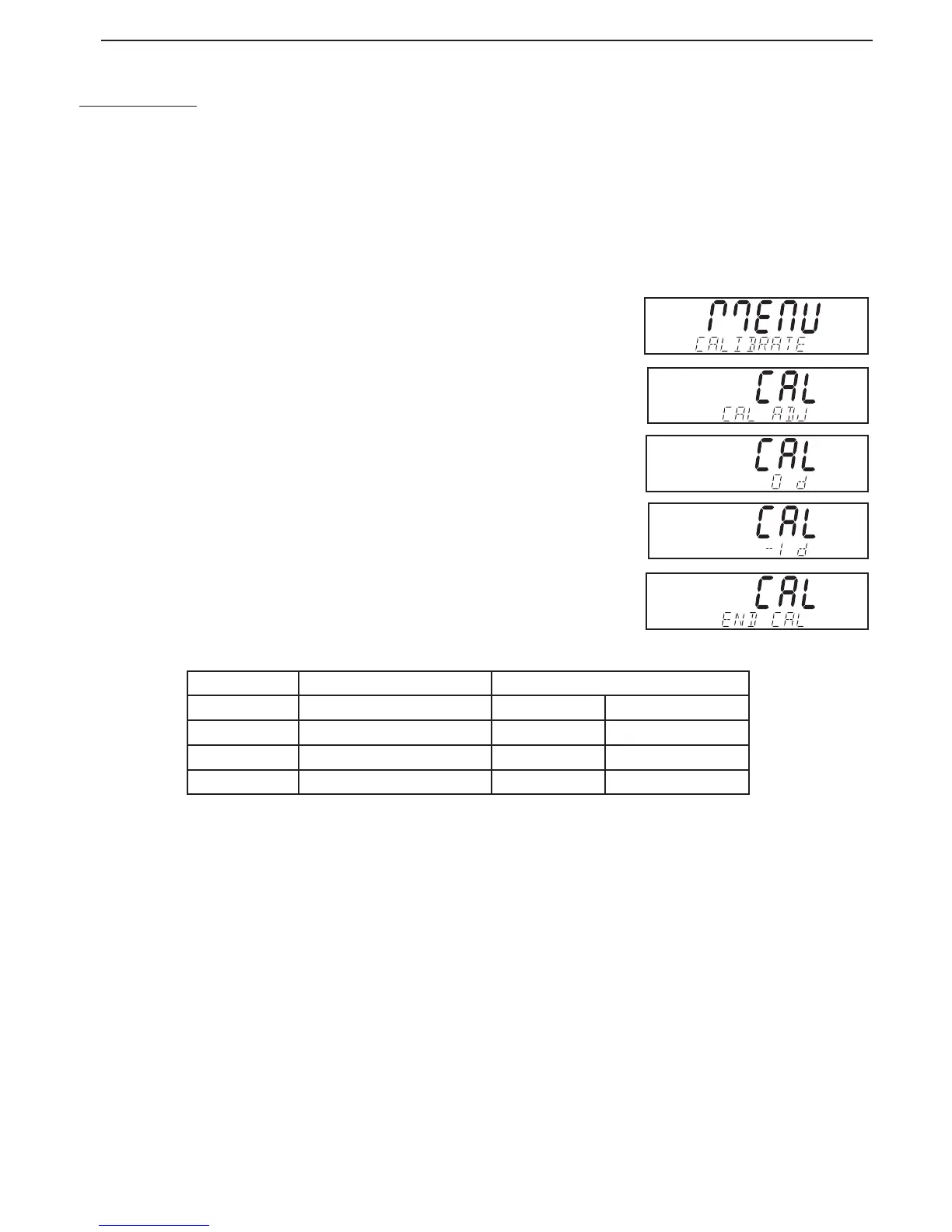
To perform a calibration adjustment, press the Cal button and release it when MENU CALIBRATE is
displayed.
Press Yes to enter the Calibration sub-menu. Press No until CAL ADJ is displayed.
Press Yes to enter the CAL ADJ menu item and view the current setting. If the actual reading was
less than the nominal mass value, a positive adjustment is required.
Press No until the setting matches the difference noted earlier in the procedure. If the actual read-
ing was greater than the nominal mass value, a negative adjustment is required.
Press Back until the setting matches the difference noted earlier in the procedure. Press Yes to
accept and store the setting.
CALIBRATION MASSES TABLE
Model Span Calibration Points (1) Weight Class
DV114C 100g ASTMI Class I OIML E1
DV214C 200g ASTMI Class I OIML E1
DV314C 300g ASTMI Class I OIML E1
DV215CD 200g ASTMI Class I OIML E1
80104130.indd Sec1:34 2011/11/25 9:08:40





 To Next Page