EasyManua.ls Logo

Ohmeda Biox 3700 - Page 70

Default Icon
130 pages
Print Icon
To Next Page IconTo Next Page
To Previous Page IconTo Previous Page
Loading...
1118-301
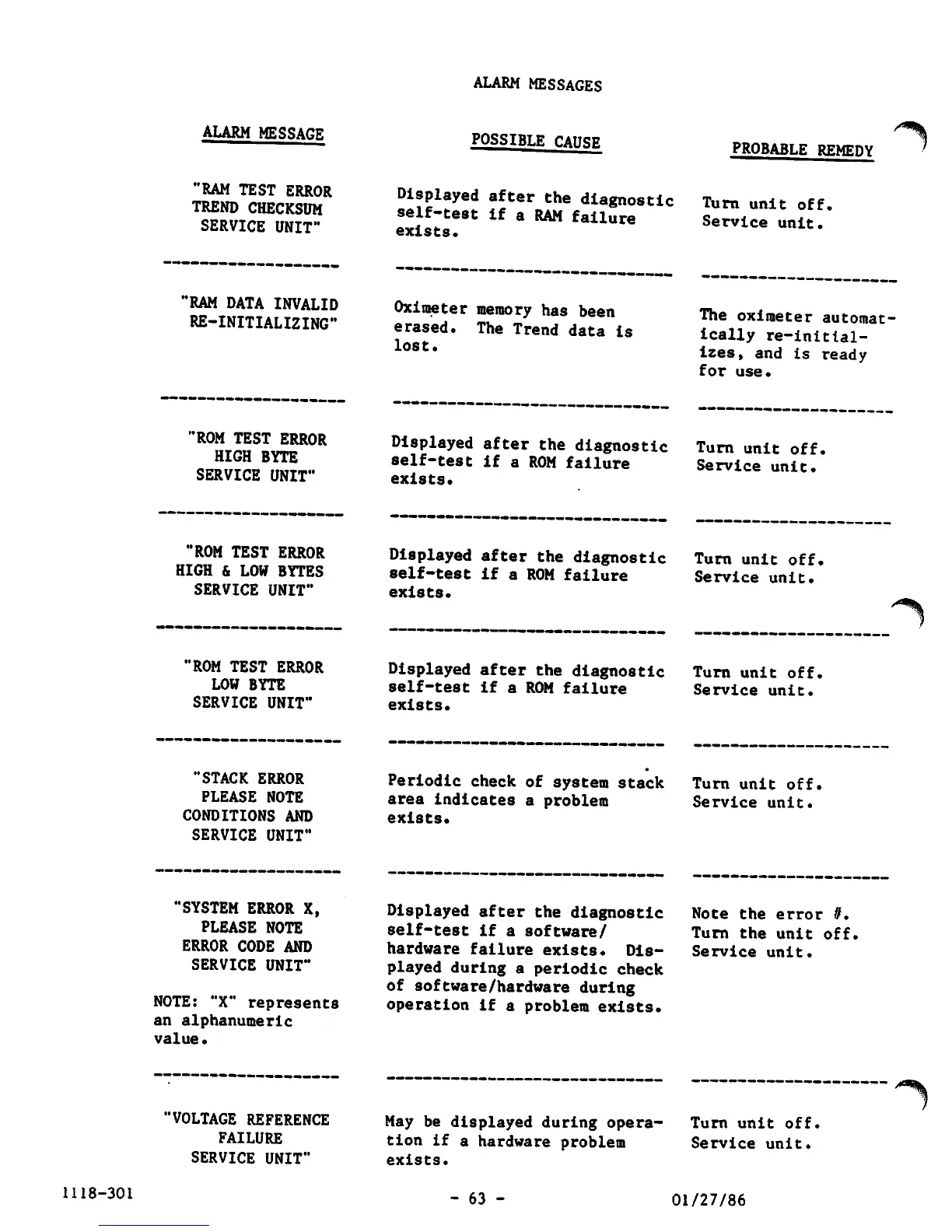
ALARM MESSAGE
"RAM TEST ERROR
TREND
CHECKSUM
SERVICE
UNIT"
'RAM
DATA INVALID
RE-INITIALIZING"
"ROM
TEST
ERROR
HIGH
BYTE
SERVICE
UNIT"
"ROM
TEST
ERROR
HIGH
&
LOW
BYTES
SERVICE
UNIT"
'ROM
TEST
ERROR
LOW
BYTE
SERVICE
UNIT"
"STACK
ERROR
PLEASE
NOTE
CONDITIONS
AND
SERVICE
UNIT"
"SYSTEM
ERROR
X,
PLEASE
NOTE
ERROR
CODE
AND
SERVICE
UNIT"
NOTE:
"X" represents
an alphanumeric
value•
'VOLTAGE
REFERENCE
FAILURE
SERVICE
UNIT"
ALARM MESSAGES
POSSIBLE CAUSE
Displayed
after
the
diagnostic
self-test
if
a
RAM
failure
exists.
Oximeter
memory
has
been
erased.
The
Trend
data
is
lost.
Displayed
after
the
diagnostic
self-test if a ROM failure
exists.
Displayed
after
the
diagnostic
self-test if a ROM failure
exists.
Displayed
after
the
diagnostic
self-test if a ROM failure
exists.
Periodic
check
of
system
stack
area
indicates
a problem
exists.
Displayed
after
the
diagnostic
self-test if a software/
hardware failure exists. Dis
played
during a
periodic
check
of
software/hardware
during
operation if a problem exists.
May
be
displayed
during opera
tion
if
a
hardware
problem
exists.
PROBABLE REMEDY
Turn
unit
off.
Service
unit.
The oximeter
automat
ically re-initial
izes,
and
is
ready
for
use.
Turn
unit
off.
Service
unit.
Turn
unit
off.
Service
unit.
Turn
unit
off.
Service
unit.
Turn
unit
off.
Service
unit.
Note
the
error
//.
Turn
the
unit
off.
Service
unit.
Turn
unit
off
Service
unit.
-
63
-
01/27/86

Other manuals for Ohmeda Biox 3700

Related product manuals