EasyManua.ls Logo

Ohmeda Biox 3700 - Control Mode

Default Icon
130 pages
Print Icon
To Next Page IconTo Next Page
To Previous Page IconTo Previous Page
Loading...
||P\
1118-301
COMPUTER
INTERFACE
CONTROL
MODE
Computer
Communication
with
Ohmeda
Biox
3700
Oximet
er
CONTROL
MODE
Entering
and
Enabling
Trend
Output
If
you
have
entered
data
incorrectly,
press
the
ENTER
key
a
few
times
to
clear
the
buffer.
When
J
(start
Trend
output)
is
selected,
the
Trend
Data
is
output
in
the
same
format
as
the
Trend-Output
Mode.
To
restore
the
previous
Trend
Data
for
the
full
eight
hours
of
output,
turn
the
Oximeter
off
and
depress
the
Sa02
TREND
20/60
key
while
turning
the
Oximeter
on.
Starting
Trend
Output
with
the
Control
Mode
can
only
be
done
while
in
the
Auto-Output
Mode.
Trend
Output
can
be
started
from
the
Oximeter
Front
Panel
at
any
time.
If
you
want
to
change
any
of
the
items
in
the
box
below,
you
need
to
press:
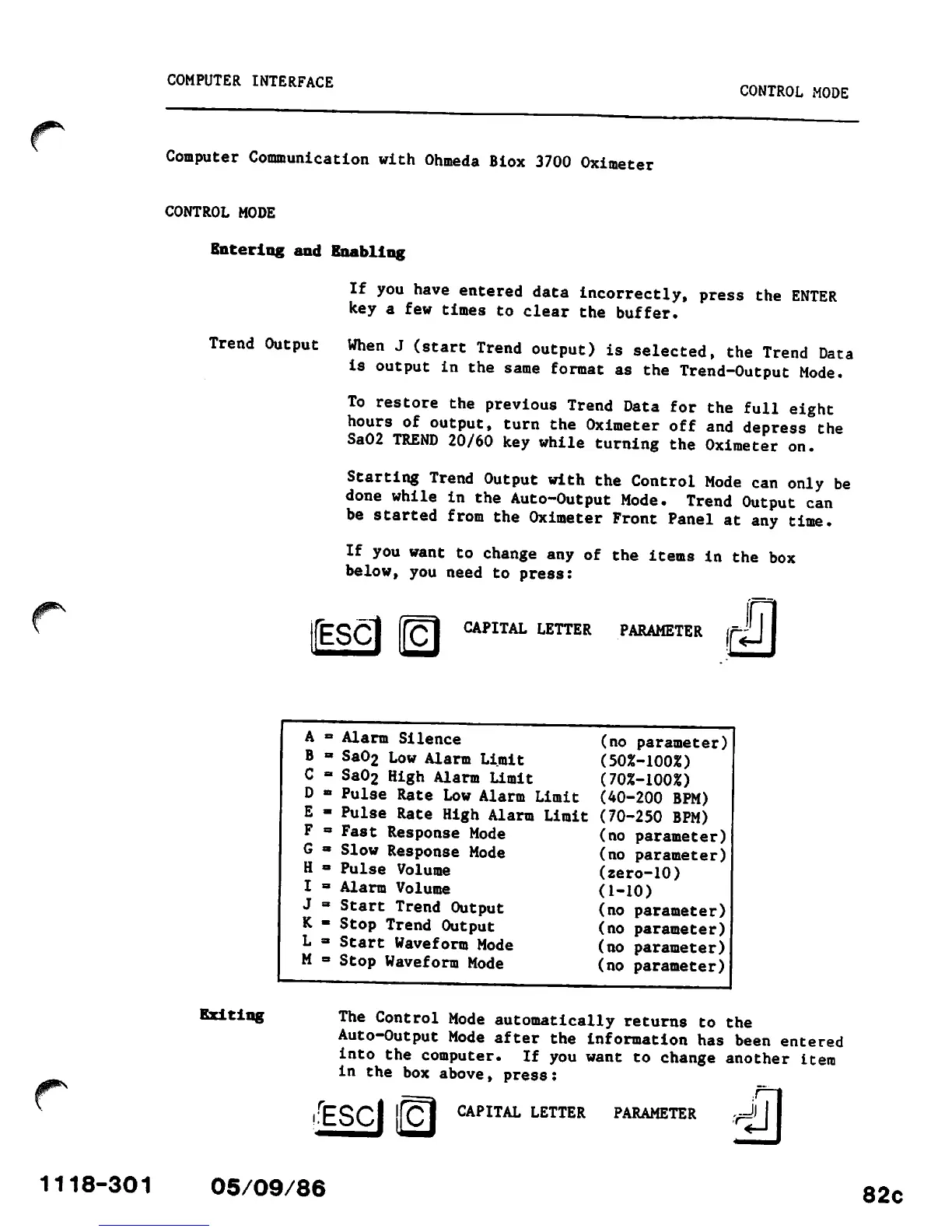
IfESCl
g]
CAPITAL LETTER PARAMETER
Exiting
A
B
C
D
E
F
G
H
I
J
K
L
M
05/09/86
Alarm
Silence
Sa02 Low
Alarm
Limit
Sa02 High
Alarm
Limit
Pulse Rate Low Alarm Limit
Pulse
Rate
High
Alarm
Limit
Fast
Response
Mode
Slow
Response
Mode
Pulse
Volume
Alarm
Volume
Start
Trend
Output
Stop
Trend
Output
Start Waveform Mode
Stop Waveform Mode
(no parameter)
(50%-100%)
(70%-100%)
(40-200
BPM)
(70-250 BPM)
(no
parameter)
(no parameter)
(zero-10)
(1-10)
(no parameter)
(no parameter)
(no
parameter)
(no
parameter)
The
Control
Mode
automatically
returns
to
the
Auto-Output
Mode
after
the
information
has
been
entered
into
the
computer.
If
you
want
to
change
another
item
in
the
box
above,
press:
CAPITAL
LETTER
PARAMETER
82c