EasyManua.ls Logo

Oki C110 - Page 87

Oki C110
115 pages
Print Icon
To Next Page IconTo Next Page
To Previous Page IconTo Previous Page
Loading...
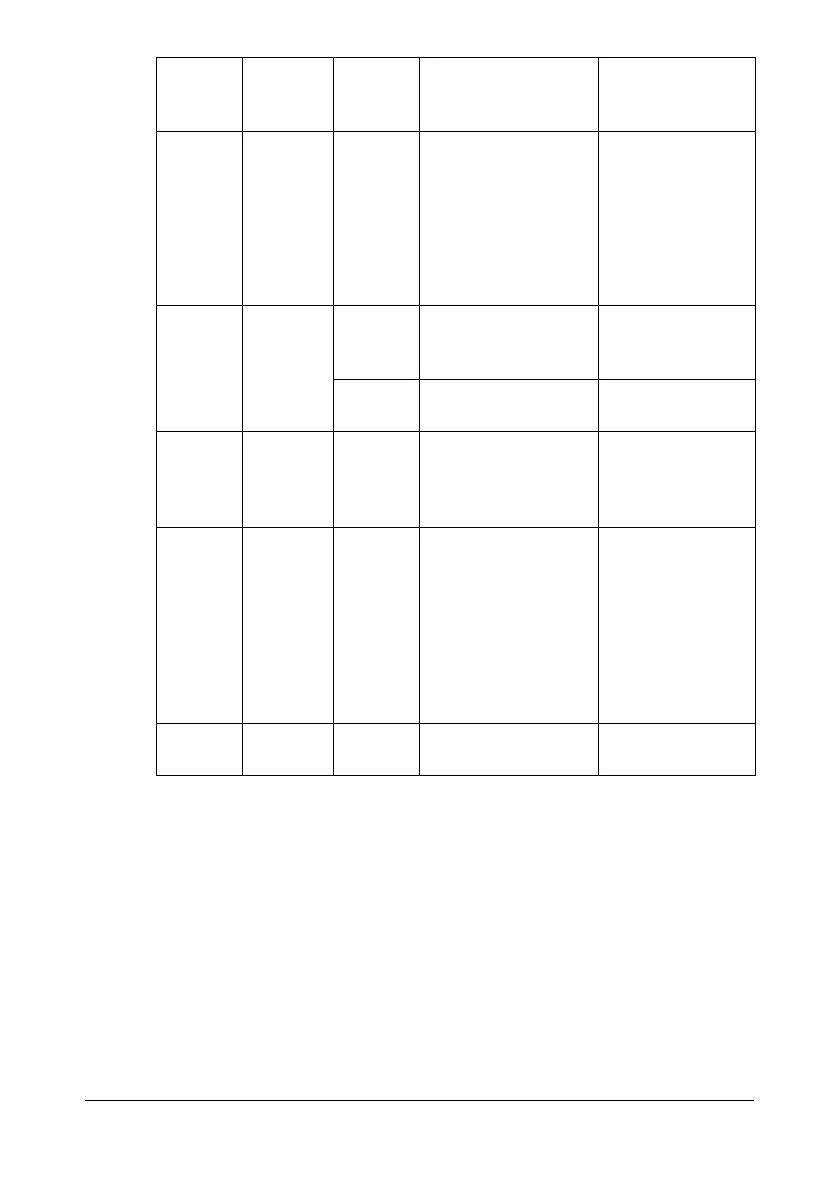
Indicator Messages7-8
* Differs depending on the toner status.
Off Slow
blinking
* Memory full Press the Cancel
key.
If the error is not
corrected, turn off
the printer. After a
few seconds, turn
on the printer.
Off Blinking * Front cover or top
cover is open.
Close the front
cover and top
cover.
* The imaging car-
tridge is not installed.
Install the imaging
cartridge.
Off Rapid
blinking
* Media jam Clear the jam,
close the covers,
and then continue
with the print job.
Off Rapid
blinking
All blink-
ing
Process error Open and close
the printer’s cov-
ers.
If the error is not
corrected, turn off
the printer. After a
few seconds, turn
on the printer.
Off On All blink-
ing
Imaging cartridge
end
Replace the imag-
ing cartridge.
Ready
indicator
(green)
Attention
indicator
(orange)
Toner
indicator
(orange)
Condition Action

Table of Contents

Other manuals for Oki C110

Related product manuals