1-5-29
(3) Detaching and refitting the main PWB
<Procedure>
1. Remove the scanner unit (See P.1-5-22).
2. Remove the original table and ejection
extension (See P.1-5-24).
3. Turn over the scanner unit.
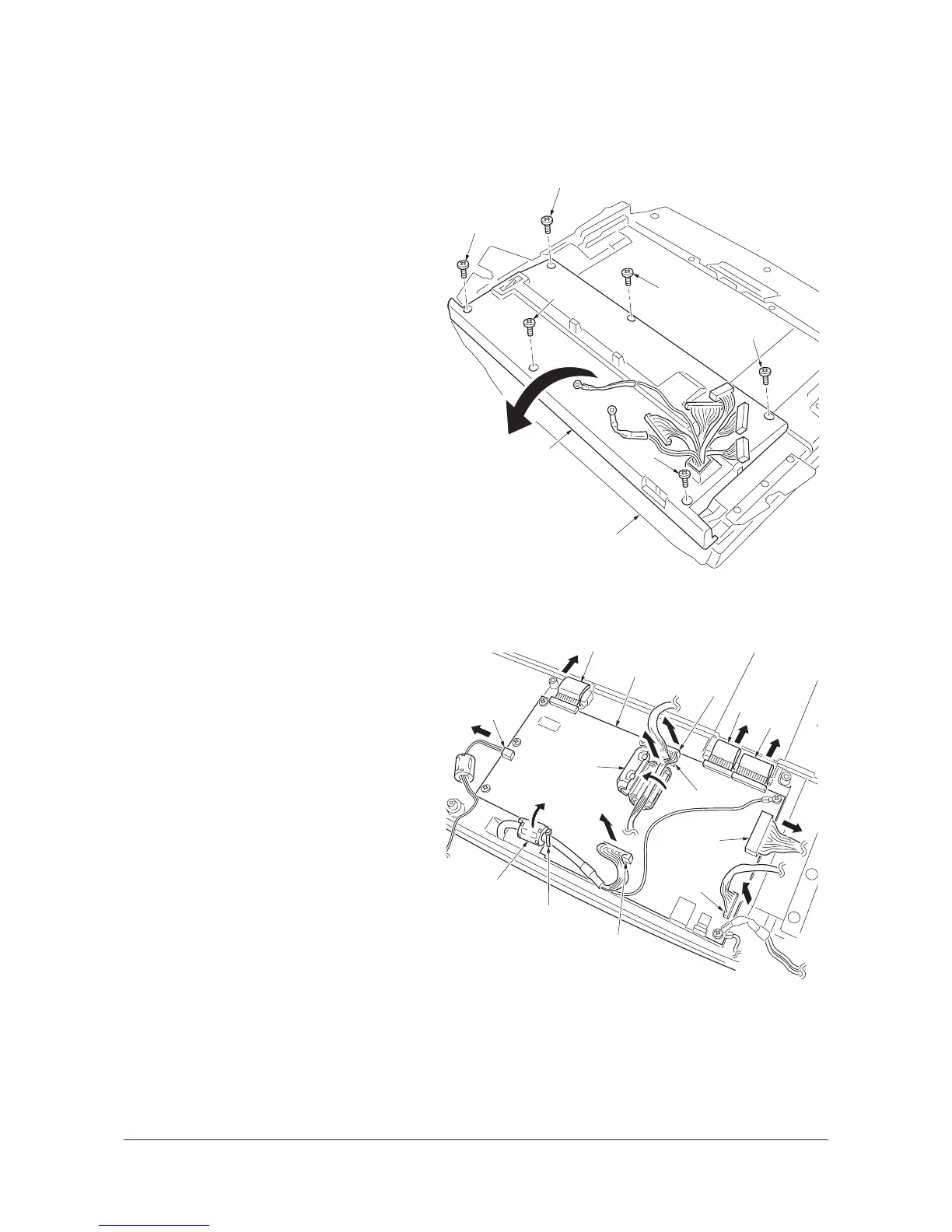
4. Remove the six screws and then open the
main PWB cover.
Figure 1-5-40
5. Remove the three FFCs.
6. Cut the band.
7. Split and remove the ferrite core (A).
8. Split the ferrite core (B).
9. Remove the six connectors.
Figure 1-5-41
Screw
Screw
Screw
Screw
Main PWB cover
Scanner unit
Screw
Screw
Connector
Connector
Connector
Connector
Connector
Band
Ferrite core (A)
Main PWB
FFC
FFC
FFC
Connector
Ferrite core (B)
Y107330-8 Service Manual



 To Next Page